🛒 Best Price Today on Amazon
Prime members get fast, free shipping on everything above, plus member-only deals. New members get a 30-day free trial — cancel anytime.
- Best White Gaming PC Cases Compared
- NZXT H9 Flow RGB – Best Overall White Gaming PC Case
- Lian Li O11 Dynamic EVO RGB – Best for Custom Cooling
- HYTE Y70 Snow White – Best for Vertical GPU Builds
- Corsair 6500X – Best for Hidden-Cable White Builds
- Fractal Design North XL Chalk White – Best for Subtle Style
- How to Choose the Best White Gaming PC Case
- FAQ
- Conclusion
Looking for the best white gaming PC case means balancing clean aesthetics with airflow, GPU clearance, radiator support, and easy cable management. The right chassis should showcase your components without trapping heat, giving your gaming build a bright, modern look while still supporting powerful hardware.
Quick answer: For most people in 2026, the best white gaming pc case is the PC Case — our #1 rated choice. See the full ranked comparison, alternatives and buying advice below.
Best White Gaming PC Cases Compared
| PC Case | Best For | Motherboard Support | Max GPU Length | Large Radiator Support |
|---|---|---|---|---|
| NZXT H9 Flow RGB | Overall showcase build | E-ATX, ATX, Micro-ATX, Mini-ITX | Up to 459 mm | Up to 420 mm |
| Lian Li O11 Dynamic EVO RGB | Custom cooling | E-ATX, ATX, Micro-ATX, Mini-ITX | 455.7 mm | Up to 420 mm |
| HYTE Y70 Snow White | Vertical GPU builds | E-ATX, ATX, Micro-ATX, ITX | 422 mm | Up to 360 mm |
| Corsair 6500X | Hidden-cable builds | E-ATX, ATX, Micro-ATX, Mini-ITX | 400 mm | Up to 360 mm |
| Fractal Design North XL Chalk White | Airflow and subtle styling | E-ATX, ATX, Micro-ATX, Mini-ITX | 413 mm | Up to 420 mm |
NZXT H9 Flow RGB – Best Overall White Gaming PC Case
Best For: High-end white gaming PCs with strong cooling and panoramic presentation
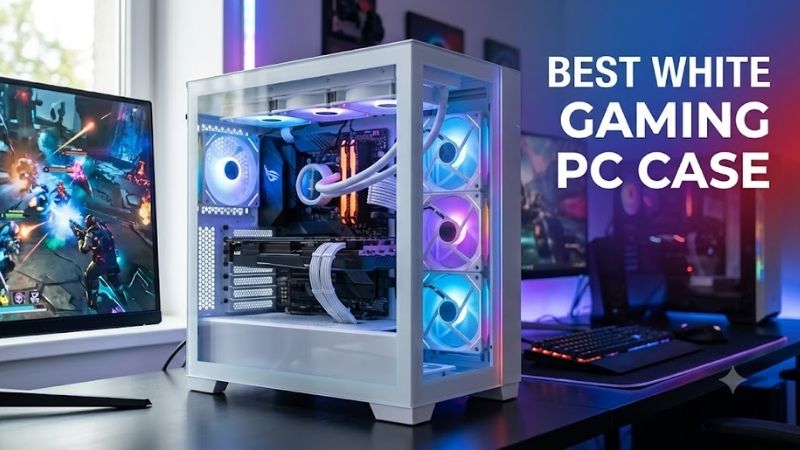
NZXT H9 Flow RGB is built around a dual-chamber layout that separates the main hardware area from the power supply and cable section. In white, its wraparound tempered glass gives the system a bright showcase look, while perforated panels and dedicated cooling mounts keep the design focused on high-performance gaming rather than decoration alone.
NZXT lists support for E-ATX boards up to 277 mm wide, ATX, Micro-ATX, and Mini-ITX. GPU clearance reaches up to 459 mm in some configurations, and the chassis supports radiators up to 420 mm at the top and front-right. That combination gives builders room for large graphics cards and substantial liquid cooling.
Key Features
- Dual-chamber mid-tower design
- White finish with clear tempered glass
- Up to 459 mm GPU clearance
- Up to 420 mm top radiator support
- Up to 420 mm front-right radiator support
- Back-connect ATX motherboard support
- Multiple 120 mm and 140 mm fan positions
What Makes It Different
The H9 Flow RGB also supports back-connect ATX motherboards, which move major cable headers behind the board tray. That matters in an all-white build because visible black cables can disrupt the theme. Wide routing channels, reusable straps, and a separate rear chamber make cable management easier to hide from the main viewing area.
Pros
- Excellent space for large graphics cards
- Strong radiator flexibility
- Clean dual-chamber layout
- Panoramic tempered-glass presentation
- Supports modern back-connect motherboards
- Multiple large fan mounting positions
Cons
- Large footprint
- More case than basic gaming builds require
- White showcase builds may need additional matching fans
Use Case
Its strongest use case is a high-end gaming system where cooling and presentation matter equally. The large chassis is not ideal for compact desks, so measure available space first. In return, the H9 gives ambitious builds generous fan positions, strong radiator flexibility, and little pressure to downsize core components.
Who It’s For
Gamers building around a large GPU, powerful CPU, 360 mm or 420 mm liquid cooler, and coordinated white components should find the H9 particularly attractive. It also suits builders who want modern hidden-cable hardware without sacrificing panoramic glass or the cooling options expected from a performance-focused gaming chassis.
Lian Li O11 Dynamic EVO RGB – Best for Custom Cooling
Best For: Enthusiast builds with multiple radiators and coordinated RGB hardware
Lian Li O11 Dynamic EVO RGB remains a natural fit for white showcase builds because its design places tempered glass across the front and side while keeping cooling hardware along the top, side, bottom, and rear. The white version supports E-ATX boards under 280 mm wide, ATX, Micro-ATX, and Mini-ITX, giving it broad platform compatibility.
Cooling support is one of its defining strengths. Lian Li specifies room for a 420 mm radiator at the top, up to 360 mm on the side, and up to 360 mm on the bottom, with multiple 120 mm and 140 mm fan positions. That layout makes the case especially useful for builders planning custom loops or AIO setups with carefully coordinated white fans.
Key Features
- White tower chassis
- Tempered-glass front and side
- Up to 420 mm top radiator support
- Up to 360 mm side radiator
- Up to 360 mm bottom radiator
- 455.7 mm maximum GPU clearance
- Optional white front mesh kit available
What Makes It Different
GPU clearance reaches 455.7 mm, while maximum CPU cooler height is 167 mm. That gives ample room for long flagship graphics cards but makes air-cooler height worth checking before purchase. The case suits builders who plan cooling in advance more than buyers who want a basic chassis with fans arranged for immediate use.
Pros
- Extensive radiator support
- Excellent showcase layout
- Very generous GPU clearance
- Flexible fan configuration
- Optional accessories expand the layout
- Well suited to custom liquid cooling
Cons
- Additional fans may be required
- Large air coolers need clearance checks
- Optional accessories increase total build cost
Use Case
The O11D EVO RGB stands apart through flexibility and visual symmetry. It can be built around a clean panoramic display, then expanded with optional accessories such as a front mesh kit or vertical GPU hardware. That modular approach benefits enthusiasts, although extra brackets, fans, and accessories can increase total build cost.
Who It’s For
This case makes the most sense for enthusiasts who already know what fan layout, radiator arrangement, and visual presentation they want. It is particularly attractive for custom-loop builders or gamers coordinating white fans, cables, radiators, and RGB hardware rather than simply installing components into a standard front-to-back airflow tower.
HYTE Y70 Snow White – Best for Vertical GPU Builds
Best For: Gamers who want the graphics card to dominate the visual design
HYTE Y70 Snow White takes a dramatic approach with a three-piece panoramic glass design and dual-chamber interior. Its strongest visual feature is the included PCIe 4.0 riser cable, which supports a full-height vertical GPU layout. That makes the graphics card part of the presentation instead of hiding it behind a standard horizontal mount.
The Y70 supports ITX, Micro-ATX, ATX, and E-ATX motherboards, with up to 422 mm of video-card length and 180 mm of CPU-cooler height. Cooling support includes up to a 360 mm radiator at the top and side. It also provides bottom fan positions that can direct fresh air toward a vertically mounted graphics card.
Key Features
- Snow White color option
- Three-piece panoramic glass
- Dual-chamber interior
- Included PCIe 4.0 x16 riser cable
- Four-slot vertical GPU support
- Up to 422 mm GPU length
- Top and side radiators up to 360 mm
- Up to ten total fan positions
What Makes It Different
Because the case is designed around vertical GPU display, it suits builders who care about the appearance of the graphics card as much as raw component density. The separate rear chamber also gives cables and storage more room away from the main glass area. That can make a white build look cleaner without requiring excessive cable extensions.
Pros
- Vertical GPU hardware included
- Excellent panoramic presentation
- Strong GPU clearance
- Large side and top cooling capacity
- Dual-chamber cable organization
- Bottom airflow can feed the GPU directly
Cons
- Large overall footprint
- Specialized layout is unnecessary for simple builds
- Vertical presentation may not appeal to minimalist users
Use Case
The trade-off is size and specialization. The Y70 occupies more space than a conventional mid-tower and makes the most sense when you actually want its panoramic layout. Builders chasing a minimalist look may prefer a simpler airflow case, while showcase builders will appreciate how intentionally the interior frames premium components.
Who It’s For
The Y70 is aimed at gamers building around a visually impressive graphics card, coordinated RGB fans, cable extensions, or custom liquid cooling. It is particularly relevant when vertical GPU mounting is already part of the plan, because the included riser hardware removes one accessory that would otherwise need to be purchased separately.
Corsair 6500X – Best for Hidden-Cable White Builds
Best For: Reverse-connector motherboards and ultra-clean cable management
Corsair 6500X is another dual-chamber case, but its layout is especially relevant to builders using reverse-connector motherboards. Corsair lists support for ASUS BTF, MSI Project Zero, and Gigabyte Project Stealth designs. Those platforms move many visible connections behind the motherboard, helping an all-white system look less cluttered.
The white 6500X supports Mini-ITX, Micro-ATX, ATX, and E-ATX boards up to 305 x 277 mm. Maximum GPU length is 400 mm, CPU cooler height reaches 190 mm, and radiator support includes 360 mm positions at the top, bottom, and side. That gives both air-cooled and liquid-cooled gaming builds plenty of configuration freedom.
Key Features
- White dual-chamber chassis
- Reverse-connector motherboard support
- Up to 400 mm GPU clearance
- 190 mm CPU cooler clearance
- 360 mm top radiator support
- 360 mm bottom radiator support
- 360 mm side radiator support
- Four USB Type-A front ports plus USB-C
What Makes It Different
Its front is glass rather than mesh, so primary intake airflow comes from other mounted fan positions instead of a traditional front intake path. The dual-chamber layout compensates with side and bottom cooling options. This design favors clean presentation, but it rewards careful planning of fan direction and radiator placement.
Pros
- Excellent hidden-cable potential
- Supports reverse-connector boards
- Large CPU air-cooler clearance
- Multiple 360 mm radiator positions
- Dual-chamber cable management
- Generous front I/O connectivity
Cons
- No traditional front fan intake
- Wide chassis requires desk space
- Additional fans may be necessary
Use Case
The 6500X is a good match for users building around modern hidden-connector hardware or a heavily coordinated Corsair ecosystem. It is less compelling for someone seeking the smallest or simplest white case possible. Its wide chassis and multiple mounting zones are strengths when building a complex system, but they also demand more physical space.
Who It’s For
Choose the 6500X if visible motherboard cables are one of your biggest aesthetic concerns. It works especially well with compatible rear-connector motherboards, although standard ATX hardware remains supported. The layout also suits builders who want separate spaces for presentation and cable routing instead of a traditional single-chamber tower.
Fractal Design North XL Chalk White – Best for Subtle Style
Best For: Airflow-focused gaming PCs that need a less aggressive aesthetic
Fractal Design North XL Chalk White takes a different route from glass-heavy showcase cases. Its white exterior is paired with a slatted wood front, giving the system a warmer, furniture-like appearance. For gamers who want a white PC that blends into an office, studio, or living room, the North XL offers a less aggressive visual style.
The chassis supports E-ATX, ATX, Micro-ATX, and Mini-ITX motherboards. Fractal lists up to 413 mm of GPU clearance, 185 mm of CPU-cooler height, front radiators up to 420 mm, and top radiators up to 360 mm. Three 140 mm Aspect PWM fans are included at the front on the Chalk White Mesh configuration.
Key Features
- Chalk White exterior
- Wood front detailing
- E-ATX motherboard support
- Up to 413 mm GPU clearance
- Up to 185 mm CPU cooler height
- Up to 420 mm front radiator
- Up to 360 mm top radiator
- Three 140 mm front fans included on the Mesh model
What Makes It Different
The mesh version prioritizes ventilation over a full side-window showcase, which can be a better fit for performance-focused gaming systems. Its large front intake and generous cooler clearance also suit high-end air cooling. Builders who prefer visible RGB components may find it less theatrical than the H9, Y70, or O11D EVO RGB.
Pros
- Strong front airflow
- Large GPU and air-cooler clearance
- Three front fans included
- Distinctive wood-and-white styling
- Large radiator compatibility
- Suitable for restrained gaming setups
Cons
- Large footprint
- Less emphasis on panoramic component display
- Wood styling will not match every gaming setup
Use Case
North XL is best for a gaming PC that needs substantial hardware room without looking like a typical RGB display case. The larger footprint supports big GPUs and radiators, but it is not meant for compact desks. Its main advantage is that the white finish, wood detail, and airflow-oriented layout create a more restrained premium aesthetic.
Who It’s For
Gamers using large air coolers, powerful GPUs, or substantial liquid-cooling hardware should consider the North XL when airflow matters more than uninterrupted glass. It is also a strong thematic match for white desks, wooden furniture, neutral gaming rooms, and workspaces where a heavily illuminated dual-chamber case could look visually excessive.
How to Choose the Best White Gaming PC Case
Check Component Clearance First
A white case should be judged first as a chassis, not as a color choice. Start with the dimensions of your graphics card, CPU cooler, power supply, and radiator before comparing aesthetics. A beautiful enclosure becomes a poor gaming case if a long GPU blocks fans, a radiator collides with memory, or the cooler exceeds the supported height.
Consider Airflow Layout
For gaming, airflow usually matters more than the number of glass panels. Mesh intakes make it easier to feed cool air directly toward the CPU and GPU, while panoramic cases often rely on side and bottom intake paths. Either layout can work well, but the fan configuration must provide a clear route for cool intake air and warm exhaust air.
Plan Radiator Placement
Radiator support matters most when you plan to use an AIO or custom loop. Check not only the nominal radiator length but also available thickness around the motherboard, memory, GPU, and cable area. A case may support a 360 mm or 420 mm radiator on paper while a thick radiator-and-fan stack can still reduce clearance elsewhere.
Measure Your Graphics Card
GPU clearance deserves extra attention in current gaming builds because high-end cards can be long, thick, and heavy. Compare maximum card length with your exact model and leave room for power connectors or vertical-mount hardware. In panoramic cases, also check the distance between a vertically mounted GPU and the side glass for healthy airflow.
Think About Cable Management
Cable management affects a white build more than many buyers expect. Dark power cables, adapters, and front-panel wires stand out strongly against a bright interior. Dual-chamber cases hide much of that clutter, while reverse-connector motherboard support can remove major cable runs from view and make the finished system look substantially cleaner.
Count the Included Fans
Included fans can change the real cost of a case. Some white chassis arrive with several usable intake or RGB fans, while others are designed as blank canvases for custom cooling. Before comparing value, count how many fans you need to buy separately, whether a hub is required, and whether matching white models are available in the sizes you want.
Consider Cleaning and Dust Control
A white exterior also needs practical maintenance. Dust and fingerprints can show differently on white paint, glass, and mesh, so removable filters and tool-free panels make routine cleaning easier. If the PC sits near the floor, prioritize accessible bottom and intake filters because those areas can collect dust quickly and restrict airflow.
Match the Case to Your Build Style
Choose the layout that matches the finished build you actually want. A panoramic dual-chamber case is ideal when the GPU, lighting, and cooling hardware are part of the display. A mesh tower is better when airflow and understated styling matter more. Neither approach is automatically superior if components fit and cooling is planned well.
FAQ
Do White Gaming PC Cases Run Hotter?
White cases do not inherently run hotter than black cases. Thermal performance depends on ventilation, fan placement, radiator support, component spacing, and cooler design rather than color. A white mesh case can outperform a poorly ventilated black case, while a glass-heavy white chassis can still cool well with strong side and bottom intake.
Is a Dual-Chamber Case Better for Gaming?
A dual-chamber case separates the visible motherboard area from the PSU, drives, and much of the cabling. That can improve organization and simplify a clean white theme, especially with panoramic glass. The trade-off is usually greater width and overall volume, so these cases suit desks or floors with generous available space.
Do I Need White Components in a White PC Case?
You do not need white components inside a white case, but matching hardware creates a more consistent theme. Black GPUs, motherboards, or radiators can also create deliberate contrast. If visual consistency matters, pay attention to cable color, fan frames, radiator finishes, and GPU power adapters because those parts remain visible through glass.
How Many Case Fans Does a Gaming PC Need?
For a gaming PC, three well-positioned case fans are a practical starting point, but hotter systems may benefit from more. What matters is balanced airflow rather than filling every mount. Front, side, or bottom fans usually provide intake, while rear and top fans commonly exhaust warm air, depending on the case and radiator layout.
Do I Need a 360 mm Radiator for Gaming?
A 360 mm radiator is not mandatory for gaming. Many processors work well with smaller AIOs or capable tower air coolers, depending on power limits and workload. Large 360 mm and 420 mm radiator support is useful for high-power CPUs, quieter fan speeds, or custom-loop planning, but it should not be treated as a basic requirement for every build.
Are Reverse-Connector Motherboards Worth Considering?
Reverse-connector motherboards place many headers and power connections on the back of the PCB, allowing compatible cases to hide cables behind the motherboard tray. They can make a white build cleaner, but compatibility must be checked because the case needs matching cutouts and enough rear space for those connectors.
Conclusion
The best white gaming PC case should match both your hardware and the style you want to see every day. NZXT H9 Flow RGB and Lian Li O11D EVO RGB favor showcase cooling, HYTE Y70 emphasizes vertical GPU display, Corsair 6500X suits hidden cables, and Fractal North XL offers a more restrained airflow-focused look.
Ready to decide? Our #1 pick for 2026 is the PC Case.
Live price & availability on Amazon.