🛒 Best Price Today on Amazon
Prime members get fast, free shipping on everything above, plus member-only deals. New members get a 30-day free trial — cancel anytime.
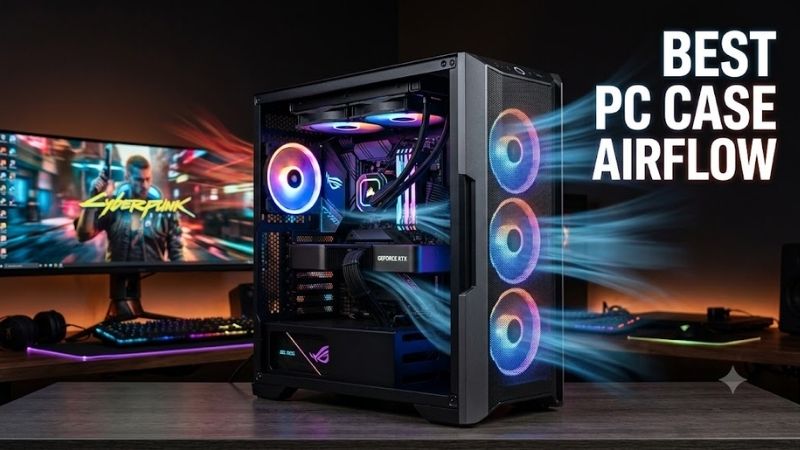
The best PC case airflow starts with an open intake, a clear path to hot components, and enough fan or radiator support to keep heat moving out of the chassis. This roundup focuses on airflow-first gaming cases that suit powerful GPUs, modern CPUs, and builders who want lower temperatures without turning cable management into a headache.
Quick answer: For most people in 2026, the best pc case airflow is the Case — our #1 rated choice. See the full ranked comparison, alternatives and buying advice below.
Quick Comparison
| Case | Best For | Included Fans | GPU Clearance | CPU Cooler Clearance | Large Radiator Support |
|---|---|---|---|---|---|
| Fractal Design Torrent | Maximum air cooling | 2 x 180 mm + 3 x 140 mm | 461 mm | 188 mm | Up to 420 mm front/bottom |
| Lian Li LANCOOL 216 | Balanced stock airflow | 2 x 160 mm + 1 x 140 mm | 392 mm | 180.5 mm | Up to 360 mm front/top |
| NZXT H7 Flow (2024) | Spacious modern builds | 3 x 120 mm front | 410 mm | 185 mm | Up to 420 mm front |
| Montech AIR 903 MAX | High fan count | 3 x 140 mm + 1 x 140 mm | 400 mm | 180 mm | Up to 360 mm front/top |
| Phanteks XT Pro Ultra | Expansion flexibility | 4 x 140 mm | 415 mm | 184 mm | Up to 360 mm top |
| Corsair 4000D Airflow | Straightforward ATX builds | 2 x 120 mm | 360 mm | 170 mm | Up to 360 mm front |
Fractal Design Torrent
Best For: Maximum air cooling with direct GPU intake
Key Features:
- Two 180 mm front fans
- Three 140 mm bottom fans
- 461 mm maximum GPU length
- 188 mm maximum CPU cooler height
- Front and bottom radiator support up to 420 mm
Fractal Design’s Torrent is built for buyers who want substantial cooling hardware already installed. The standard model uses two 180 mm front fans and three 140 mm bottom fans, creating intake from both the front and base. That arrangement sends fresh air toward the graphics card as well as the rest of the main chamber.
The interior supports graphics cards up to 461 mm and CPU coolers up to 188 mm, leaving room for oversized hardware. Radiators up to 420 mm fit at the front or bottom. The trade-off is scale: at 544 x 242 x 530 mm, the Torrent occupies more desk or floor space than a typical compact mid-tower.
What Makes It Different: A top-mounted PSU leaves the bottom open for direct GPU intake rather than a conventional PSU shroud.
Pros:
- Five large fans included
- Excellent GPU-focused intake layout
- Very generous GPU and air-cooler clearance
- Extensive 420 mm radiator compatibility
Cons:
- Larger footprint than many mid-towers
- No conventional top radiator position
Use Case: High-wattage gaming systems using large GPUs and either a tower air cooler or a front/bottom liquid-cooling setup.
Who It’s For: Gamers who prioritize airflow capacity and component cooling over compact dimensions.
Lian Li LANCOOL 216
Best For: Balanced airflow in a conventional mid-tower layout
Key Features:
- Two 160 mm front PWM fans
- One 140 mm rear PWM fan
- 392 mm maximum GPU length
- 180.5 mm maximum CPU cooler height
- 360 mm radiator support at front and top
The Lian Li LANCOOL 216 delivers strong stock airflow without requiring an unusually large chassis. Two 160 mm PWM fans fill most of the front intake, while a 140 mm rear fan handles exhaust. The oversized front fans reduce obstruction from extra fan frames and push air across the GPU, CPU zone, and motherboard area.
Hardware clearance is generous for a mid-tower, with up to 392 mm for a graphics card and 180.5 mm for an air cooler. The front and top both support 360 mm or 280 mm radiators. A dedicated PCIe fan bracket also gives builders another way to direct airflow toward a vertically mounted or especially hot GPU.
What Makes It Different: A movable cooling layout and PCIe fan bracket give the LANCOOL 216 more tuning options than a basic front-intake case.
Pros:
- Large 160 mm front intake fans
- Three useful stock fans
- Strong front and top radiator support
- Extra PCIe fan bracket
Cons:
- More layout decisions than simpler cases
- Some features matter mainly to advanced builders
Use Case: Gaming PCs that need strong out-of-box airflow with room for future AIO or fan upgrades.
Who It’s For: Builders who want a flexible, airflow-focused mid-tower without stepping up to a very large case.
NZXT H7 Flow (2024)
Best For: Spacious builds with strong radiator flexibility
Key Features:
- Three 120 mm front fans on the non-RGB model
- Up to three 140 mm front fans
- Three 120 mm bottom fan mounts
- 410 mm maximum GPU length
- Front radiator support up to 420 mm
NZXT’s H7 Flow (2024) combines a spacious interior with broad fan placement. The standard H7 Flow includes three 120 mm front intake fans, while the chassis can also hold three 140 mm fans in front, three 120 mm fans along the bottom, and either a 120 mm or 140 mm exhaust fan at the rear.
The chassis supports graphics cards up to 410 mm and CPU coolers up to 185 mm. Liquid-cooling support reaches 420 mm at the front and 360 mm at the top. That gives builders enough flexibility to start with air cooling, add a large AIO later, or preserve the front intake by mounting a 360 mm radiator in the roof.
What Makes It Different: Bottom GPU-focused fan mounts and integrated mesh add cooling flexibility, but the chassis favors room over compact dimensions.
Pros:
- Excellent front and top radiator flexibility
- Bottom fan support for GPU airflow
- Long GPU and tall air-cooler clearance
- Clean, open internal layout
Cons:
- Large for a mid-tower
- Extra fan positions increase total build cost if fully populated
Use Case: High-end ATX gaming systems that may evolve from air cooling to larger AIO or multi-fan configurations.
Who It’s For: Gamers who want plenty of installation room and several future cooling paths.
Montech AIR 903 MAX
Best For: High stock fan count with straightforward airflow
Key Features:
- Three 140 mm ARGB PWM front fans
- One 140 mm rear PWM fan
- 400 mm maximum GPU length
- 180 mm maximum CPU cooler height
- 360 mm radiator support at front and top
Montech’s AIR 903 MAX focuses on giving buyers a complete airflow pattern from the first build. It ships with three 140 mm ARGB PWM fans in front and one 140 mm PWM fan at the rear. That four-fan setup establishes intake and exhaust without requiring an immediate fan purchase, simplifying a new gaming PC build.
The chassis supports E-ATX through Mini-ITX motherboards, graphics cards up to 400 mm, and CPU coolers up to 180 mm. Both the top and front accept radiators up to 360 mm, while the PSU shroud can hold two 120 mm fans. That lets builders add targeted GPU airflow or an AIO without redesigning the whole cooling path.
What Makes It Different: Four included 140 mm fans create a ready-to-use conventional airflow setup without unusual chassis engineering.
Pros:
- Four 140 mm fans included
- 400 mm GPU clearance
- 360 mm radiator support at front and top
- Familiar component layout
Cons:
- Fewer specialized layout features than some rivals
- Top and bottom dust-filter coverage differs from cases with fully filtered intakes
Use Case: Gaming builds that need strong stock airflow and broad component clearance without extensive fan shopping.
Who It’s For: Value-conscious builders who prefer a conventional layout with plenty of cooling already installed.
Phanteks XT Pro Ultra
Best For: Fan expansion and rear-connector motherboard support
Key Features:
- Four M25-140 D-RGB fans included
- Up to ten 120 mm or six 140 mm fans
- 415 mm maximum GPU length
- 184 mm maximum CPU cooler height
- 360 mm top radiator support
Phanteks’ XT Pro Ultra arrives with four M25-140 D-RGB fans and supports a large total fan count. Builders can install up to ten 120 mm fans or six 140 mm fans at the front, top, rear, and midplate. That layout gives users several ways to strengthen GPU intake, increase exhaust, or tune airflow around a hotter CPU.
Clearance is generous, with room for graphics cards up to 415 mm long and CPU coolers up to 184 mm high. The top supports a 360 mm radiator, making the roof the logical position for a large AIO. Front radiator support is more limited, so builders should preserve the front mainly as a high-volume intake path.
What Makes It Different: Rear-connector motherboard support helps hide cabling, while the case prioritizes fan expansion over broad front-radiator support.
Pros:
- Four 140 mm D-RGB fans included
- Very high total fan capacity
- Long GPU clearance
- Rear-connector motherboard support
Cons:
- Large front radiators are not its strength
- Maximum fan population may be unnecessary for typical builds
Use Case: Airflow-heavy gaming systems using a top AIO, many case fans, or a compatible rear-connector motherboard.
Who It’s For: Builders who value expansion options and a clean cable presentation.
Corsair 4000D Airflow
Best For: Straightforward ATX gaming builds
Key Features:
- Two 120 mm AirGuide fans included
- Three 120 mm or two 140 mm front fan support
- 360 mm maximum GPU length
- 170 mm maximum CPU cooler height
- 360 mm front and 280 mm top radiator support
Corsair’s 4000D Airflow uses a ventilated front panel and an uncomplicated ATX layout. It includes two 120 mm AirGuide fans, while the chassis supports three 120 mm or two 140 mm fans in front, two 120 mm or two 140 mm fans in the roof, and one 120 mm fan at the rear. The cooling path is easy to visualize and tune.
The case allows graphics cards up to 360 mm long and CPU coolers up to 170 mm high. A 360 mm radiator fits at the front, while the roof supports up to 280 mm. Those clearances cover many mainstream gaming builds, but owners of especially long GPUs or oversized air coolers should confirm component dimensions before buying.
What Makes It Different: RapidRoute simplifies cable routing, but only two stock 120 mm fans means hotter builds may need extra cooling.
Pros:
- Simple, builder-friendly internal layout
- 360 mm front radiator support
- Dedicated cable-management channel
- Broad ATX ecosystem compatibility
Cons:
- Only two fans included
- Less GPU and air-cooler clearance than larger cases
Use Case: Mainstream ATX gaming PCs where a clean build process matters as much as airflow.
Who It’s For: Builders who want a familiar case design and are comfortable adding fans if their hardware runs hot.
How to Choose the Best PC Case Airflow
Start with the front panel. A mesh or highly perforated intake lets fans draw air with less restriction than a mostly sealed front. The goal is not simply having more holes; the intake should also align with the GPU and CPU area. A clear path from front or bottom intake to rear or top exhaust reduces recirculation around hot components.
GPU airflow deserves special attention because modern gaming systems often dump a large share of their heat into the graphics card. Front fans should feed the GPU directly, while bottom or PSU-shroud mounts can provide additional intake. Avoid layouts where thick radiators, drive cages, or bundled cables block the card’s access to cool air.
Radiator support matters even if you start with an air cooler. A 360 mm top mount leaves the front intake unobstructed, while a front radiator can warm the air reaching the GPU. Neither layout is automatically wrong. Choose based on which component needs the most cooling, then verify radiator thickness and motherboard clearance.
Dust filtration is a trade-off between cleanliness and restriction. Fine filters can reduce dust entering the system, but they also add resistance that fans must overcome. Cases with removable filters are easier to maintain. Cleaning the front intake and lower filters regularly helps preserve airflow as dust builds up over time.
Positive pressure is a useful starting point for many gaming PCs. That means intake airflow is roughly equal to or slightly stronger than exhaust, encouraging air to enter through filtered openings rather than every gap. Exact pressure depends on fan speed and restriction, so use fan curves rather than simply counting intake and exhaust fans.
FAQ
Is mesh always better for PC case airflow?
Mesh is usually helpful because it reduces intake restriction, but mesh alone does not guarantee strong cooling. Fan quality, intake area, internal obstructions, exhaust placement, and component layout all matter. A mesh case with two or three properly positioned fans can outperform a highly ventilated case with poor fan placement.
How many case fans do I need for a gaming PC?
Many gaming PCs work well with two or three intake fans and one rear exhaust fan, but there is no universal number. High-power GPUs, radiators, compact interiors, and warm rooms can justify extra airflow. Start with a balanced front-to-back path, monitor temperatures, and add fans only where they solve a clear thermal limitation.
Should an AIO radiator go in the front or top?
A top-mounted radiator can preserve cooler front intake air for the graphics card, while a front-mounted radiator may feed the CPU cooler with colder outside air. The trade-off is that front radiator exhaust can warm air reaching the GPU. Choose the position based on component priorities, then verify radiator, RAM, motherboard, and GPU clearance.
What matters most for GPU cooling inside a case?
The GPU benefits most from direct access to cool intake air and a clear path for its hot exhaust to leave the chassis. Front and bottom intake fans can help, especially when they align with the card. Keep cables and drive cages out of the intake path, and use rear or top exhaust fans to prevent warm air from recirculating.
Conclusion
The best PC case airflow depends on how your GPU, CPU cooler, radiators, and available space fit together. Fractal Torrent favors maximum air cooling, while LANCOOL 216, H7 Flow, AIR 903 MAX, XT Pro Ultra, and 4000D Airflow offer different balances of size, stock fans, clearance, radiator support, and build simplicity.
Ready to decide? Our #1 pick for 2026 is the Case.
Live price & availability on Amazon.