🛒 Best Price Today on Amazon
Prime members get fast, free shipping on everything above, plus member-only deals. New members get a 30-day free trial — cancel anytime.
- Best CPU Coolers for Intel Ultra Compared
- Noctua NH-D15 G2 – Best Premium Air Cooler
- ARCTIC Liquid Freezer III Pro 360 – Best for Heavy Loads
- Corsair iCUE LINK TITAN 360 RX RGB – Best RGB AIO
- be quiet! Dark Rock Elite – Best Black Air Cooler
- How to Choose the Best CPU Cooler for Intel Ultra
- Which Cooler Should You Choose?
- FAQ
- Conclusion
Choosing the best CPU cooler for Intel Ultra means balancing LGA1851 compatibility, thermal capacity, noise, and case clearance. This roundup compares premium air coolers and 360mm AIOs for gaming, productivity, and high-load builds, helping you match cooling performance to your Intel Core Ultra processor without overspending.
Quick answer: For most people in 2026, the best cpu cooler for intel ultra is the Cooler — our #1 rated choice. See the full ranked comparison, alternatives and buying advice below.
Best CPU Coolers for Intel Ultra Compared
| Cooler | Type | LGA1851 | Best For | Key Consideration |
|---|---|---|---|---|
| Noctua NH-D15 G2 | Dual-tower air | Yes | Premium air-cooled gaming builds | 168mm height |
| ARCTIC Liquid Freezer III Pro 360 | 360mm AIO | Yes | Sustained CPU-heavy workloads | Requires at least 63mm installation clearance |
| Corsair iCUE LINK TITAN 360 RX RGB | 360mm AIO | Yes | RGB and iCUE LINK builds | 396 x 120 x 27mm radiator |
| be quiet! Dark Rock Elite | Dual-tower air | Yes | Quiet black gaming builds | 168mm height and 1.34kg weight |
Noctua NH-D15 G2 – Best Premium Air Cooler
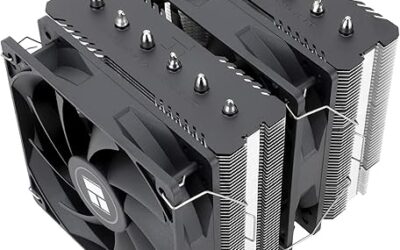
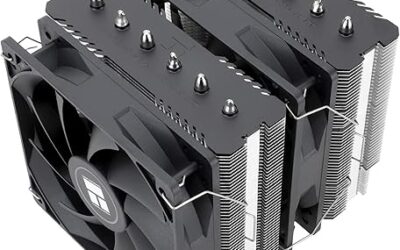
The Noctua NH-D15 G2 is the premium air-cooling option here for builders who want high thermal capacity without a pump or radiator. Its dual-tower design uses eight heatpipes, two 140mm-class fans, and official LGA1851 support. The main trade-off is its 168mm height, which demands a roomy PC case overall.
Best For
High-end Intel Ultra gaming PCs where low maintenance, strong air cooling, and simple long-term ownership matter more than RGB or radiator-based cooling.
Key Features
- Dual-tower heatsink design
- Eight heatpipes
- Two NF-A14x25r G2 PWM fans
- 168mm total height
- LGA1851 and LGA1700 support
- NT-H2 thermal compound included
- 228 Noctua Standardised Performance Rating
What makes the NH-D15 G2 different is its emphasis on large fin area and slow-moving airflow rather than high pump speed. That approach suits gaming PCs where low mechanical complexity and predictable acoustics matter. It also avoids radiator placement issues, but tall memory or compact cases can limit clearance.
For Intel Ultra gaming systems, the NH-D15 G2 is most attractive when the case supports tall air coolers and the graphics card already occupies much of the front airflow path. It keeps the cooling system self-contained around the socket, making upgrades and troubleshooting simpler than with an AIO loop.
Pros
- No pump or liquid loop
- Official LGA1851 compatibility
- Large dual-tower heatsink
- Two premium PWM fans
- Straightforward long-term maintenance
Cons
- 168mm height limits case compatibility
- Large footprint around the CPU socket
- Memory clearance must be checked
Use Case
Choose the NH-D15 G2 for a roomy gaming tower where you want premium CPU cooling without adding radiator placement, pump control, or extra liquid-cooling hardware.
Who It’s For
It suits gamers, streamers, and workstation users who prefer a large air cooler and are willing to dedicate significant case space to the CPU heatsink.
ARCTIC Liquid Freezer III Pro 360 – Best for Heavy Loads
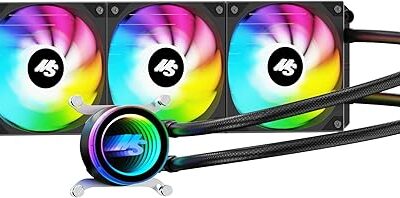
The ARCTIC Liquid Freezer III Pro 360 is built for users who expect long CPU-heavy workloads, high sustained power draw, or aggressive boost behavior. It supports LGA1851 and uses a 360mm radiator, a copper cold plate, and separate or unified PWM control for the pump, VRM fan, and radiator fans together.
Best For
Intel Ultra systems used for gaming alongside rendering, compiling, content creation, encoding, or other sustained multithreaded workloads.
Key Features
- 360mm radiator
- LGA1851 and LGA1700 compatibility
- Copper micro-skived-fin cold plate
- 450mm tubing
- 800–2800 RPM PWM pump
- Independent or combined PWM control
- Integrated Intel contact frame
Its biggest practical advantage is thermal headroom without depending on a massive tower above the motherboard. That leaves more room around the DIMM slots and CPU socket, but the radiator itself needs substantial case space. ARCTIC specifies at least 63mm of installation clearance for this cooler inside a case.
The Liquid Freezer III Pro 360 also uses a dedicated contact-frame mounting approach for Intel sockets. This can improve mechanical consistency, but installation is more involved than a standard clip-on air cooler. Builders should follow the socket-specific instructions carefully and retain the original Intel loading mechanism.
Pros
- Large 360mm radiator
- Official Intel LGA1851 support
- Separate pump, VRM, and radiator fan control
- Frees space around memory modules
- Designed for sustained thermal loads
Cons
- Requires substantial radiator clearance
- More complicated installation
- Some motherboards require compatibility checks
- Intel installation changes the socket loading hardware
Use Case
Use the Liquid Freezer III Pro 360 when sustained processor workloads matter as much as gaming and your chassis has adequate top or front radiator clearance.
Who It’s For
It targets performance-oriented Intel Ultra builders who are comfortable with a more involved installation in exchange for greater radiator capacity.
Corsair iCUE LINK TITAN 360 RX RGB – Best RGB AIO
The Corsair iCUE LINK TITAN 360 RX RGB is a better fit for builders who want cooling and cable management integrated into the same ecosystem. It supports LGA1851, uses a 360mm aluminum radiator with three RX120 RGB fans, and connects through Corsair’s iCUE LINK platform for centralized system control.
Best For
RGB-focused gaming PCs already using Corsair components or builds where synchronized fan, pump, and lighting management is a priority.
Key Features
- 360mm aluminum radiator
- Three RX120 RGB fans
- LGA1851, LGA1700, AM5, and AM4 support
- Copper cold plate
- Three-phase FlowDrive pump
- 450mm tubing
- iCUE LINK digital control
Its FlowDrive cooling engine uses a three-phase pump motor and a copper cold plate, while the digital control system handles fan and lighting management. The benefit is a cleaner, more coordinated build, but the cooler makes the most sense when you already use or plan to use other iCUE LINK components.
Pros
- Official LGA1851 support
- Integrated iCUE LINK control
- Three included RGB fans
- 360mm radiator format
- Cleaner ecosystem-based cable management
Cons
- Ecosystem features matter less outside iCUE LINK
- Requires 360mm radiator support
- More hardware and software complexity than air cooling
Use Case
The TITAN 360 RX RGB fits showcase gaming systems where cooling hardware is visible and synchronized lighting is part of the overall build design.
Who It’s For
Choose it if your Intel Ultra PC already contains Corsair iCUE LINK hardware or you want one software environment controlling cooling and lighting.
be quiet! Dark Rock Elite – Best Black Air Cooler
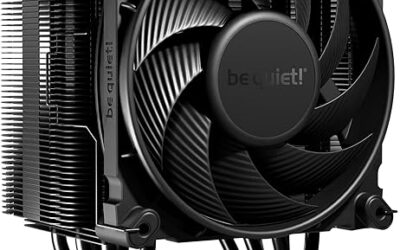
The be quiet! Dark Rock Elite is aimed at users who want high-end air cooling in a black, understated package. It officially supports LGA1851 and uses seven 6mm heatpipes, two fans, and a 168mm overall height. Its rated cooling capacity is high, but physical clearance must be checked carefully in advance.
Best For
Black gaming PCs where a premium tower cooler, subdued design, and low-complexity cooling system are preferred over an AIO.
Key Features
- Seven 6mm heatpipes
- Dual-fan design
- 168mm overall height
- 1.34kg total weight
- Copper base
- Aluminum fins
- LGA1851 and LGA1700 support
- Rated for up to 280W TDP by be quiet!
Compared with the Noctua, the Dark Rock Elite puts more emphasis on visual integration and built-in lighting while still avoiding a pump. Its 1.34kg mass and large footprint mean the motherboard and case should be handled carefully during installation. The payoff is strong air cooling with fewer moving parts.
For gaming-focused Intel Ultra systems, the Dark Rock Elite works best in a mid-tower or full-tower chassis with generous CPU cooler clearance. It is less suitable for compact builds, where radiator-based cooling or a shorter tower may be easier to fit. Memory height should also be checked before purchase.
Pros
- Official LGA1851 support
- No pump or liquid loop
- Seven heatpipes
- Black finish suits dark builds
- Dual-fan tower layout
Cons
- 168mm height
- Heavy 1.34kg construction
- Can interfere with tall memory or compact layouts
Use Case
The Dark Rock Elite suits gaming towers where visual consistency, air cooling, and simplified maintenance are more important than minimizing socket-area size.
Who It’s For
It is best suited to builders who want an all-black Intel Ultra system without moving to liquid cooling.
How to Choose the Best CPU Cooler for Intel Ultra
Choosing between these coolers comes down to sustained load, available space, acoustics, and how much complexity you want in the build. A large air cooler is easier to maintain and has no pump, while a 360mm AIO moves heat to the case edge and can offer more thermal reserve during long, demanding workloads.
Match Cooling Capacity to Your Workload
For a Core Ultra gaming PC that spends most of its time in GPU-limited titles, the difference between a premium air cooler and a 360mm AIO may be smaller than expected. CPU temperature still matters, but case airflow, fan curves, room temperature, and motherboard power settings can change results substantially.
For mixed gaming and productivity, a 360mm AIO becomes more attractive because rendering, compiling, encoding, and other sustained workloads keep the processor loaded for longer periods. The extra radiator area helps absorb and dissipate heat over time, although pump noise and radiator placement become new variables.
Check Case Clearance First
Case compatibility should be checked before thermal performance. A 168mm air cooler cannot fit into a chassis with lower CPU clearance, and a 360mm radiator may conflict with front drive cages, top motherboard heatsinks, or tall memory. Measuring the actual installation space prevents costly returns.
RAM clearance matters most with dual-tower air coolers because the front fan may sit above the memory modules. Raising that fan can solve the problem, but it increases total cooler height. AIO pump blocks usually avoid this issue, which is useful for systems with tall heat spreaders or four populated DIMM slots.
Consider Noise and Fan Curves
Noise should be judged as a whole-system characteristic rather than a single published number. Large air coolers can run quietly because their fans move useful airflow at moderate speed, while AIOs add a pump to the sound profile. Good fan curves often matter more than chasing the lowest possible idle temperature.
Motherboard compatibility also extends beyond the socket label. Large M.2 heatsinks, VRM covers, and dense top-edge layouts can interfere with some mounting systems or radiator tubing. ARCTIC specifically notes limited compatibility with certain boards that use oversized first-slot M.2 heatsinks near the socket.
Think About Installation Complexity
Installation difficulty is another meaningful difference. Air coolers require careful backplate and heatsink alignment, but the process is usually self-contained. A 360mm AIO adds radiator mounting, tube routing, fan orientation, and pump connections. That extra work is worthwhile only if the thermal or layout benefit matters.
Thermal paste application should follow the cooler maker’s instructions because contact pressure and cold-plate geometry vary. More paste does not automatically improve cooling, and too little can leave gaps. For a new Intel Ultra build, use the included compound unless you have a specific reason to replace it.
Plan Airflow Around the Cooler
Fan orientation affects both CPU temperatures and the rest of the system. Tower coolers should normally push air toward the rear exhaust, while top-mounted radiators are commonly used as exhausts. Front-mounted radiators can feed the CPU cooler with cooler outside air, but may warm the air reaching the graphics card.
Builders should also consider maintenance. Air coolers mainly need dust removal and occasional fan replacement, while an AIO adds a pump and sealed liquid loop. Modern AIOs are designed as closed systems, but they still introduce more components than a heatsink-and-fan design, which can matter for long ownership cycles.
Match Cooler Cost to the Rest of the PC
Value depends on the rest of the system rather than cooler price alone. Spending heavily on a premium 360mm AIO makes sense in a high-end workstation-style build, but it can be excessive in a gaming PC with moderate CPU demand. Cooling budget should stay proportional to the processor, case, and workload.
The best CPU cooler for Intel Ultra is therefore not automatically the largest model. A cooler that fits cleanly, stays quiet under your normal workload, and leaves room for the graphics card and memory is usually the smarter choice. Thermal headroom is useful only when the rest of the build can take advantage of it.
Which Cooler Should You Choose?
For users prioritizing simplicity, the NH-D15 G2 is the most straightforward premium option in this roundup. It delivers a high-end air-cooling layout with official LGA1851 support and avoids pump-related complexity. The key requirement is enough chassis height and space around the memory area and socket.
For users prioritizing sustained cooling headroom, the Liquid Freezer III Pro 360 is the more workload-focused choice. Its large radiator and Intel-specific mounting approach suit long CPU-heavy sessions. It demands more installation space, and its motherboard compatibility list should be checked before purchase.
For users building around Corsair’s ecosystem, the TITAN 360 RX RGB offers the cleanest integration. Its cooling hardware, RGB fans, and iCUE LINK controls are designed to work as a coordinated system. That convenience is less valuable if you prefer hardware-agnostic control or do not plan to use iCUE.
For users who want a premium black air cooler, the Dark Rock Elite offers a strong alternative to Noctua. Its large dual-fan heatsink, official LGA1851 support, and restrained styling suit dark themed builds. Like other 168mm-class towers, it needs careful clearance checks before installation in your chosen case.
Before buying, confirm the exact case CPU-cooler height or radiator support, the motherboard model, and the memory height. Then check whether the cooler includes the required LGA1851 hardware in the current package. This three-part compatibility check is more reliable than choosing by socket name alone.
Also decide how much manual tuning you are willing to do. A quiet system often benefits from a custom fan curve that allows short temperature spikes instead of instantly ramping fans to maximum speed. Intel Ultra processors can change load rapidly, so smoother fan response usually sounds better in everyday use.
Finally, separate peak temperatures from real-world behavior. A cooler should be judged by whether the CPU maintains expected performance without excessive noise or throttling in your actual workload. Synthetic stress tests are useful for validation, but they do not always represent the thermal pattern of gaming.
FAQ
Can I Use an LGA1700 Cooler on Intel LGA1851?
Yes, many LGA1700 coolers can also support LGA1851, but support must be verified for the exact model and mounting kit. Do not assume that identical-looking hole spacing guarantees full compatibility. Manufacturers may provide revised brackets, offsets, or instructions specifically for Intel Ultra platforms.
Does Intel Core Ultra Need a 360mm AIO?
A 360mm AIO is not required for every Intel Ultra gaming build. Premium air coolers can be entirely practical when the processor is not running long all-core workloads. AIO cooling becomes more useful when you want extra sustained thermal headroom, better socket-area clearance, or a specific case layout.
Is Air Cooling or AIO Cooling Better for Intel Ultra?
Air cooling is often the lower-complexity choice because it removes the pump and liquid loop from the system. AIO cooling can provide more radiator area and move heat away from the socket. Neither is automatically quieter in every build, because fan curves, pump speed, case airflow, and load behavior all matter.
Is a Large Air Cooler Enough for Gaming?
High-end air coolers are usually the best fit for users who value easy maintenance, predictable acoustics, and long-term simplicity. They are less ideal when case height is limited or memory clearance is tight. In those situations, an AIO can free the socket area even though it needs radiator space elsewhere.
What Should I Check Before Buying an LGA1851 Cooler?
The first compatibility check should be the CPU socket, followed by case dimensions and motherboard interference. For LGA1851, confirm the cooler maker lists the socket explicitly. Then verify height, radiator thickness, top clearance, M.2 heatsink clearance, and RAM height before ordering any large cooler.
Conclusion
The best choice for most Intel Ultra builders is the cooler that balances verified LGA1851 support, case fit, noise, and workload rather than chasing maximum size. Noctua and be quiet! lead the air options here, while ARCTIC and Corsair cover 360mm AIO needs for sustained loads and cleaner socket clearance.
Ready to decide? Our #1 pick for 2026 is the Cooler.
Live price & availability on Amazon.