🛒 Best Price Today on Amazon
Prime members get fast, free shipping on everything above, plus member-only deals. New members get a 30-day free trial — cancel anytime.

Asus ROG Strix B550-F Gaming WiFi II AMD AM4 (3rd Gen Ryzen) ATX DDR4 Gaming Motherboard (PCIe 4.0, WiFi 6E, 2.5Gb LAN, BIOS Flashback, HDMI 2.1, Addressable RGB Header and Aura Sync)
Included for 'Best Motherboard for Gaming: AMD and Intel Picks Compared' because the listing specifies WiFi 6E and 2.5Gb LAN, details this guide uses to compare options.
View on Amazon
ASUS ROG Strix X870-A Gaming WiFi AMD AM5 X870 ATX Motherboard 16+2+2 Power Stages, Dynamic OC Switcher, Core Flex, DDR5 AEMP, WiFi 7, 4X M.2, PCIe® 5.0, Q-Release Slim, USB4®, AI OCing & Networking
Included for 'Best Motherboard for Gaming: AMD and Intel Picks Compared' because the listing specifies Dynamic OC Switcher and Core Flex, details this guide uses to compare options.
View on Amazon
ASUS ROG Strix X870E-E Gaming WiFi AMD AM5 X870 ATX Motherboard 18+2+2 Power Stages, Dynamic OC Switcher, Core Flex, DDR5 AEMP, WiFi 7, 5X M.2, PCIe® 5.0, Q-Release Slim, USB4®, AI OCing & Networking
Included for 'Best Motherboard for Gaming: AMD and Intel Picks Compared' because the listing specifies Dynamic OC Switcher and Core Flex, details this guide uses to compare options.
View on AmazonChoosing the best motherboard for gaming starts with the CPU platform, then moves to power delivery, PCIe layout, M.2 storage, networking, USB, and upgrade headroom. This roundup focuses on current enthusiast AMD AM5 and Intel LGA1851 boards that pair modern gaming features with practical build flexibility.
Best Motherboards for Gaming at a Glance
| Motherboard | Platform | Best For | Key Strength |
|---|---|---|---|
| ASUS ROG Crosshair X870E Hero | AMD AM5 / X870E | Premium AMD gaming builds | Expansion and connectivity |
| MSI MPG X870E Carbon WiFi | AMD AM5 / X870E | Balanced enthusiast builds | Storage and high-speed I/O |
| Gigabyte X870E AORUS Master | AMD AM5 / X870E | Storage-heavy gaming PCs | PCIe 5.0 storage |
| MSI MAG B850 Tomahawk Max WiFi | AMD AM5 / B850 | Mainstream performance builds | Practical feature balance |
| ASUS ROG Maximus Z890 Hero | Intel LGA1851 / Z890 | Premium Intel gaming builds | Storage and Thunderbolt 4 |
A gaming motherboard does not raise frame rates by itself, but it determines which CPU, memory, graphics, storage, networking, and expansion options your system can use. The strongest boards also simplify building with useful BIOS controls, robust cooling, tool-free M.2 access, and dependable high-speed connectivity.
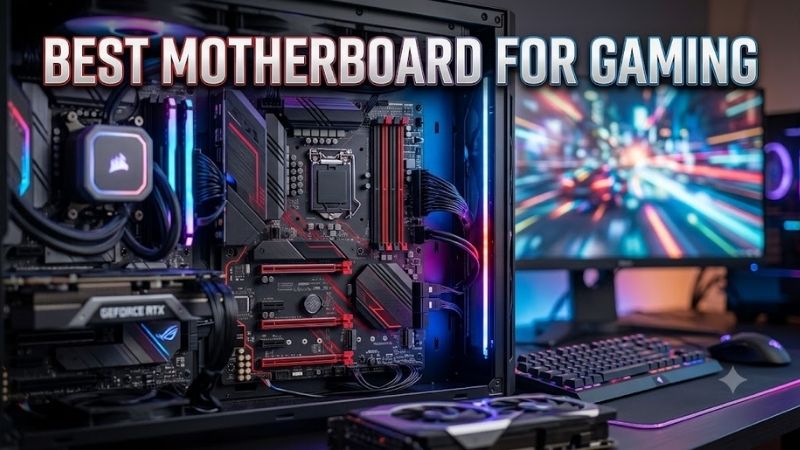
ASUS ROG Crosshair X870E Hero
Best For: Premium AMD gaming systems
The ROG Crosshair X870E Hero is built for high-end AM5 gaming systems using Ryzen 9000, 8000, or 7000 processors. It combines PCIe 5.0 expansion, five M.2 slots, dual USB4 ports, Wi-Fi 7, 5Gb and 2.5Gb Ethernet, plus extensive cooling and tuning controls for complex enthusiast builds with several fast devices.
Key Features
- AMD X870E chipset
- AMD AM5 socket
- Ryzen 9000, 8000, and 7000 Series support
- Four DDR5 DIMM slots
- Five M.2 storage positions
- PCIe 5.0 expansion
- Dual USB4 40Gbps Type-C
- Wi-Fi 7
- Realtek 5Gb Ethernet
- Intel 2.5Gb Ethernet
- BIOS FlashBack and Clear CMOS controls
What Makes It Different
Its appeal is breadth rather than a single headline feature. Gamers running multiple NVMe drives, high-speed networking, several USB devices, and custom cooling get room to expand without immediately relying on add-in cards. The trade-off is that many of these capabilities exceed the needs of a simple one-GPU gaming PC.
Pros
- Extensive high-speed connectivity
- Five M.2 positions
- USB4 support
- Dual Ethernet options
- Strong platform expansion
- Useful enthusiast troubleshooting controls
Cons
- Feature set exceeds typical gaming requirements
- Complex expansion options require lane planning
- Unnecessary for basic single-GPU builds
Use Case: Ryzen gaming PC with several NVMe drives, high-speed networking, premium peripherals, custom cooling, and long-term expansion requirements.
Who It’s For: Enthusiast gamers building around a high-end Ryzen processor who expect to use the additional storage, networking, USB, and tuning capabilities.
MSI MPG X870E Carbon WiFi
Best For: Feature-rich AMD gaming builds
The MSI MPG X870E Carbon WiFi targets builders who want a feature-rich AM5 platform without moving into the most elaborate flagship designs. It supports Ryzen 9000, 8000, and 7000 CPUs, four DDR5 DIMMs, modern PCIe expansion, multiple M.2 drives, Wi-Fi 7, 5Gb Ethernet, and broad high-speed USB connectivity.
Key Features
- AMD X870E chipset
- AMD AM5 socket
- Four DDR5 DIMM slots
- Four M.2 slots
- Two CPU-connected PCIe 5.0-capable M.2 slots
- PCIe 5.0 primary expansion
- Two rear USB4 40Gbps Type-C ports
- 5Gb Ethernet
- 2.5Gb Ethernet
- Wi-Fi 7
- Realtek ALC4080 audio
What Makes It Different
This board stands out as a balanced enthusiast option because it combines strong storage, networking, and memory support with a conventional ATX layout. It is especially useful for gamers who also stream, edit video, or move large files locally, while buyers with basic gaming needs may leave much of its I/O unused.
Pros
- Four M.2 slots
- USB4 connectivity
- Dual wired network interfaces
- Wi-Fi 7
- Multiple PCIe expansion options
- Strong rear USB selection
Cons
- Some PCIe and M.2 resources share bandwidth
- More connectivity than most gaming-only PCs require
- Ryzen 8000 CPUs change some expansion capabilities
Use Case: High-end AM5 machine used for gaming, streaming, content production, large local file transfers, and multiple internal SSDs.
Who It’s For: Gamers who want enthusiast connectivity and expansion but prefer a conventional ATX board with a practical mixture of storage and networking features.
Gigabyte X870E AORUS Master
Best For: Multi-SSD gaming systems
The Gigabyte X870E AORUS Master is a strong fit for storage-heavy and high-bandwidth AM5 gaming rigs. It supports Ryzen 9000, 8000, and 7000 processors, four DDR5 DIMMs, four M.2 slots with three PCIe 5.0 x4 connections, 5Gb Ethernet, Wi-Fi 7, dual USB4 Type-C connectivity, and a PCIe 5.0 x16 graphics slot.
Key Features
- AMD X870E chipset
- AMD AM5 socket
- Ryzen 9000, 8000, and 7000 Series support
- Four DDR5 DIMM slots
- Four M.2 slots
- Three PCIe 5.0 x4 M.2 connections
- PCIe 5.0 x16 graphics slot
- 5Gb Ethernet
- Wi-Fi 7
- Dual USB4 Type-C
- Screwless M.2 installation features
What Makes It Different
Its defining advantage is the emphasis on PCIe 5.0 storage and DIY-friendly hardware. Gamers who install several fast NVMe drives for large libraries, capture footage, or content work can use the extra bandwidth and thermal hardware. A lighter build with one SSD and one GPU will not exploit the same expansion depth.
Pros
- Three PCIe 5.0 x4 M.2 connections
- Four total M.2 positions
- 5Gb Ethernet
- Wi-Fi 7
- Dual USB4
- Tool-free storage installation features
Cons
- Storage capabilities may be excessive for gaming-only builds
- Multiple high-speed devices require careful configuration
- Benefits are smaller with only one NVMe SSD
Use Case: Gaming workstation carrying several large NVMe drives for installed games, recorded gameplay, video projects, mods, or other high-volume files.
Who It’s For: Gamers who treat internal NVMe capacity and next-generation storage expansion as major motherboard priorities.
MSI MAG B850 Tomahawk Max WiFi
Best For: Mainstream high-performance AM5 gaming
The MSI MAG B850 Tomahawk Max WiFi is the most sensible option here for an AM5 gaming build that prioritizes core features over premium extras. It supports Ryzen 9000, 8000, and 7000 processors, four DDR5 DIMMs, four M.2 slots, PCIe 5.0 graphics support, 5Gb Ethernet, Wi-Fi 7, and a rear Flash BIOS button.
Key Features
- AMD B850 chipset
- AMD AM5 socket
- Ryzen 9000, 8000, and 7000 Series support
- Four DDR5 DIMM slots
- Four M.2 positions
- Up to two PCIe 5.0-capable M.2 slots with supported Ryzen CPUs
- PCIe 5.0 x16 primary slot with Ryzen 9000 and 7000 CPUs
- 5Gb Ethernet
- Wi-Fi 7
- Flash BIOS and Clear CMOS rear buttons
What Makes It Different
Compared with X870E boards, B850 trims some platform luxury while keeping the features most gaming PCs actually use. Two PCIe 5.0-capable M.2 connections with supported Ryzen CPUs, strong wired networking, and modern wireless make it practical for performance builds that do not need USB4 or unusually dense expansion.
Pros
- Four M.2 slots
- 5Gb Ethernet
- Wi-Fi 7
- PCIe 5.0 expansion with supported CPUs
- Practical rear troubleshooting buttons
- Strong feature set without relying on X870E
Cons
- No USB4 listed on the rear I/O
- Some M.2 and secondary PCIe resources share bandwidth
- Expansion capabilities vary by Ryzen processor family
Use Case: Gaming-focused Ryzen build with one powerful GPU, several SSDs, modern networking, and enough expansion for future upgrades without flagship-level I/O requirements.
Who It’s For: Buyers who care more about usable gaming features and storage capacity than premium chipset extras they are unlikely to connect.
ASUS ROG Maximus Z890 Hero
Best For: Premium Intel Core Ultra gaming builds
The ROG Maximus Z890 Hero is the Intel option for builders using Core Ultra Series 2 processors on LGA1851. It provides four DDR5 DIMMs, a PCIe 5.0 x16 graphics slot, six M.2 positions, Thunderbolt 4, Wi-Fi 7, 5Gb plus 2.5Gb Ethernet, and extensive onboard controls for tuning, cooling, and troubleshooting.
Key Features
- Intel Z890 chipset
- LGA1851 socket
- Intel Core Ultra Series 2 support
- Four DDR5 DIMM slots
- Six M.2 storage positions
- PCIe 5.0 x16 graphics slot
- Multiple PCIe 5.0-capable M.2 connections
- Two Thunderbolt 4 ports
- 5Gb Ethernet
- 2.5Gb Ethernet
- Wi-Fi 7
What Makes It Different
Its strength is platform completeness for an Intel enthusiast system, especially when storage and external connectivity matter as much as gaming. Six M.2 slots provide unusual internal expansion, while Thunderbolt 4 helps with fast peripherals. Some M.2 configurations can share bandwidth with the primary graphics slot, so layout planning matters.
Pros
- Six M.2 positions
- Thunderbolt 4
- PCIe 5.0 graphics support
- Wi-Fi 7
- Dual wired networking
- Extensive tuning and troubleshooting controls
Cons
- Some M.2 configurations affect primary PCIe lane allocation
- Premium expansion is unnecessary for straightforward gaming systems
- Limited to the LGA1851 processor platform
Use Case: Intel gaming workstation combining a powerful GPU with several NVMe drives, Thunderbolt peripherals, fast networking, and extensive onboard tuning controls.
Who It’s For: Core Ultra Series 2 builders who intend to use the board’s storage, Thunderbolt, networking, and enthusiast expansion rather than paying for features that remain idle.
How to Choose the Best Motherboard for Gaming
Choose Your CPU Platform First
Start with the processor, because socket and chipset compatibility define the entire shortlist. AM5 boards support current Ryzen desktop families, while Z890 boards use Intel LGA1851 for Core Ultra Series 2. Pick the CPU first, then confirm the exact board supports it before comparing networking, storage, or aesthetics.
Check PCIe Slots and Lane Sharing
For gaming, the primary PCIe x16 slot matters more than having many secondary slots. PCIe 5.0 support gives modern expansion headroom, but lane sharing can change slot speed when certain M.2 sockets are populated. Read the lane map if you expect to use several NVMe drives, capture cards, or other PCIe devices.
Count the M.2 Slots You Will Actually Use
Storage layout matters when your game library, recordings, and project files live on separate NVMe drives. Count the M.2 slots, note which ones support PCIe 5.0 or 4.0, and check for shared lanes. Integrated heatsinks and tool-free latches can also make installation and future SSD upgrades easier inside a crowded build.
Match Networking to Your Home Setup
Networking is worth matching to your actual setup. Wi-Fi 7 is useful when paired with compatible routers and operating systems, while 5Gb Ethernet can benefit fast local transfers and multi-gig internet. Neither feature improves offline game performance, so do not overpay for connectivity your home network cannot use.
Examine USB and External Connectivity
USB and rear I/O become important once a gaming setup adds headsets, controllers, microphones, capture devices, external SSDs, and charging cables. USB4 or Thunderbolt 4 can simplify high-bandwidth peripherals, but mainstream users may be fully served by several 10Gbps ports plus a front-panel USB-C connection.
FAQ
Is B850 Good Enough for a Gaming PC?
For many gaming PCs, B850 is enough because it can provide PCIe 5.0 graphics support, fast M.2 storage, DDR5, Wi-Fi 7, and strong Ethernet without the extra connectivity of X870E. X870E makes more sense when you need additional high-speed I/O, more complex lane layouts, or a broader enthusiast feature set.
Does a Better Motherboard Increase FPS?
A motherboard does not normally increase gaming FPS when two boards run the same CPU, GPU, and memory at the same settings. Its value is in compatibility, stable power delivery, memory support, expansion, cooling, and I/O. Those factors can affect reliability, upgrade options, and how easily high-end components are used.
Do I Need PCIe 5.0 for Gaming?
PCIe 5.0 is useful for long-term expansion and for very fast compatible SSDs, but it is not a requirement for a strong gaming PC. A modern GPU can run well on a suitable x16 slot, and many games do not benefit directly from the peak throughput of a PCIe 5.0 SSD. Buy it for platform headroom, not instant FPS.
Is Wi-Fi 7 Worth Having on a Gaming Motherboard?
Wi-Fi 7 is worth considering when you already have, or plan to buy, a compatible router and use Windows 11 with the required support. It can improve wireless capacity and throughput in the right network, but Ethernet remains attractive for a fixed desktop. Choose based on your room layout, router, and local network speed.
Conclusion
The best motherboard for gaming is the one that matches your CPU, expansion plan, and real connectivity needs. X870E boards suit feature-heavy AM5 builds, B850 covers most gaming essentials efficiently, and Z890 serves Intel Core Ultra systems. Prioritize socket support, lane layout, M.2 capacity, networking, and usable I/O.