🛒 Best Price Today on Amazon
Prime members get fast, free shipping on everything above, plus member-only deals. New members get a 30-day free trial — cancel anytime.
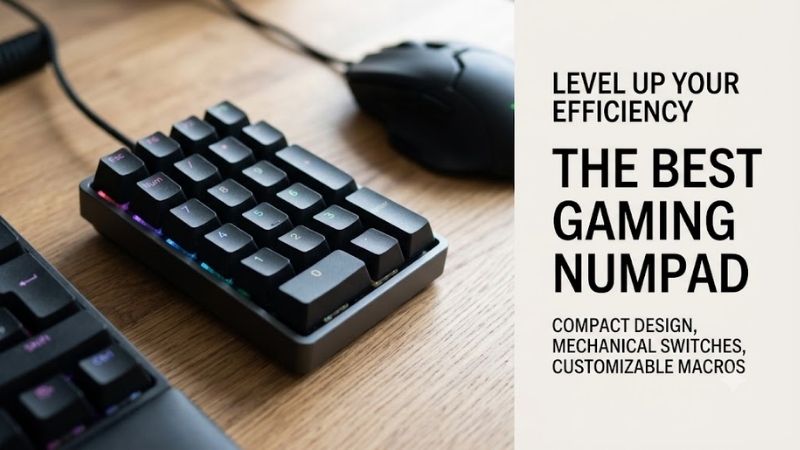
The best gaming numpad adds programmable inputs without forcing you to use a full-size keyboard. For MMO hotkeys, macros, streaming controls, or number-heavy games, a dedicated pad can free your mouse hand and keep commands closer. These picks focus on response, remapping, switches, and layout flexibility.
Best Gaming Numpad Comparison
| Model | Best For | Switch Technology | Connectivity | Programming |
|---|---|---|---|---|
| Keychron Q0 HE | Rapid Trigger and adjustable inputs | Magnetic | 2.4 GHz, Bluetooth, USB-C | QMK, Keychron Launcher |
| Keychron Q0 Max | Premium mechanical customization | Mechanical | 2.4 GHz, Bluetooth, USB-C | QMK, Keychron Launcher |
| Glorious GMMK Numpad | Knob, slider, and macro controls | Mechanical | Bluetooth, USB-C | Glorious CORE, QMK |
| EPOMAKER EK21 | Compact tri-mode setup | Mechanical | 2.4 GHz, Bluetooth, USB-C | VIA |
Keychron Q0 HE
Best For: Competitive gaming and adjustable actuation
Key Features
- Gateron double-rail magnetic switches
- Rapid Trigger
- Adjustable actuation from 0.2 to 3.8 mm
- 0.1 mm sensitivity
- Dynamic keystrokes
- 1000 Hz polling in wired and 2.4 GHz modes
- Bluetooth connectivity
- 1800 mAh battery
- Aluminum body
- South-facing RGB
- NKRO
Keychron’s Q0 HE is the most gaming-focused option here because its magnetic switches support Rapid Trigger, adjustable actuation, and dynamic keystrokes. Those features matter when you want faster resets or multiple actions from one key, while the dedicated numpad layout still works for macros, shortcuts, and normal numeric entry.
What Makes It Different
Its 2.4 GHz and wired modes run at a 1000 Hz polling rate, while Bluetooth is better suited to convenience than competitive play. The aluminum body adds weight and stability, and the 1800 mAh battery supports wireless use. The limitation is switch choice: hot-swap support is restricted to compatible Gateron magnetic switches.
Pros
- Rapid Trigger support
- Adjustable actuation
- Dynamic multi-action keys
- 1000 Hz wired and 2.4 GHz polling
- Wireless and wired operation
- Solid aluminum construction
Cons
- Magnetic switch compatibility is limited
- Extra gaming features may be unnecessary for simple macros
Use Case
The Q0 HE makes the most sense when the numpad itself becomes part of active gameplay. Rapid Trigger and adjustable actuation can be assigned to frequently repeated commands, movement-style inputs, rhythm actions, or fast ability binds. It can also serve as a conventional macro pad when its advanced magnetic features are not needed.
Who It’s For
Choose it if you already use Hall Effect keyboards or want the same adjustable-input concept on a separate pad. It is particularly relevant for players who experiment with custom actuation points rather than simply mapping static shortcuts. Gamers who only need occasional macros may get more practical value from a conventional mechanical numpad.
Keychron Q0 Max
Best For: Premium mechanical gaming and macro customization
Key Features
- Mechanical switches
- Hot-swappable PCB
- 3-pin and 5-pin MX-style switch support
- Left-side macro column
- Rotary encoder
- 1000 Hz polling over wired and 2.4 GHz
- Bluetooth 5.1
- QMK support
- Keychron Launcher
- Aluminum body
- 1800 mAh battery
The Keychron Q0 Max suits gamers who want a premium mechanical numpad with broad remapping rather than magnetic-switch features. It combines a standard number cluster with a left-side macro column and rotary encoder, giving you extra places for push-to-talk, media, editing shortcuts, ability binds, or repeated in-game commands.
What Makes It Different
QMK support and Keychron Launcher make key remapping and macro setup a major strength, while 2.4 GHz and wired modes support 1000 Hz polling. The hot-swappable PCB accepts common 3-pin and 5-pin MX-style mechanical switches, so you can tune feel and sound. Bluetooth adds flexibility, but it runs at a lower polling rate.
Pros
- Dedicated macro column
- Programmable rotary encoder
- 1000 Hz 2.4 GHz mode
- QMK customization
- Broad MX-style switch compatibility
- Aluminum construction
Cons
- No Rapid Trigger
- Heavy construction is less portable
- Bluetooth is not the preferred gaming mode
Use Case
This model works well beside a 60%, 65%, or TKL keyboard when you want a permanent bank of extra controls. The macro column can handle game commands while the normal number keys remain available for inventory slots, numeric entry, or shortcuts. The knob can also manage volume without taking a key away from your gaming layout.
Who It’s For
The Q0 Max fits mechanical keyboard enthusiasts who care about switch choice, remapping, and chassis quality. It is also useful for gamers who switch between gameplay and productivity because the familiar number pad remains intact. Players seeking adjustable magnetic actuation should consider the Q0 HE instead of paying for features they will not use.
Glorious GMMK Numpad
Best For: Gaming, streaming, and rotary controls
Key Features
- 17 keys
- Clickable rotary encoder
- Programmable slider
- CNC-machined aluminum body
- 5-pin hot-swap sockets
- Bluetooth
- USB-C wired connectivity
- 1000 Hz maximum polling rate
- Glorious CORE
- QMK support
- Per-key RGB
- Gasket mount
Glorious GMMK Numpad is designed for users who want a programmable control surface as much as a number pad. Its 17 keys, clickable rotary encoder, and slider can be reassigned for game commands, media, streaming, or productivity. That combination is useful when you need analog-style controls beside a compact keyboard.
What Makes It Different
Glorious CORE supports keybinds, macros, lighting, and profiles on Windows, while QMK support opens another route for deeper customization. The board uses a CNC-machined aluminum body, gasket mount, and 5-pin hot-swap sockets. Bluetooth and USB-C are supported, but there is no 2.4 GHz wireless mode for low-latency cable-free gaming.
Pros
- Programmable slider
- Clickable rotary encoder
- QMK support
- Hot-swappable switches
- Aluminum construction
- Wired and Bluetooth modes
Cons
- No 2.4 GHz wireless connection
- Full software customization relies on Windows
- Controls may be excessive for basic numeric use
Use Case
The GMMK Numpad becomes especially useful in mixed gaming and streaming setups. Keys can trigger shortcuts while the knob and slider handle audio-related functions, media, or other configurable actions. It also pairs naturally with compact keyboards when you want a separate control module that can remain on the desk instead of a permanently attached numpad.
Who It’s For
Consider the GMMK Numpad if a knob and slider are more useful to you than a dedicated 2.4 GHz connection. Streamers, creators, and gamers who manage several software controls from one desk can make better use of its unusual layout. Competitive players wanting wireless 1000 Hz operation should look toward the Keychron or EPOMAKER alternatives.
EPOMAKER EK21
Best For: Compact tri-mode gaming setups
Key Features
- 20 keys and one knob
- VIA programmability
- 2.4 GHz wireless
- Bluetooth
- USB wired mode
- 1000 Hz polling in wired and 2.4 GHz modes
- 125 Hz Bluetooth polling
- 3-pin and 5-pin hot-swap support
- Per-key RGB
- 1000 mAh battery
- Gasket-mounted structure
The EPOMAKER EK21 is a compact choice for players who want wireless flexibility without paying for a full aluminum chassis. It uses a 20-key layout plus a knob and supports VIA remapping, making it practical for macros, inventory shortcuts, media controls, or number entry. Its small footprint also works well beside a 60% keyboard.
What Makes It Different
For gaming, the EK21 supports 1000 Hz polling in wired and 2.4 GHz modes, while Bluetooth runs at 125 Hz. It is hot-swappable with 3-pin and 5-pin mechanical switches, includes per-key RGB, and uses a gasket-mounted structure. The ABS case keeps weight down, but it feels less substantial than heavier metal numpads.
Pros
- 2.4 GHz, Bluetooth, and wired modes
- 1000 Hz polling for wired and 2.4 GHz
- VIA support
- Hot-swappable switches
- Compact footprint
- Programmable knob
Cons
- Plastic case
- Bluetooth polling rate is lower
- Fewer premium chassis features than metal alternatives
Use Case
The EK21 works well when you move between a desktop, laptop, or multiple keyboard layouts and want the numpad to remain independent. VIA lets its keys become game commands rather than fixed numeric inputs, while 2.4 GHz keeps the desk cable-free during play. Bluetooth is more appropriate when convenience matters more than input frequency.
Who It’s For
This model fits gamers who prioritize flexible connectivity and a small footprint over a heavy enthusiast-grade case. It is also a sensible companion for compact mechanical keyboards because it adds number keys, macros, and a knob only when required. Users specifically seeking magnetic switches or Rapid Trigger should choose a different category of numpad.
Which Gaming Numpad Should You Choose?
Choose the Q0 HE if actuation tuning and Rapid Trigger matter most, the Q0 Max if you want premium mechanical customization with a macro column, the GMMK Numpad if a slider and rotary control fit your workflow, or the EK21 if you want tri-mode connectivity, VIA support, and a compact design at a simpler level of build.
How to Choose the Best Gaming Numpad
Polling Rate
Polling rate matters when the numpad is used for active gameplay rather than occasional macros. A 1000 Hz mode reports input more frequently than typical Bluetooth operation, so wired or 2.4 GHz modes are preferable for rhythm inputs, repeated actions, or fast commands. For media keys and productivity shortcuts, Bluetooth is usually sufficient.
Programmability and Macros
Programmability determines whether a numpad becomes a true gaming accessory or remains only a calculator-style keypad. QMK, VIA, and vendor software can let you remap keys, create macros, add layers, or change a knob’s function. The trade-off is setup time, especially if you want several game-specific profiles instead of one universal layout.
Mechanical vs Magnetic Switches
Switch type changes both feel and control. Traditional mechanical switches offer familiar linear, tactile, or clicky behavior and often support broad hot-swap compatibility. Magnetic switches can add adjustable actuation and Rapid Trigger, but they usually require a specific switch family. Choose based on controls you actually use.
Wired, 2.4 GHz, or Bluetooth
Connectivity should match where the numpad sits on your desk. Wired USB-C avoids battery management and is easy to trust for competitive play. A 2.4 GHz mode can provide low-latency wireless operation on supported models, while Bluetooth is convenient for laptops and multiple devices. More wireless modes add flexibility.
Layout and Extra Controls
Layout matters because extra keys are only useful if you can reach them without looking. A traditional number cluster suits numeric input and familiar macro mapping, while side macro columns, knobs, and sliders create extra control zones. Gamers with small desks should also check width, cable direction, and mouse clearance.
FAQ
Is a Gaming Numpad Actually Useful?
A gaming numpad can be useful for MMOs, simulators, rhythm games, strategy titles, and any setup that benefits from extra macros or isolated controls. It is less essential for shooters that rely mainly on WASD and mouse input. Its biggest advantage is modularity: you can place programmable keys where your hand naturally rests.
Is a Numpad Faster Than Using Normal Keyboard Keys?
A numpad is not automatically faster than a keyboard, but it can reduce hand travel when important commands are grouped on a smaller device. Models with 1000 Hz polling, magnetic switches, or custom actuation can improve responsiveness for specific actions. The practical gain depends on your bindings, game type, and muscle memory.
Can a Gaming Numpad Be Used as a Macro Pad?
Yes. Programmable numpads can handle push-to-talk, scene switching, media control, editing shortcuts, and application macros as well as game commands. QMK, VIA, or vendor software may support layers and custom bindings. A model with a knob or slider is especially useful when you want volume or timeline control without leaving your main keyboard.
Is 2.4 GHz Better Than Bluetooth for Gaming?
For gaming, 2.4 GHz wireless is generally the better choice when the numpad supports a high polling rate, because Bluetooth modes often run more slowly. Bluetooth remains useful for casual play, laptops, and multi-device setups. For the simplest path to consistent input, USB-C wired mode avoids pairing and battery concerns.
Do I Need a Hot-Swappable Gaming Numpad?
Hot-swap support is valuable if you want to change switch feel without soldering. Mechanical numpads may accept common 3-pin and 5-pin MX-style switches, while magnetic models often use a narrower compatible switch family. If you do not plan to experiment with switches, programmability and layout will matter more than hot-swap capability.
Conclusion
The best gaming numpad depends on how you plan to use the extra keys. Keychron Q0 HE targets rapid, adjustable magnetic input, Q0 Max emphasizes premium mechanical remapping, GMMK Numpad adds a slider and rotary control, and EPOMAKER EK21 keeps tri-mode wireless and VIA support in a compact format. Match features to your games first.