The $1,500 gaming laptop segment is simultaneously the best and most confusing place to shop in 2026. It’s the price band where you finally escape entry-level compromises — 8GB of RAM, 60Hz panels, thermally throttled chassis — but it’s also where manufacturers play the most aggressive spec games. Two laptops with the same GPU name can differ by 40% in real-world frame rates depending on wattage, cooling design, and whether the CPU is a current-generation part or last year’s inventory wearing a new sticker.
This guide cuts through that noise. We’ve focused on machines that deliver genuine 1080p and 1440p gaming performance without hidden compromises, prioritizing GPU wattage, display quality, memory configuration, and — critically — thermal headroom, since a throttling laptop is a slow laptop no matter what the spec sheet claims. Every pick below is realistically attainable under $1,500, and we’ve flagged exactly who each machine is for.
As an Amazon Associate we earn from qualifying purchases.



⚡ Save on Your Next PC — Amazon Prime
Prime members get fast free shipping on the systems above, plus early access to Prime Day & Black Friday PC deals. New members get a 30-day free trial.
Watch: Best Gaming Laptop Under $1500 — Video Review
How to Choose Gaming Laptop Under $1500
- GPU tier and wattage: At this budget, target an RTX 5060 or RTX 4070 class GPU. More importantly, check the total graphics power (TGP) — a 115W RTX 5060 can outperform a 75W RTX 4070 in sustained loads, so wattage matters as much as the model number.
- RAM and upgradeability: 16GB DDR5 is the floor in 2026, and many 2025-era titles will use every bit of it. Prioritize laptops with two accessible SODIMM slots so you can jump to 32GB later for around $60 rather than paying a $200 factory premium.
- Display resolution and refresh: A 165Hz panel is standard at this price and worth insisting on. QHD (1440p) looks noticeably sharper on 15–16 inch screens, but it demands more GPU horsepower — pair it with at least an RTX 4070, or stick with FHD/WUXGA for higher, more consistent frame rates.
- Cooling and chassis design: Look for dual-fan setups with multiple heat pipes and rear-plus-side exhaust. Thin-and-light gaming laptops in this bracket almost always throttle under sustained load; a slightly thicker chassis buys you meaningful sustained performance.
- Storage headroom: 512GB fills up after roughly four or five modern AAA installs. A 1TB Gen 4 SSD is the comfortable choice, but a 512GB machine with a free M.2 slot is an equally good value play if you’re willing to add a drive yourself.
The Best Picks Reviewed
ASUS ROG Strix G16 (2025)
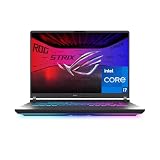
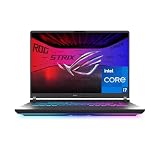
The Strix G16 is the most complete package in this roundup, pairing an RTX 5060 with Intel’s 14-core i7-14650HX and a genuinely excellent 16-inch 16:10 165Hz panel that gives you more vertical working space than standard widescreen rivals. ROG’s cooling system is the differentiator here — it sustains high clocks far longer than thinner competitors, and the 1TB Gen 4 SSD plus Wi-Fi 7 means there’s nothing you’ll need to upgrade on day one.
MSI Katana 15
The Katana 15 is the raw-performance pick, and the only laptop here that pairs a full RTX 4070 with a QHD 165Hz display — a combination that normally lives well above this price bracket. The i7-13620H is a generation behind, but for pure gaming that matters far less than the GPU tier, and Cooler Boost 5 keeps thermals respectable under load.
GIGABYTE Gaming A16
GIGABYTE’s A16 is the value specialist, offering RTX 5060 performance and a 16-inch 1920×1200 WUXGA 165Hz display at a price that typically undercuts the ASUS and MSI options by a meaningful margin. The build is more utilitarian than premium, but with 16GB DDR5 and a 1TB SSD included, you’re paying for silicon rather than styling.
Lenovo LOQ 15.6″
The LOQ is the smartest AMD-based buy in this segment, pairing a Ryzen 7 250 with an RTX 5060 for excellent battery efficiency and cool, quiet operation compared to Intel HX-series rivals. The 144Hz FHD panel is a small step down from the 165Hz competition and the 512GB SSD will need supplementing, but the second M.2 slot makes that a cheap fix.
Acer Nitro V 15.6″
The Nitro V is the entry point to this list, and it’s an honest one — the RTX 5050 with 8GB of fast GDDR7 handles 1080p high settings comfortably, and the 165Hz IPS panel is a genuine strength at this tier. The i5-13420H will bottleneck you in CPU-heavy simulation and strategy titles, so treat this as a shooter-and-action machine rather than an all-rounder.
Frequently Asked Questions
Is an RTX 5060 enough for 1440p gaming in 2026?
Yes, with caveats. The RTX 5060 handles most current titles at 1440p high settings between 60–90fps, and DLSS 4 with frame generation pushes that considerably higher. For competitive esports at 1440p you’ll have plenty of headroom; for path-traced AAA titles, expect to lean on upscaling.
Should I choose an RTX 4070 over an RTX 5060?
Generally yes for raw rasterization performance, as the 4070’s wider memory bus and higher core count still hold an edge. However, the 5060 offers newer DLSS 4 features and better efficiency — if the 4070 laptop has a significantly lower TGP or worse cooling, the gap narrows or reverses entirely.
Is 16GB of RAM still sufficient for gaming?
For gaming alone in 2026, 16GB remains workable, though a handful of demanding titles now benefit from more. If you stream, run a browser with dozens of tabs, or do any content creation alongside gaming, budget for a 32GB upgrade — it’s the cheapest meaningful performance gain available.
Do I need to buy a cooling pad?
Not with any of the laptops on this list, all of which use adequate dual-fan designs. Cooling pads offer marginal temperature reductions on well-designed chassis; your money is better spent on thermal paste replacement after two or three years of ownership.
Final Thoughts
For most buyers, the ASUS ROG Strix G16 is the safest and most well-rounded choice under $1,500, combining a modern CPU, capable RTX 5060, and the best cooling in this group. If you want maximum GPU muscle and a sharper 1440p display, the MSI Katana 15 delivers the strongest raw performance per dollar, while the GIGABYTE Gaming A16 is the pick for anyone chasing the same core specs at the lowest possible price.