The best mouse for work isn’t the flashiest one, it’s the one that disappears under your hand for eight straight hours. Comfort, quiet clicks, reliable wireless, and enough precision for spreadsheets and design work matter far more than sky-high DPI figures. Whether you’re wired-in at a desk or bouncing between meetings with a laptop, the right mouse reduces fatigue and keeps you focused.
This roundup covers dependable options from trusted names like Logitech, Anker, Acer, and TECKNET, spanning simple wired plug-and-play units to ergonomic vertical designs. Each pick earns its place through comfort, battery life, or value rather than gaming gimmicks.
As an Amazon Associate we earn from qualifying purchases at no extra cost to you. Product prices and availability are accurate as of the date shown and are subject to change.






🎮 Get More From Your Setup — Free
Prime Gaming gives you free PC games every month, in-game loot, and a free Twitch channel sub — plus fast free shipping on all the gear above. New members get a 30-day free trial.
Watch: Best Computer Mice For Work — Video Review
How to Choose a Work Mouse
- Grip and hand size: Match the shape to your hand. Compact mice suit travel, while full-size or vertical designs support larger hands and longer sessions.
- Wired vs. wireless: Wired mice never need charging and are ideal for fixed desks; 2.4GHz wireless offers freedom with minimal lag for everyday work.
- Ergonomics: Vertical mice reduce forearm strain, which matters if you feel wrist discomfort after long days.
- Quiet clicks: Silent switches are worth prioritizing in shared offices and on calls.
- Adjustable DPI: Even for office work, switchable DPI helps you fine-tune tracking across single and multi-monitor setups.
The Best Work Mice Reviewed
Logitech M185 Wireless
The M185 is the reliable everyday default: compact, ambidextrous, and running on a simple 2.4GHz connection with long battery life. It’s inexpensive, fuss-free, and a safe pick for any laptop bag or spare-desk role.
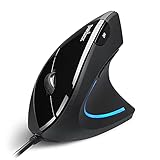
Anker 2.4G Vertical Ergonomic Mouse
Anker’s vertical mouse tackles wrist fatigue head-on with a handshake grip that keeps your forearm in a neutral position. For anyone who works long hours or feels strain with a flat mouse, it’s a genuinely comfortable upgrade at a modest price.
Logitech G305 Lightspeed
Marketed for gaming, the G305 doubles as an excellent work mouse thanks to its precise sensor, low-latency Lightspeed wireless, and impressive battery life on a single AA. If you want one mouse for productivity and after-hours play, it’s a smart crossover.
TECKNET Wireless Mouse
The TECKNET offers strong value with 2600 DPI, comfortable ergonomics, and quiet operation in a distinctive purple finish. It’s a great budget choice for anyone who wants adjustable tracking and all-day comfort without spending much.
Logitech B100 Wired
Sometimes simple wins. The B100 is a wired, ambidextrous mouse that just works, no batteries, no pairing, no drivers. For a permanent desk setup or a no-nonsense backup, it’s dependable and endlessly practical.
Frequently Asked Questions
Are vertical mice really better for your wrist?
For many users, yes. The neutral grip reduces forearm rotation and can relieve strain, though there’s a short adjustment period when switching from a traditional shape.
Is wireless lag a problem for office work?
No. Modern 2.4GHz and Lightspeed connections are more than fast enough for documents, browsing, and design. Lag only matters at competitive gaming levels.
How much DPI do I need for work?
Most office tasks are comfortable between 800 and 1600 DPI. Adjustable DPI helps if you use high-resolution or multiple monitors.
Do quiet-click mice feel different to use?
They feel slightly softer but remain responsive. The trade-off is well worth it in quiet offices, libraries, or on video calls.
Final Thoughts
For pure comfort, the Anker vertical mouse leads; for a versatile do-it-all wireless option, the Logitech G305 is excellent; and for a reliable, affordable everyday driver, the Logitech M185 remains hard to beat. Match the shape and connection to your workspace and your hands will thank you.