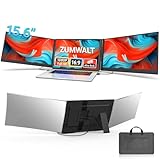
A laptop extender turns your single screen into a portable multi-monitor workstation, folding out one or two extra displays that clip to your laptop lid. For remote workers, students, and anyone tired of cramming everything onto one panel, these travel-friendly screens deliver the productivity of a desk setup wherever you go.
This review examines a range of laptop extenders, including dual and triple portable monitor designs from KEFEYA, MNN, SMISEACOW, and others. We focus on image quality, weight, connectivity, and ease of attachment, since a good extender should add screens without adding hassle.
As an Amazon Associate we earn from qualifying purchases.




Design & Build
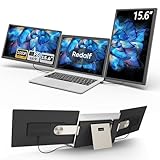
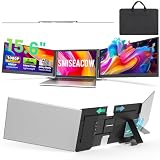
These extenders come in dual and triple layouts. The KEFEYA 14-inch models add a single 1080p IPS panel to one side of your laptop, while the triple SMISEACOW 15.6-inch folds out two extra screens for a full wraparound workspace. Build quality centers on slim, lightweight FHD IPS panels, with the thinnest options measuring well under a quarter inch and weighing around three to four pounds for triple setups. The MNN 15.6-inch takes a different route as a standalone portable monitor that works freestanding too. Attachment uses magnetic or clamp systems that grip the lid, and compatibility spans laptops from roughly 12 to 17.3 inches.
Performance
Image quality is consistently strong across these 1080p FHD IPS panels, delivering sharp text and wide viewing angles that matter when screens sit at an angle to you. Connectivity is the practical dividing line: single-cable USB-C models carry video and power over one connection for the cleanest setup, while some triple designs mix HDMI, USB-A, and USB-C. The KEFEYA models offer broad plug-and-play support for Windows, Mac, Android, and consoles like the Switch and PS5. Triple extenders draw more from your laptop’s ports and graphics, so lighter dual setups run more smoothly on modest hardware. The freestanding MNN monitor adds flexibility as a screen you can also use on its own.
Pros & Cons
- Pro: Adds one or two extra screens to a laptop anywhere you work.
- Pro: Sharp FHD IPS panels with wide viewing angles.
- Pro: Slim, lightweight designs travel easily.
- Pro: Broad compatibility including Mac, Windows, and game consoles.
- Con: Triple setups can tax laptop ports and integrated graphics.
- Con: Some models require drivers or specific USB-C support.
- Con: Heavier extenders can put stress on the laptop hinge.
Alternatives to Consider
If you only occasionally need a second screen, a standalone portable monitor like the MNN 15.6-inch is simpler and doubles as a freestanding display. For maximum productivity on the road, a triple extender such as the SMISEACOW 15.6-inch gives you three screens at once. Those who prioritize the lightest travel kit should choose a single-cable KEFEYA dual model for its easy attachment and effortless portability.
Frequently Asked Questions
How do laptop extenders connect?
Most use USB-C for single-cable video and power, though some triple models add HDMI and USB-A. Confirm your laptop’s USB-C port supports video output before buying.
Will it fit my laptop?
These extenders fit laptops roughly 12 to 17.3 inches. Match the extender’s supported size range to your screen for proper alignment and secure mounting.
Do triple extenders affect performance?
Driving two extra screens uses more graphics power and port bandwidth, so lower-powered laptops may slow slightly. Dual setups are easier on modest hardware.
Are these compatible with Mac?
Many, including the KEFEYA models, support macOS, though some may need a driver or specific USB-C alt-mode. Verify Mac compatibility before purchasing.
Verdict
For a big productivity boost on the go, a triple extender like the SMISEACOW 15.6-inch is the standout, while the single-cable KEFEYA dual model offers the easiest everyday setup. If you want a screen that also works freestanding, the MNN 15.6-inch portable monitor is the flexible choice.