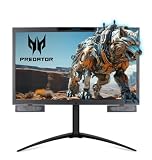
A triple-monitor notebook setup gives you the desktop workstation experience wherever your laptop goes. Whether you clip on portable extenders or mount external monitors around your notebook, spreading work across three screens eliminates the endless window-shuffling that slows you down. For power users, traders, and multitaskers, it’s a transformative upgrade.
I tested both portable clip-on triple extenders and mounting solutions that pair a notebook with external monitors to see which approach fits different working styles. Here’s a grounded review of triple-monitor notebook solutions, their trade-offs, and how to choose the right one for your desk and travel needs.
As an Amazon Associate we earn from qualifying purchases.





Design & Build
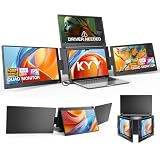
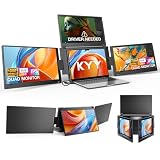
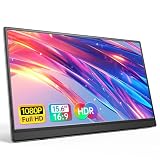
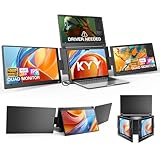
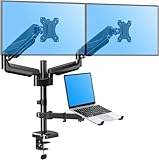
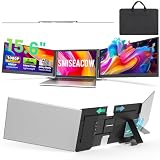
There are two ways to give a notebook three screens. Portable extenders like the ultra-slim 15.6-inch triple, the Synnov 15.6-inch triple, the KYY quad-capable extender, and the Miesebe 15.6-inch triple clip directly onto your laptop lid and swing out, traveling with you as a self-contained multi-screen kit. The alternative is a desk-based mount, like the WALI triple arm for a 17-inch notebook and dual 27-inch screens, or the MOUNTUP dual-monitor-and-laptop mount, which holds your notebook alongside larger external monitors on adjustable arms. Portable extenders win on mobility; mount-based setups win on screen size, brightness, and ergonomics at a fixed desk.
Performance
For multitasking, both approaches deliver a major productivity boost. Portable extenders like the 15.6-inch triple and Synnov give you two extra FHD IPS panels that mirror your notebook’s size, ideal for spreadsheets, research, and communication on the move, though they depend on your laptop’s port bandwidth and may need DisplayLink drivers. The Miesebe’s ultra-thin build and the KYY’s rotation add flexibility. Desk mounts like the WALI triple arm take a different route, letting you use full-size external monitors for more brightness and screen area, with your notebook elevated ergonomically alongside. That’s the better choice for a permanent workstation, while extenders shine for hybrid workers who need three screens both at home and on the road. Either way, confirm your notebook can drive the displays you’re adding.
Pros & Cons
- Major multitasking gains from three dedicated screens.
- Portable extenders travel with your notebook for on-the-go multi-screen work.
- Desk mounts enable larger, brighter external monitors with ergonomic positioning.
- Flexible options for both mobile and fixed-desk setups.
- Extenders depend on port bandwidth and may need DisplayLink drivers.
- Mounts require desk space and separate external monitors.
- Battery drain when powering portable panels from your notebook.
Alternatives to Consider
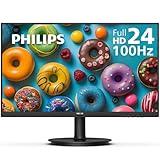
If you work mostly at one desk, a mount like the WALI triple arm paired with two external 27-inch monitors delivers the best screen size and ergonomics. For hybrid or mobile work, portable triples like the ultra-slim 15.6-inch or the lightweight Miesebe are the way to go. Those wanting a mix could keep a portable extender for travel and a mount at their main desk. If your notebook struggles with multiple displays, verify DisplayLink support before buying an extender.
Frequently Asked Questions
Portable extender or desk mount for a triple-monitor notebook?
Choose a portable extender if you need three screens on the move, or a desk mount with external monitors for a fixed workstation with larger, brighter displays and better ergonomics.
Will my notebook drive two extra screens?
Many can, but driving multiple panels over one cable may require DisplayLink drivers or a full-featured USB-C port. Check your notebook’s display-output capability first.
Do portable triples work with any laptop size?
Most 15.6-inch triples fit notebooks from about 12 to 17.3 inches. Match the panel size to your laptop for the cleanest, most balanced setup.
Are extenders bright enough for office work?
Yes, their FHD IPS panels are sharp and comfortable indoors, though they don’t match full-size desktop monitors in brightness for very bright rooms.
Verdict
A triple-monitor notebook setup is one of the best productivity investments for multitaskers. The ultra-slim 15.6-inch triple and Synnov extenders are the top portable picks, the lightweight Miesebe suits travelers, and the WALI triple arm mount is best for a fixed desk with larger external monitors. Match the approach to whether you value mobility or maximum screen size, and confirm your notebook’s port support.