- Top Pick: Logitech MX Mechanical Wireless Illuminated Keyboard Tactile – Graphite
- Best Value: Keychron C2 Full Size Wired Mechanical Keyboard Compatible with Mac, Keychron Brown Switch, 104 Keys ABS Retro Color Keycaps Gaming Keyboard for Windows, USB-C Type-C Braid Cable
- Premium Choice: Cherry KC 200 MX Wired Mechanical Office Keyboard MX2A Silent RED Switches
A mechanical keyboard built for productivity is a different animal from a flashy gaming board. Where gaming keyboards chase the fastest linear switches and loudest RGB, a productivity keyboard prioritizes typing comfort, quiet operation for shared offices, ergonomic layouts, and features like multi-device pairing that keep you moving between a laptop and desktop without missing a keystroke. The right board genuinely reduces fatigue over long working days.
We compared a range of mechanical keyboards suited to writers, coders, and office professionals to find the ones that balance tactile feedback, acoustics, and workflow features. Whether you want whisper-quiet switches for the office or a full-size board with a number pad, here’s what matters for productivity typing.
As an Amazon Associate we earn from qualifying purchases at no extra cost to you.






🎮 Get More From Your Setup — Free
Prime Gaming gives you free PC games every month, in-game loot, and a free Twitch channel sub — plus fast free shipping on all the gear above. New members get a 30-day free trial.
Watch: Mechanical Keyboard For Productivity — Video Review
Design & Build
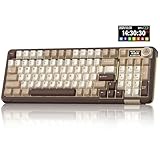
Productivity boards span a range of layouts and philosophies. The Logitech MX Mechanical in graphite is the archetype, pairing tactile switches with a low-profile design, smart illumination, and multi-device wireless that many professionals swear by. The Keychron C2 offers a full-size, Mac-compatible layout with retro keycaps for those who want a wired, no-nonsense typing surface. The Cherry KC 200 MX leans fully into office etiquette with genuine MX2A Silent Red switches. At the enthusiast end, the RK Royal Kludge R98 Pro and SOLAKAKA A99 Pro add gasket-mounted construction, volume knobs, and even LCD screens, blurring the line between office tool and hobbyist board.
Performance
Switch choice defines the productivity experience. Tactile options like those in the Logitech MX Mechanical give a satisfying bump that helps typing accuracy without excessive noise, while the Cherry KC 200’s Silent Red linear switches are the quietest here, ideal for open offices and video calls. The Keychron C2’s Brown switches strike a middle ground of tactility and moderate sound. The enthusiast R98 Pro and A99 Pro ship with pre-lubed, hot-swappable switches and gasket mounts that deliver a cushioned, premium typing feel, plus the convenience of a volume knob and number pad for spreadsheet work. Multi-device Bluetooth on the Logitech and SOLAKAKA boards lets you flip between machines instantly, a real productivity multiplier.
Pros & Cons
- Tactile and silent switch options suit both feedback lovers and quiet offices
- Multi-device pairing on several boards streamlines multi-computer workflows
- Full-size and knob-equipped layouts speed up number and media tasks
- Hot-swappable enthusiast boards let you tune the typing feel over time
- Premium models cost well above basic membrane keyboards
- Enthusiast boards can be heavier and less portable
- Learning curve exists when switching switch types and layouts
Alternatives to Consider
Office workers who prioritize silence above all should focus on the Cherry KC 200 with Silent Red switches. Professionals juggling multiple computers will get the most from the Logitech MX Mechanical’s seamless multi-device pairing. Hobbyists who enjoy customization and want a premium typing feel with extra features like a knob and screen should look at the RK R98 Pro or SOLAKAKA A99 Pro.
Related Guides
- Best Mechanical Keyboard For Typists (2026)
- Retro Mechanical Keyboard (2026)
- Best Gaming Keyboard (2026)
- Best Keyboard For Work From Home (2026)
Frequently Asked Questions
Are mechanical keyboards better for productivity?
For many people, yes. The tactile feedback improves typing accuracy and comfort over long sessions, and features like multi-device pairing and dedicated number pads streamline real work. The key is choosing switches that match your noise tolerance.
Which switches are quietest for an office?
Silent linear switches like Cherry’s Silent Red are the quietest, followed by dampened tactiles. If you share a workspace or take frequent calls, prioritize switches explicitly labeled silent or quiet.
Do I need a full-size keyboard or a compact one?
If you work heavily with numbers, a full-size board with a number pad like the Keychron C2 saves time. If desk space and mouse ergonomics matter more, a compact layout keeps your hands closer together.
What does hot-swappable mean and does it matter?
Hot-swappable boards let you change switches without soldering, so you can tune the feel or replace a faulty switch easily. It’s a nice future-proofing feature for enthusiasts, though not essential for everyone.
Verdict
The best productivity mechanical keyboard depends on your workspace. The Logitech MX Mechanical is our overall pick for its multi-device convenience and refined tactile feel, while the Cherry KC 200 Silent Red wins for quiet offices. Enthusiasts wanting extra features and tunability will love the RK R98 Pro. Match the switch to your environment, and your hands will thank you.