Affiliate disclosure: As an Amazon Associate we earn from qualifying purchases. This post contains affiliate links — we may earn a small commission at no extra cost to you. This never affects our picks. Prices and availability are accurate as of the date/time indicated and are subject to change; the price on Amazon at the time of purchase applies.
- Quick Answer: What to Buy Right Now
- The Five Criteria That Actually Matter
- The Buying Checklist
- Spec Primer: What the Numbers Actually Mean
- Common Mistakes Buyers Make
- Frequently Asked Questions
- Three Webcam Setups by Production Quality
- Lighting Trumps Everything
- Background and Framing Tips That Cost Nothing
- Final Take
- Related Guides
- Related Articles
Top picks at a glance:
As an Amazon Associate we earn from qualifying purchases at no extra cost to you.



This guide may contain affiliate links. We may earn a small commission on purchases made through these links at no extra cost to you. Our recommendations are based on detailed research and independent analysis.
Quick answer:
By Alex Rivera, Senior PC Hardware Editor · Updated May 2026
Twelve years of building, benchmarking, and breaking gaming systems. Reviews informed by real-world long-term use and current 2026 hardware testing.
🛒 Best Price Today on Amazon
Prime members get fast, free shipping on everything above, plus member-only deals. New members get a 30-day free trial — cancel anytime.
Quick Answer: What to Buy Right Now
For streaming in 2026, the right starting point is a 1080p60 webcam with a 1/1.8-inch or larger sensor and autofocus (Logitech MX Brio, Insta360 Link 2, Elgato Facecam Pro 4K). Budget 150-300 USD. For premium image quality, a mirrorless camera with clean HDMI out plus an Elgato Cam Link 4K delivers DSLR-level image at 350-700 USD all-in.
The Five Criteria That Actually Matter
Most buying guides for a webcam for streaming throw ten or twelve specs at you. In practice, the gap between a satisfying purchase and a regretted one usually narrows to five decisions. The rest are details you can tweak later or simply never notice.
1. Sensor size
Sensor size drives low-light performance more than resolution does. A 1/1.8-inch sensor (MX Brio, Facecam Pro) copes with dim room lighting; a 1/2.7-inch sensor (cheap webcams) needs bright key lighting to look acceptable. For streaming in a typical room, sensor size matters far more than 4K vs 1080p.
2. Resolution and frame rate
1080p60 is the streaming sweet spot – higher resolution just wastes bitrate against Twitch’s 6-8 Mbps cap. 4K only pays off for YouTube content, where downscaling 4K to 1080p yields cleaner final video. 60 fps is essential for smooth motion; 30 fps webcams look juddery on stream.
3. Autofocus quality
Modern PDAF (phase-detect autofocus) keeps your face sharp through normal movement. Older contrast-detect autofocus visibly hunts when you lean back or shift sideways. The Logitech MX Brio and Insta360 Link 2 have the current-best autofocus for streaming.
4. Field of view
A 65-78 degree FOV suits single-person streaming with the desk in frame. 90+ degree FOV captures more background but distorts the edges. Wider isn’t always better – it reveals more clutter and plays up room imperfections.
5. Software and customization
Webcam software for white balance, exposure compensation, and HDR is critical. Logitech G-Hub, Elgato Camera Hub, and OBS-native controls offer the most flexibility. Steer clear of webcams that lock features behind subscriptions or cloud accounts.
The Buying Checklist
Print it, save it, or screenshot it on your phone. Run through it before you commit – every item here is a real mistake we’ve watched people make and regret.
- Choose sensor size over resolution
- Pick 1080p60 unless you need 4K for non-streaming reasons
- Verify autofocus works for your typical movement
- Match field of view to your background – narrower is usually cleaner
- Add a key light – the webcam matters less than your lighting
- Set white balance manually for consistency across sessions
- Use webcam software EQ to balance exposure
- Mount the webcam at eye level or slightly above
Spec Primer: What the Numbers Actually Mean
Webcam image quality is roughly 30% sensor, 30% lens, 30% lighting, 10% resolution. The Logitech C920 ruled for a decade despite 1080p30 because its lens and sensor were great for the price. Modern flagship webcams (MX Brio, Facecam Pro 4K) use mid-tier smartphone-grade sensors that are dramatically better in low light than a decade ago. Lighting matters more than the camera: a 30 USD ring light or 60 USD softbox key light improves any webcam more than jumping from a 200 USD to a 400 USD model. White balance, exposure lock, and ISO control should live in software – automatic modes drift mid-stream and look unprofessional.
Common Mistakes Buyers Make
These are the patterns we run into most in support forums, return reviews, and our own past mistakes. Dodging them is worth more than chasing the top of the spec sheet.
- Buying a 4K webcam and streaming it at 4K – Twitch transcodes back to 1080p and you waste upload
- Skipping the key light and blaming the webcam for low-light noise
- Using factory white balance and watching the image shift colour through the stream
- Placing the webcam below face height – the up-the-nose angle is unflattering
- Choosing a 90-degree FOV in a small room and showing every laundry pile in the background
Frequently Asked Questions
Webcam or mirrorless camera for streaming?
Webcam for plug-and-play simplicity and good results. Mirrorless for premium image quality if you already own the camera and lens. The image-quality gap between a 250 USD flagship webcam and a 1,500 USD mirrorless rig has narrowed dramatically but still favours mirrorless visibly.
Is 4K webcam streaming worth it?
Only for YouTube uploads downscaled to 1080p. For live streaming on Twitch, YouTube Live, or Kick, the encoder caps stop 4K from looking better than well-lit 1080p. 4K matters for VOD content creation, not live.
How important is webcam lighting?
More important than the webcam itself. A 50 USD softbox light makes a 100 USD webcam look like a 400 USD setup. Without lighting, even the best webcam looks dim and noisy. Always budget for lighting.
Do I need a separate microphone?
Yes. Even premium webcam mics sound noticeably worse than a 100 USD desktop USB mic (Shure MV7, Elgato Wave 3, Rode NT-USB Mini). Audio quality matters more to viewer retention than video quality – never skip the mic.
Three Webcam Setups by Production Quality
Starting Out (Under 150 USD)
Logitech C920 HD Pro or Razer Kiyo Pro. The C920 has dominated for a decade and still looks fine with good lighting. The Kiyo Pro adds a larger sensor for low-light scenarios. Pair either with a 50 USD ring light or softbox – the lighting matters more than the camera at this tier.
Mid-Tier Production (200-350 USD)
Logitech MX Brio, Insta360 Link 2, or Elgato Facecam MK.2. All deliver 1080p60 with large sensors and current autofocus. Plug-and-play into OBS, manual controls in vendor software. The right tier for streamers building toward partner status.
Premium Production (400-700 USD)
Elgato Facecam Pro 4K or a mirrorless camera (Sony ZV-E10 II, Canon EOS R50) with an Elgato Cam Link 4K. The mirrorless route gives DSLR-quality image with shallow depth of field that makes streams look genuinely cinematic. Budget for an extra battery or AC adapter – the mirrorless cameras overheat and run out of battery during long sessions.
Lighting Trumps Everything
Spend 80 USD on a softbox key light before spending another 80 USD on the webcam. A bright, well-positioned key light at 45 degrees above and to the side of your face does more for image quality than any sensor upgrade. Add a fill light on the opposite side for shadow softness, and a rim or hair light behind you for separation from the background. A total lighting budget of 200-300 USD returns more image quality than doubling your webcam budget. Stream lighting is one area where small upgrades pay outsized dividends. Order of operations matters: lighting first, audio second, camera third.
Background and Framing Tips That Cost Nothing
The webcam captures whatever sits in front of it – clutter behind you included. Spend 30 minutes arranging the background before spending more on the camera. Rules that consistently hold: no flat empty wall directly behind you (it reads like a passport photo), at least one mid-distance element (plant, lamp, shelf) for depth, no bright window behind you (it silhouettes you), no clutter at the frame edges. Framing follows the rule of thirds – your eyes should land on the top third line, not the centre. Crop tight enough that your shoulders show but loose enough that small movements don’t push you out of frame. Position the camera at eye height or 1-2 inches above – never below. Set the framing once with a friend on a video call, screenshot the result, and use it as a reference every time you sit down. Consistent framing across streams looks more professional than variable framing on a pricier camera.
Final Take
Webcams in 2026 have caught up to what most streamers actually need. Pick one with a large sensor, 1080p60, and good autofocus, then pour your energy into lighting and audio rather than the camera itself. The path from acceptable to professional runs through key lights and proper white balance, not through 4K resolution.
Related Guides
Top picks from this guide
 EMEETEMEET S600 4K Webcam for Streaming, Sony 1/2.55'' Sensor, PDAF…$53 \xc2\xb7 99/100
 EMEETEMEET C60E Dual-Camera 4K Webcam for Streaming, Wide-Angle & Telephoto$54 \xc2\xb7 98/100
 AOCAOC 4K Webcam for PC, Streaming Computer Camera with Noise-Canceling…$25 \xc2\xb7 96/100
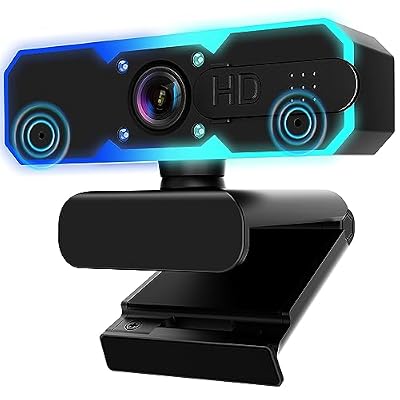 NBPOWERNBPOWER 1080P 60FPS Streaming Camera Webcam with Microphone and Fill…$30 \xc2\xb7 96/100