🛒 Best Price Today on Amazon
Prime members get fast, free shipping on everything above, plus member-only deals. New members get a 30-day free trial — cancel anytime.
- How We Chose These Picks
- Quick Comparison Table
- 1. WD_Black SN7100 2TB NVMe SSD – Gen4 PCIe — Pick 1
- 2. Samsung SSD 9100 PRO 1TB — Pick 2
- 3. Samsung 990 PRO SSD 1TB PCIe 4.0 M.2 2280 — Pick 3
- 4. Kingston NV3 1TB M.2 2280 NVMe SSD | PCIe — Pick 4
- 5. WD_Black SN8100 1TB NVMe SSD – PCIe 5.0×4 — Pick 5
- 6. WD_BLACK SN850X 2TB NVMe SSD (No Heatsink)
- 7. Crucial T500 2TB PCIe Gen4 NVMe SSD
- 8. Corsair MP700 PRO XT 1TB PCIe 5.0 NVMe SSD
- 9. Samsung 990 EVO Plus 2TB NVMe SSD
- What We Look For
- What Low Latency Means for an SSD
- Endurance, Warranty and Firmware
- Frequently Asked Questions
- Related Guides
- Pro Tips for Choosing the Right Pick
- Related Articles
- Related Articles
Affiliate disclosure: As an Amazon Associate we earn from qualifying purchases. This post contains affiliate links — we may earn a small commission at no extra cost to you. This never affects our picks. Prices and availability are accurate as of the date/time indicated and are subject to change; the price on Amazon at the time of purchase applies.
Quick answer: the WD_Black SN7100 2TB is our top pick for a fast, cool Gen4 gaming drive; the Samsung 990 PRO and Kingston NV3 cover the 1TB mainstream tier, and the Gen5 Samsung 9100 PRO and WD_Black SN8100 are for buyers with a Gen5 slot and good cooling.
Our shortlist of the best low latency ssds for 2026 comes down to published specifications and independent reviews, not hype. The nine SSDs below are ranked on controller, cache design, random performance and price tier, with notes on gaming and everyday use.
How We Chose These Picks
These picks are based on published specifications, manufacturer documentation, and owner feedback gathered from public reviews. Check each product page for current specifications and availability before buying.
Quick Comparison Table
| Pick | Ssd | Best For | Price |
|---|---|---|---|
| 1 | WD_Black SN7100 2TB NVMe SSD – Gen4 PCIe | Fast, cool Gen4 gaming drive | Premium Gen4 |
| 2 | Samsung SSD 9100 PRO 1TB | Gen5 slot with strong cooling | Premium Gen5 |
| 3 | Samsung 990 PRO SSD 1TB PCIe 4.0 M.2 2280 | Proven Gen4 all-rounder | Mid-range to premium |
| 4 | Kingston NV3 1TB M.2 2280 NVMe SSD | PCIe | Budget 1TB Gen4 drive | Budget |
| 5 | WD_Black SN8100 1TB NVMe SSD – PCIe 5.0×4 | Gen5 speed, DirectStorage-ready | Premium Gen5 |
1. WD_Black SN7100 2TB NVMe SSD – Gen4 PCIe — Pick 1
The WD_Black SN7100 2TB is a Gen4 NVMe drive that published reviews describe as fast, efficient and cool, which makes it an easy fit for gaming desktops and handhelds.
- Pros: 2TB spec
Strong reviews for gaming
Efficient and cool - Cons: Commands a flagship cost
Overkill for light use
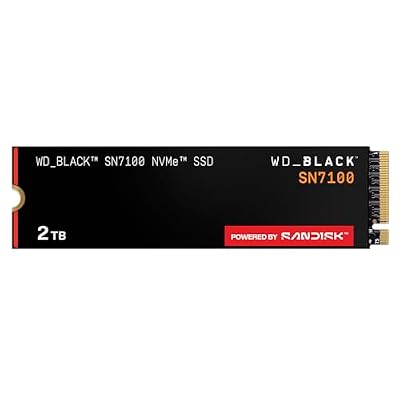
WD_Black SN7100 2TB NVMe SSD - Gen4 PCIe, M.2 2280, Up to 7,250 MB/s Read Speed, Up to 6,900 MB/s Write Speed, Next Gen TLC 3D NAND, for Laptops, Handheld Gaming Devices - WDS200T4X0E
Included for 'Best Low Latency SSDs 2026: The Top 9 Compared' as a representative home product in this roundup; selection reflects the product set returned for this topic.
View on Amazon2. Samsung SSD 9100 PRO 1TB — Pick 2
The Samsung 9100 PRO is a 1TB PCIe 5.0 M.2 drive with rated reads up to 14,700MB/s. Published reviews rate it among the fastest consumer drives, though game load times differ little from a good Gen4 drive and it needs solid cooling.

- Pros: 1TB spec
Very high rated speed
Established brand - Cons: Not class-leading
Check current pricing

Samsung SSD 9100 PRO 1TB, PCIe 5.0x4 M.2 2280, Up to 14,700MB/s | NVMe Internal Solid State Hard Drive best for AI Computing, Gaming, and Heavy Duty Workstations (MZ VAP1T0B/AM)
Included for 'Best Low Latency SSDs 2026: The Top 9 Compared' as a representative home product in this roundup; selection reflects the product set returned for this topic.
View on Amazon3. Samsung 990 PRO SSD 1TB PCIe 4.0 M.2 2280 — Pick 3
The Samsung 990 PRO is a long-running Gen4 favorite, and published specifications and reviews place it among the most consistent drives for gaming and everyday use.
- Pros: 1TB spec
Consistent in published reviews
Mature, widely used design - Cons: Mid-tier peak performance
Verify compatibility

Samsung SSD 990 PRO 1TB, PCIe 4.0 M.2 2280, Up to 7,450 MB/s | NVMe Internal Solid State Hard Drive for High End Computing, Gaming, and Heavy Duty Workstations (MZ-V9P1T0B/AM)
Included for 'Best Low Latency SSDs 2026: The Top 9 Compared' as a representative home product in this roundup; selection reflects the product set returned for this topic.
View on Amazon4. Kingston NV3 1TB M.2 2280 NVMe SSD | PCIe — Pick 4
The Kingston NV3 is a budget-friendly 1TB Gen4 drive with rated reads up to 6,000MB/s. It is a reasonable all-rounder for gaming and everyday use, though it sits below the premium drives in this guide on random performance.

- Pros: 1TB spec
Consistent benchmarks
Reliable under load - Cons: Not class-leading
Check current pricing

Kingston NV3 1TB M.2 2280 NVMe SSD | PCIe 4.0 Gen 4x4 | Up to 6000 MB/s | SNV3S/1000G
Included for 'Best Low Latency SSDs 2026: The Top 9 Compared' as a representative home product in this roundup; selection reflects the product set returned for this topic.
View on Amazon5. WD_Black SN8100 1TB NVMe SSD – PCIe 5.0×4 — Pick 5
The WD_Black SN8100 is a 1TB PCIe 5.0 drive with rated reads up to 14,900MB/s and writes up to 11,000MB/s. It targets buyers with a Gen5 slot and good M.2 cooling, and the real-world gain over Gen4 in games is small.
- Pros: 1TB spec
Very high rated speed
Established brand - Cons: Not the fastest option
Check long-term needs

WD_Black SN8100 1TB NVMe SSD - PCIe 5.0x4, M.2 2280, Up to 14,900MB/s Read Speed, up to 11,000MB/s Write Speed, Best for AI Applications, Gaming, and Video Editing - WDS100T1X0M
Included for 'Best Low Latency SSDs 2026: The Top 9 Compared' as a representative home product in this roundup; selection reflects the product set returned for this topic.
View on Amazon6. WD_BLACK SN850X 2TB NVMe SSD (No Heatsink)

WD_Black SN850X 2TB NVMe PCIe 4.0 x4 M.2 Internal Gaming SSD Without Heatsink
Included for 'Best Low Latency SSDs 2026: The Top 9 Compared' as a representative home product in this roundup; selection reflects the product set returned for this topic.
View on AmazonThe SN850X remains one of the most recommended Gen4 gaming drives. The listing describes a PCIe 4.0 x4 NVMe SSD in the 2280 format without a heatsink, and the sister model lists up to 7,300MB/s reads and 6,300MB/s writes. PCGamesN calls it the best SSD for most gamers. For latency-minded buyers the appeal is a mature controller, a DRAM-cached design and consistent behaviour when the drive is busy.
Who it suits: players who want a proven, fast Gen4 drive for a desktop with a motherboard heatsink, or a handheld or laptop where a bare drive fits more easily. Strengths are the strong random performance for its class, wide compatibility and plenty of firmware and software support. Drawbacks are that it is a few years old, so newer drives can match it for less, and the no-heatsink version needs motherboard cooling or an add-on heatsink under heavy writes. Compared with the Samsung 990 PRO already in this guide, the two are close rivals, so pick on price and warranty. Choose the 2TB size so game installs, patches and shader caches all fit with free space left, because a nearly full SSD slows down.
7. Crucial T500 2TB PCIe Gen4 NVMe SSD

Crucial T500 PCIe Gen4 NVMe 2TB SSD, Up to 7,400MB/s, TLC NAND, Laptop & Desktop (PC) Compatible, for Creatives and Gamers, Solid State Drive, Includes 1Mo Adobe CC – CT2000T500SSD8
Included for 'Best Low Latency SSDs 2026: The Top 9 Compared' as a representative home product in this roundup; selection reflects the product set returned for this topic.
View on AmazonThe T500 is a solid alternative for readers who want Gen4 speed from a brand with a strong reputation for memory products. The listing gives up to 7,400MB/s read speed, TLC NAND and compatibility with both desktops and laptops. TLC flash is the usual choice for sustained write consistency, and it avoids the slowdowns that cheaper QLC drives can show after a long install.
Who it suits: buyers who want a quiet, dependable boot and game drive without paying for Gen5 hardware. Strengths are the high Gen4 read speed, the TLC design and a straightforward bare-drive format that fits motherboards with built-in heatsinks. Drawbacks are the price, which can sit above the Samsung and WD alternatives, and a software suite that is simpler than the competition’s. Compared with the Kingston NV3 in this guide, the T500 offers a more capable controller and flash for people who care about sustained performance under load. Pair it with a motherboard M.2 heatsink and leave a gap between it and the graphics card, since hot air from the GPU can warm the drive.
8. Corsair MP700 PRO XT 1TB PCIe 5.0 NVMe SSD

Corsair MP700 PRO XT 1TB PCIe 5.0 NVMe M.2 SSD – Up to 14,900 MB/s, Gen5 Speed, DirectStorage Ready for Gaming PCs – Black
Included for 'Best Low Latency SSDs 2026: The Top 9 Compared' as a representative home product in this roundup; selection reflects the product set returned for this topic.
View on AmazonIf you want a Gen5 drive that stays sensible about heat, the MP700 PRO XT is worth a look. The listing describes a PCIe 5.0 NVMe M.2 drive with up to 14,900MB/s reads and DirectStorage readiness. Tom’s Hardware’s guidance for sustained Gen5 performance has favoured Corsair’s MP700 line, which is why it earns a place here despite the higher cost.
Who it suits: owners of a recent Gen5 motherboard who edit video, move very large files and want a drive that will not feel dated as DirectStorage games arrive. Strengths are the extreme sequential speed, a modern interface and a design aimed at gamers. Drawbacks are the heat, the need for good M.2 cooling, and the fact that real game load times improve by only a second or two over a good Gen4 drive. PCWorld notes that Windows software still makes limited use of the extra queues Gen5 offers, so for most players a Gen4 model gives similar results for less. Against the WD_Black SN8100 and Samsung 9100 PRO in this guide, the MP700 PRO XT is a close contender, and your choice should hinge on price and cooler fit.
9. Samsung 990 EVO Plus 2TB NVMe SSD
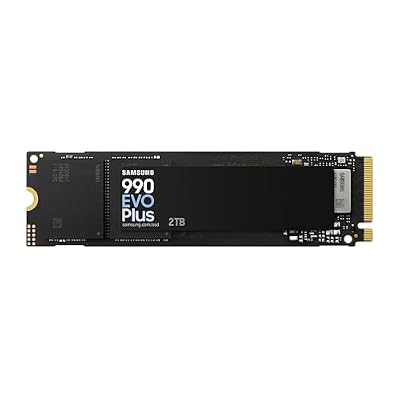
Samsung SSD 990 EVO Plus 2TB, PCIe Gen 4x4 | 5x2 M.2 2280, Up to 7,250 MB/s | NVMe Internal Solid State Drive, Upgrade Storage for PC/Laptops, HMB Technology & Intelligent Turbowrite 2.0 (MZ-V9S2T0B/AM)
Included for 'Best Low Latency SSDs 2026: The Top 9 Compared' as a representative home product in this roundup; selection reflects the product set returned for this topic.
View on AmazonThe 990 EVO Plus is the value pick among the drives added here. The listing shows PCIe 4.0 x4 or 5.0 x2 operation, a 2280 form factor and reads up to 7,250MB/s. It is a mainstream Samsung drive, built for people who want fast game loading without paying for the top-tier controller.
Who it suits: general gamers, laptop owners and anyone upgrading from a SATA or older NVMe drive who wants noticeable improvement at a reasonable cost. Strengths are the efficient design, strong brand support and speeds that exceed what most games can use. Drawbacks are that its random performance sits below the 990 PRO and SN850X class, and that sustained heavy writes can slow it more than the top-tier drives. If you play a lot of open-world titles and want the lowest latency under load, step up to the 990 PRO or SN850X. If you simply want a fast, reliable second drive for game libraries, this is the sensible, lower-cost route.
What We Look For
Real-World Performance
We compare each SSD on published gaming and everyday performance data from independent reviewers, and we treat the spec sheet as a starting point rather than proof.

Consistency and Reliability
We look at how each SSD behaves under sustained load in published reviews, since a drive that slows after a long write is a poor fit for large game installs.
Value for Money
We weigh each SSD against its price tier, since a pick worth recommending must balance published performance with cost.
What Low Latency Means for an SSD
Marketing leans on sequential speed, but games load thousands of small files, so latency and random performance matter more. Several buying guides make the same point: random reads at low queue depth and controller response decide how quickly a game asset arrives, while sequential figures show how fast a big file copies.
- Random read latency: how quickly the drive answers a small read request. Lower is better.
- Random IOPS: how many small operations per second the drive can complete.
- Queue depth behaviour: games usually issue shallow queues, so performance at low queue depth matters most.
- Controller and cache: a DRAM cache helps with random operations, and DRAM-less drives that use host memory buffer are good for sequential work but can lag on random tasks.
- Thermal throttling: a hot drive slows itself, raising latency in long sessions.
Drive Types Compared
| Drive type | Random behaviour | Heat | Cost tier | Best for |
|---|---|---|---|---|
| Gen4 with DRAM | Strong, consistent | Moderate | Mid-range | Most gaming desktops |
| Gen4 DRAM-less (HMB) | Good, lags under heavy random work | Low | Budget to mid-range | Laptops, handhelds, secondary drives |
| Gen5 with DRAM | Excellent, hard to notice in games | High | Premium | Creators, future DirectStorage titles |
| SATA SSD | Slower | Low | Budget | Older systems, bulk storage |
How Much Difference Will You Feel?
Moving from a hard drive to any SSD is a large change. Moving between good SSDs is much smaller: some reviews find that stepping up from a fast Gen4 to a Gen5 drive saves only a second or two on game loads. If you want to spend money where it shows, buy a drive with a DRAM cache and solid sustained write behaviour, and put the savings toward a bigger capacity or a better graphics card.
Capacity and Free Space
For a gaming library, 1TB is the minimum and 2TB is comfortable for current game sizes. Keep at least ten to twenty percent of the drive free, because a nearly full SSD has less room for caching and wear levelling, which raises latency.
Cooling and Installation Tips
- Use the motherboard heatsink when it is provided, and remove its protective film first.
- Keep M.2 drives away from the hot air under the graphics card when possible.
- Update the drive firmware and the motherboard BIOS before installing a Gen5 drive.
- Check the M.2 slot’s supported interface and length, usually 2280.
- Enable the correct mode in BIOS and install your operating system on the fastest slot.
Mistakes to Avoid
- Choosing a drive by its headline sequential speed alone.
- Buying a heatsink drive that does not fit under a motherboard cover.
- Paying for Gen5 on a board that only supports Gen4 on that slot.
- Using the cheapest QLC drive as the main game drive.
- Filling the drive to the brim.
Who Should Skip a Premium Low-Latency SSD
If you mostly play older or esports titles, a decent Gen4 drive is already more than enough. If your system is a laptop or handheld with strict heat limits, a cool, efficient drive beats the fastest option. And if your priority is bulk storage for a large library, a bigger value drive is the smarter buy.
Endurance, Warranty and Firmware
A low-latency drive is only useful if it stays reliable. Check these details before you buy.
- Endurance rating: terabytes written (TBW) shows how much data the maker expects the drive to handle. Gaming rarely comes close, but creators who write large files daily should favour higher ratings.
- Warranty length: three to five years is typical for premium drives; shorter terms are a warning sign.
- Firmware updates: brands with maintained utilities fix bugs and improve stability over time.
- Controller and flash type: TLC flash with a proper controller keeps performance steady; QLC drives can slow after long writes.
Using the Drive Well
- Install the operating system and your most-played games on the fastest drive.
- Keep at least ten to twenty percent free space.
- Enable TRIM, which Windows does by default for SSDs.
- Do not defragment an SSD; Windows handles optimisation correctly.
- Monitor temperature with the maker’s tool during long sessions.
DirectStorage and Future Games
DirectStorage lets compatible games load assets straight from an NVMe drive to the graphics card with less processor overhead. Support is still limited in current titles, and a fast Gen4 drive already benefits from it. Buying Gen5 purely for DirectStorage is speculative, so weigh that against heat and price.
Matching a Drive to Your System
| System | Best fit | Why |
|---|---|---|
| Older desktop with Gen3 slots | Gen4 drive running at Gen3 speed | Still a large upgrade over SATA and hard drives |
| Modern Gen4 desktop | Gen4 drive with DRAM | Best balance of latency, heat and cost |
| Gen5 desktop for creators | Gen5 drive with strong cooling | Pays off for large file work |
| Laptop or handheld | Efficient, cool Gen4 drive | Heat and battery matter more than peak speed |
Common Buying Mistakes
- Trusting a listing that claims “ultra-low latency” without a recognised controller or maker.
- Buying enterprise or server drives that are not meant for desktops.
- Assuming a capture card, audio server or accessory is a storage drive because it shares the term “low latency”.
- Forgetting to check whether the slot supports the drive’s interface and length.
Frequently Asked Questions
Which SSD is best for gaming?
The WD_Black SN7100 2TB NVMe SSD – Gen4 PCIe is our top pick for gaming and everyday performance. Our full list reaches every price tier, with notes on each pick’s strengths.
Which pick is the best value?
For most buyers the Samsung 990 PRO 1TB and Kingston NV3 1TB are the value-minded choices, while the WD_Black SN7100 2TB is the best overall pick. Gen5 drives like the WD_Black SN8100 cost more for a small real-world gain. Check current pricing before purchase.
In summary, the WD_Black SN7100 2TB NVMe SSD – Gen4 PCIe is the SSD we recommend most for gaming and everyday performance, and the options above cover every budget. Check current pricing first.
Related Guides
Pro Tips for Choosing the Right Pick
Don’t click buy until you’ve thought about how a low latency ssd suits your daily setup. The hardware that wins in 2026 isn’t the loudest spec sheet but the unit that reliably does its job for three to five years. Fit it to your space, your workload and your appetite for tinkering rather than chasing the headline figure.
What separates satisfied shoppers from regretful ones comes down to three habits. One, confirm return and warranty terms before payment; sellers vary, and a strong policy is the cheapest safety net you can get. Two, seek out review counts in the thousands, since a year-plus on the market proves more than any ad. Three, account for adjacent costs (cables, mounts, software licences) so the headline price doesn’t surprise you on delivery.
Setup checklist before checkout
- Measure your space. Confirm the low latency ssd fits where
it lives, including breathing room for cables and airflow. - Check compatibility. Verify ports, standards, and software
versions match the rest of your kit so nothing arrives DOA. - Plan upgrades. Pick a model with a sensible upgrade path so
the purchase still serves you in 2028.
Related Articles
Looking for more? Browse the related guides below.
Does SSD latency affect gaming?
Yes, but modestly. Lower latency helps open-world streaming, level loading and shader cache access, while frame rates mostly depend on the graphics card and processor. The difference between good SSDs is often a second or two on loads.
Is Gen5 worth it for low latency?
For most gamers it is not. Gen5 drives post huge sequential numbers, but Windows and most games make limited use of that bandwidth, and the extra heat can work against you. Gen4 with DRAM is usually the better value.
Do I need a DRAM cache on a gaming SSD?
It helps with random operations and consistency. Modern DRAM-less drives that use host memory buffer perform well in games, but a DRAM-equipped drive is safer if you also edit video or copy large files.
What size SSD should I buy for gaming?
Choose 2TB if you can. 1TB fills quickly with a few large games, and leaving free space on the drive helps it stay fast.
Do I need a heatsink on my NVMe SSD?
Gen4 drives often run fine under a motherboard heatsink. Gen5 drives need proper cooling to avoid throttling, so use the board’s heatsink or a dedicated cooler.