🛒 Best Price Today on Amazon
Prime members get fast, free shipping on everything above, plus member-only deals. New members get a 30-day free trial — cancel anytime.
- Best Gaming Lap Desks at a Glance
- How to Pick a Gaming Lap Desk
- Budget Gaming Lap Desks
- Mid-Range Lap Desks for Couch and Bed Gaming
- Best Cooling Lap Desks and Cooling Fan Options
- Best Bed Desks, Couch Desks and Sofa Bed Desks
- Best Lap Desks for Console and Handheld Gaming
- Pick X If… Decision Table
- Fit, Size and Safety Notes
- Alternatives to a Gaming Lap Desk
- Best Cooling Lap Desks: What the Fan Claims Mean
- Cushion, Tray or Wood: Choosing the Surface
- Setting Up a Lap Desk for Long Sessions
- Frequently Asked Questions
Updated November 2026 – The best gaming lap desks for most players are the LapGear Home Office Pro for couch and bed laptop play, the HUANUO Portable Lap Desk for a light budget pick, the Targus Dual Fan Lap Chill Mat when a hot laptop is the main worry, and the SAIJI Adjustable Laptop Bed Tray when you want a rigid, adjustable surface.
If you are searching for the best gaming lap desks, the choice comes down to three things: whether you play on a laptop or a handheld or console controller, whether you want a cushion, a hard tray or a cooling fan, and how much weight the surface must carry. This guide sorts current lap desks by those needs, using the maker’s listed specs and what independent roundups report. Cooling claims are kept to what makers state, because a lap desk cannot replace proper airflow under a gaming laptop.
Best Gaming Lap Desks at a Glance
| Model | Best for | Key stated specs | Limits |
|---|---|---|---|
| LapGear Home Office Pro | Couch and bed keyboard-and-mouse play | Laptops up to 17 in, cushioned dual-bolster base, built-in mouse pad, device ledge, phone or tablet slot | Microbead cushion compresses over time; no active cooling |
| HUANUO Portable Lap Desk | Light budget pick | Laptops up to 15.6 in, cushioned base, anti-slip surface, slot for phone and pens | Smaller surface; large gaming laptops may overhang |
| HUANUO lap desk with USB fan | Small laptops that run warm | Reported at 17 x 12 x 2.5 in, built-in USB fan, tilts up to 30 degrees | Reviewers describe the build as not very sturdy; compact top |
| SAIJI Adjustable Laptop Bed Tray | Bed or recliner gaming with a rigid top | About 23.6 in wide, folding legs, adjustable height and tilt angles, optional USB fan | Needs a flat surface under the legs; bulkier to store |
| Targus Dual Fan Lap Chill Mat | Hot laptops on your knees | Fits laptops up to 17 in, two USB-powered fans, pass-through USB port, soft underside | Mat, not a full desk; needs a free USB port |
| AboveTEK Bamboo Adjustable Desk with fan | Wood-look desk with cooling | Bamboo top, adjustable angle, built-in cooling fan as listed by roundups | Premium tier; heavier than cushion desks |
How to Pick a Gaming Lap Desk
A gaming lap desk does two jobs: it gives a flat, steady surface for a keyboard, mouse or controller, and it keeps a warm laptop off your legs and bedding. Start with the laptop. A 15.6 in model sits fine on most cushion desks, while a 17 in gaming laptop with a large power brick needs a top that the maker says supports 17 in devices. Next, decide on the base. Cushion desks are light and soft, tray desks are rigid and often adjustable, and fan desks add airflow at the cost of USB power draw.
- Weight limit: many cushion desks do not publish a clear load rating. Where the maker does not list one, keep the load to the laptop, a mouse and a drink in a spill-safe cup.
- Surface size: you need room for a mouse beside the laptop. Built-in mouse pad zones, like the one on the LapGear, solve this on a small footprint.
- Cooling: fans move air around the laptop base but cannot change how the laptop is designed. Makers state fan counts and sizes, not temperature drops, so treat any large claim with caution.
- Soft surfaces: laptops pull air in through the underside. Blocking vents on a duvet or pillow is a common cause of throttling, so a hard base or raised feet helps.
Budget Gaming Lap Desks
HUANUO Portable Lap Desk – Best for a Light Budget Pick
Roundups list HUANUO as the budget-friendly name and a common first lap desk. Specs: Up to 15.6 in laptops · cushioned base · anti-slip top · phone and pen slot. Independent reviewers describe it as comfortable for couch use and stable enough for casual keyboard-and-mouse play. The limits are the smaller top and microbead cushion, which compresses with regular use. It suits a 14 to 15.6 in laptop and a compact mouse. If your gaming laptop is 16 or 17 in, the maker’s stated size cap matters, so check it against your model before buying.
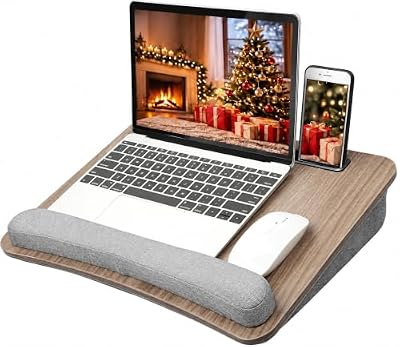
HUANUO Laptop Lap Desk with Cushion, Fit up to 15.6" Laptops, Woodgrain | Portable Lap Desk with Pillow Cushion, Anti-Slip Strip & Storage Function for Home Office Students as Computer Laptop Stand
Included for 'Best Gaming Lap Desks in 2026 (Laptop, Console and Couch Gaming)' as a representative pillow in this roundup; selection reflects the product set returned for this topic.
View on AmazonHUANUO Lap Desk with USB Fan – Best for Small Warm-Running Laptops
One reviewer reports this variant at 17 x 12 x 2.5 in, with a built-in USB fan and a tilt of up to 30 degrees. Specs: 17 x 12 x 2.5 in as reported · USB-powered fan · tilt up to 30 degrees. The same review says the build does not feel very sturdy, and that review is quite old, so treat it as a rough guide. It is a fit for thin laptops and tablets, not for a heavy 17 in gaming system. This is also the clearest example of why fan lap desks are a separate category from cushion desks.
Mid-Range Lap Desks for Couch and Bed Gaming
LapGear Home Office Pro – Best for Couch and Bed Keyboard-and-Mouse Play
Several 2026 roundups name the LapGear Home Office Pro as the best overall lap desk for gaming. Specs: Laptops up to 17 in · cushioned dual-bolster base · built-in mouse pad on the right · device ledge · phone or tablet slot. The mouse pad zone is the main gaming feature, giving a smooth patch for an optical mouse without a separate pad. The device ledge stops a laptop sliding when the desk is tilted by a cushion. Independent sites also note the usual cushion drawback: the filling flattens over time and offers little active cooling. It works best for sitting up in bed or on a sofa.

LAPGEAR Home Office Pro Lap Desk - Black Carbon, Fits 15.6” Laptops | Built-In Mouse Pad & Phone Slot, Wide Cushioned Wrist Rest, Dual-Bolster Microbead Cushion, Carry Handle
Included for 'Best Gaming Lap Desks in 2026 (Laptop, Console and Couch Gaming)' as a representative home product in this roundup; selection reflects the product set returned for this topic.
View on AmazonSAIJI Adjustable Laptop Bed Tray – Best for Bed or Recliner Gaming
The SAIJI is a tray rather than a cushion. Specs: About 23.6 in wide · folding legs · adjustable height · multiple tilt angles · optional USB cooling fan · 17 in and larger laptops compatible. The wider top gives room for a mouse and a controller on one side. Folding legs let it sit over your lap while you lie down, or work as a small bed table. The trade-off is bulk: it stores flat but takes more space than a cushion desk, and legs need a level surface such as a firm mattress. Check the maker’s load rating before putting a heavy gaming laptop and a monitor stand on it.

SAIJI Height & Angle Adjustable Lap Desk Laptop Stand for Bed | LightWeight Foldable Portable Laptop Table for Couch Sofa Chair Floor
Included for 'Best Gaming Lap Desks in 2026 (Laptop, Console and Couch Gaming)' as a representative home product in this roundup; selection reflects the product set returned for this topic.
View on AmazonBest Cooling Lap Desks and Cooling Fan Options
Cooling lap desks fall into two groups: fan trays that act as the desk, and fan mats that sit between laptop and lap. Neither group is a guaranteed fix for a laptop that overheats, so makers describe features such as fan count and USB powering, not set temperature drops.
Targus Dual Fan Lap Chill Mat – Best for Hot Laptops on Your Knees
Roundups recommend this mat for hot laptops. Specs: Fits laptops up to 17 in · dual USB-powered fans · pass-through USB port · soft cushioned underside. Because it has a soft underside, you can use it on your legs. The pass-through USB port gives back the port the fans use. Since the mat is thin, it will not give you a mouse surface, so pair it with a small lap board or a mouse pad. The fans draw USB power, so on a laptop with only two ports, count what else you must plug in.

Targus 17 Inch Dual Fan Lap Chill Mat - Soft Neoprene Laptop Cooling Pad for Heat Protection, Fits Most 17" Laptops and Smaller - USB-A Connected Dual Fans for Heat Dispersion (AWE55US)
Included for 'Best Gaming Lap Desks in 2026 (Laptop, Console and Couch Gaming)' because the listing adds cooling or gel-infused layers; lists an explicit depth/thickness, which is the attribute this article compares.
View on AmazonAboveTEK Bamboo Adjustable Desk with Cooling Fan – Best for a Wood Desk with Cooling
A premium option listed by one roundup, with a bamboo top and a built-in cooling fan. Specs: Bamboo top · adjustable angle · built-in fan · bed and sofa use. This suits players who want one hard surface that works on a sofa, in bed or at a table. As a solid bamboo piece it is heavier than cushion desks and less comfortable on the legs, so check the maker’s weight and size listing for your laptop. It is also the answer to the “best wood lap desks” search: wood and bamboo give a flat, firm top and a tidy look, but they are heavier than cushioned models and rarely include a mouse pad.
Best Bed Desks, Couch Desks and Sofa Bed Desks
For the best bed desks, pick a tray with folding legs, such as the SAIJI, because the legs spread the load across the mattress rather than your thighs. For the best couch desks, a cushioned model such as the LapGear works well because it rests on your lap and adapts to a sofa’s angle. Sofa beds and recliners suit trays that can tilt. Choose by posture: sitting up favors a cushion desk, lying back favors a tray with adjustable height.
- Bed with a built-in desk: some bed frames and Murphy bed units include a fold-down desk surface. These vary widely by maker, so use the maker’s stated load rating and follow the installation manual, especially for wall-mounted parts.
- Bed work desks: trays with a lip and a device slot hold a laptop and a phone safely.
- Murphy bed desks: these are fitted pieces. Wall anchoring and load limits are set by the unit’s maker, and a qualified installer should handle any wall fixing.
Best Lap Desks for Console and Handheld Gaming
You do not need a laptop to benefit from a lap desk. Controller players can use a cushioned desk as a flat tray for a drink, snacks and a headset. Handheld players can use the ledge to prop a device at a comfortable angle. For a Steam Deck style handheld or a tablet, a cushion desk with a phone or tablet slot works without the extra size of a bed tray. A larger console controller session usually needs little more than a lap pad, so a basic cushion model is enough.
Pick X If… Decision Table
| Pick this | If you |
|---|---|
| LapGear Home Office Pro | want a mouse pad built in and play from a sofa or bed with a laptop up to 17 in |
| HUANUO Portable Lap Desk | have a 15.6 in or smaller laptop and want the lowest-cost start |
| HUANUO desk with USB fan | want a small fan tray for a thin laptop and accept a lighter build |
| SAIJI Adjustable Laptop Bed Tray | game in bed or a recliner and want a rigid, adjustable top |
| Targus Dual Fan Lap Chill Mat | mainly want airflow under a hot laptop and already have a mouse surface |
| AboveTEK Bamboo desk with fan | prefer a wood-look desk with a fan and can spend in the premium tier |
Fit, Size and Safety Notes
- Laptop size: match the maker’s stated maximum screen size. A 17 in gaming laptop on a 15.6 in rated desk can overhang and tip.
- Weight: where no load rating is listed, avoid stacking a monitor, a console and drinks on a cushion desk.
- Heat and skin: a laptop running a demanding game can get warm underneath. If the base feels uncomfortably hot against your legs, stop and use a hard tray or mat. Follow the laptop maker’s guidance on ventilation.
- Vents: never block intake grilles with soft bedding. Use a hard base on bedding.
- Cables: short USB cables for fans and mice keep cords from dragging the desk off your lap.
- Microbead cushions: the beads shift and flatten. Reshape the cushion now and then, and replace it if it no longer holds a level surface.
Alternatives to a Gaming Lap Desk
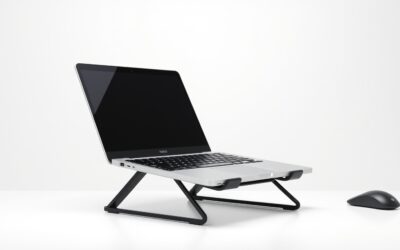
- Laptop cooling stand: for a table or desk, a stand with fans raises the laptop and improves airflow.
- Small folding bed table: a hard, low table over your legs, usually with a lip, works for longer sessions.
- Lap tray with a built-in mouse pad: a middle path between a pillow and a full desk; look for a stated size that fits your laptop.
Best Cooling Lap Desks: What the Fan Claims Mean
Search results for the best cooling lap desks mix three product types: fan trays, fan mats and cushion desks with a vent cut-out. Fan trays such as the HUANUO fan model and the AboveTEK bamboo desk place the fan in the desk body. Mats like the Targus sit under the laptop. A cushion desk usually has no active cooling at all, and independent sites note that cushion bases offer little in this respect. When a listing quotes fan speed or airflow, read it as a maker figure for the fan, not a guaranteed result for your laptop.
Gaming laptops draw air through underside vents, so any desk that raises the body a few millimetres and leaves the vents open can help. A flat cushion pressed against the base can do the opposite. If your laptop’s fans spin loudly at idle on a soft surface, move to a hard tray or a mat. Laptop makers also publish ventilation guidance in the manual, and that guidance takes priority over any accessory listing.
Cushion, Tray or Wood: Choosing the Surface
| Type | Strengths | Weaknesses | Example |
|---|---|---|---|
| Cushion desk | Light, soft on the legs, adapts to sofa angle | Beads flatten; no active cooling; softer mouse surface unless a pad is built in | LapGear Home Office Pro, HUANUO |
| Folding tray | Rigid top, adjustable height and tilt, leg-supported in bed | Bulkier; needs a flat base | SAIJI Adjustable Laptop Bed Tray |
| Bamboo or wood desk | Firm, flat, tidy look | Heavier; hard on the lap | AboveTEK Bamboo desk |
| Cooling mat | Adds airflow, thin, passes USB through | Not a desk; needs a mouse surface | Targus Dual Fan Lap Chill Mat |
For long sessions, a rigid top beats a soft one for mouse precision. For short couch sessions with a controller or touchpad, a cushion desk is more comfortable. If you move between sofa and bed, a light cushion desk with a mouse pad zone is the most flexible choice, and you can add a mat for hot games.
Setting Up a Lap Desk for Long Sessions
- Put the desk on your thighs with your back supported, so the screen sits near eye level when you lean back slightly.
- Place the mouse on the pad zone or a small pad, and keep the cable short so it does not pull the laptop.
- Run the charger cable along the side and keep the brick off the cushion, since power bricks warm up.
- Stand up and stretch every so often. Long sessions in one posture can strain your neck and wrists, and you should see a doctor if pain persists.
- Keep drinks in a lidded cup on a side table rather than on the desk.
Frequently Asked Questions
What is the best gaming lap desk for a 17 inch laptop?
Choose a lap desk the maker lists for 17 in laptops, such as the LapGear Home Office Pro or the Targus Dual Fan Lap Chill Mat. A tray like the SAIJI, with a wider top, also suits larger laptops. Confirm the weight rating if the maker lists one.
Do cooling lap desks really lower laptop temperatures?
Makers state fan counts and sizes but not guaranteed temperature drops. Fans can add airflow when vents are open, but they cannot fix a poorly ventilated design. A hard base that keeps vents clear matters more than the fan itself.
Is a cushion lap desk or a tray better for gaming in bed?
A tray with folding legs is steadier in bed because the legs rest on the mattress. A cushion desk is lighter and more comfortable on the lap. If you lie back, pick the tray; if you sit up, the cushion desk is usually enough.
Can I use a lap desk for mouse and keyboard play?
Yes, if the surface has room for a mouse beside the laptop. Models with a built-in mouse pad area, like the LapGear Home Office Pro, handle this best. A rigid top gives the smoothest mouse movement.
Are wood lap desks worth it?
Wood and bamboo desks give a firm, flat surface and a clean look. They are heavier and less soft on the legs than cushion models. They suit players who want a table-like top on a sofa or bed.
How much weight can a lap desk hold?
It depends on the model, and many cushion desks do not publish a clear rating. Use the maker’s stated limit, and keep the load to a laptop and a mouse when none is listed. Do not stack heavy extras such as a second screen on a soft desk.