🛒 Best Price Today on Amazon
Prime members get fast, free shipping on everything above, plus member-only deals. New members get a 30-day free trial — cancel anytime.

N-GEN GAMING Gaming Chair with Footrest, Lumbar, High-Back, All Black | Reclining Backrest, Linkage Armrests, Durable PU Leather, Adjustable Comfort for Extended Computer, Desk, or Home Office Use
Included for 'Best Ergonomic Gaming Chair: 5 Supportive Picks Compared' because the listing specifies Lumbar and High-Back, details this guide uses to compare options.
View on Amazon
GTPLAYER Gaming Chair, Computer Chair with Footrest and Lumbar Support, Height Adjustable Game Chair with 360°-Swivel Seat and Headrest and for Office or Gaming (Pearl White)
Included for 'Best Ergonomic Gaming Chair: 5 Supportive Picks Compared' because the listing specifies Computer Chair with Footrest and Lumbar Support, details this guide uses to compare options.
View on AmazonFinding the best ergonomic gaming chair means looking beyond aggressive styling. Adjustable lumbar support, seat fit, armrest positioning, recline control, head support, and materials all affect comfort during long sessions. The five chairs below focus on meaningful adjustability instead of relying only on thick padding.
Best Ergonomic Gaming Chairs Compared
Ergonomics depends heavily on body fit, so no gaming chair works equally well for everyone. A chair should let your feet rest comfortably, keep your elbows near desk height, support the lower back without forcing it forward, and allow posture changes. Multiple adjustment points matter more than decorative racing-seat details.
| Gaming Chair | Best For | Lumbar Support | Armrests | Recline | Size Options |
|---|---|---|---|---|---|
| Secretlab TITAN Evo | Overall adjustability | Integrated 4-way | 4D | Up to 165° | Small, Regular, XL |
| Razer Iskur V2 | Dynamic lumbar support | Adaptive lumbar system | 4D | Adjustable | Multiple fit adjustments |
| AndaSeat Kaiser 4 | Big and tall gamers | 4-way + pop-out lumbar | 6D | Up to 135° | L, XL |
| Corsair TC500 LUXE | Wide-seat comfort | 4-way adjustable | 4D | 90°–160° | One roomy design |
| Herman Miller x Logitech G Vantum | Upright PC posture | Integrated ergonomic support | Adjustable | Tilt-based | Performance task-chair design |
Secretlab TITAN Evo
Best For: Overall ergonomic gaming adjustability
The Secretlab TITAN Evo combines a firm cold-cure foam seat with an integrated lumbar system, adjustable armrests, recline, tilt control, and multiple chair sizes. Instead of using a loose lumbar pillow, the backrest contains a support mechanism that can be adjusted to better match the height and curvature of your lower back.
Its L-ADAPT lumbar system adjusts vertically and outward, helping users position the supportive curve where their spine actually needs it. That matters because a fixed lumbar bulge may feel comfortable for one person but sit too high or low for another. Fine adjustment is especially valuable when gaming sessions regularly last several hours.
The 4D armrests move through several directions, allowing you to bring the pads closer to your elbows instead of reaching outward. Proper arm positioning can reduce tension through the shoulders and forearms during mouse and keyboard use. Replaceable magnetic armrest tops also make the contact surface easy to change.
The TITAN Evo is available in Small, Regular, and XL sizes. This is an important ergonomic advantage because seat depth and backrest dimensions affect how naturally a chair fits. A model sized for the user is generally easier to configure than an oversized chair that forces the legs or shoulders into an awkward position.
What makes the TITAN Evo different is the combination of size choice and integrated adjustments. It retains the familiar gaming-chair shape but avoids depending on removable cushions for basic back support. The seat is deliberately firm, however, so gamers who prefer soft cushioning may need time to adapt to its supportive feel.
Key Features:
- Integrated 4-way lumbar adjustment
- 4D adjustable armrests
- Cold-cure foam seat
- Magnetic memory-foam head pillow
- Adjustable tilt mechanism
- Recline up to 165 degrees
- Small, Regular, and XL sizes
Pros:
- Broad adjustment range
- Multiple chair sizes
- Integrated lumbar support
- Highly adjustable armrests
Cons:
- Firm seat may not suit everyone
- Racing-inspired shape remains relatively structured
Use Case: Long gaming and work sessions where one chair needs to support multiple seated positions throughout the day.
Who It’s For: Gamers who want extensive adjustment without switching to a traditional mesh office chair.
Razer Iskur V2
Best For: Adaptive lumbar support
The Razer Iskur V2 focuses heavily on lower-back support through a lumbar mechanism designed to respond as the user changes position. Rather than relying only on a stationary cushion, the system is intended to support movement while seated, which is useful for gamers who frequently shift between upright aiming and more relaxed positions.
Dynamic support matters because long gaming sessions rarely involve one perfectly fixed posture. Players lean forward during competitive rounds, sit upright while typing, and recline between matches. A lumbar mechanism that allows movement can maintain contact with the lower back more consistently than a loose pillow that stays in one location.
The chair also includes adjustable armrests that can be repositioned to suit keyboard, mouse, or controller use. Arm support becomes especially important during competitive gaming because an incorrectly positioned elbow can encourage raised shoulders or unnecessary wrist pressure. Moving the armrests out of the way also provides more freedom when needed.
Seat shape is another important consideration. The Iskur V2 uses a more open sitting area than heavily bolstered racing seats, reducing the tendency for side wings to restrict leg position. This makes it easier to shift posture naturally, although users should still compare seat measurements with their own hip width before deciding.
What makes the Iskur V2 different is its emphasis on lumbar movement instead of simply adding more padding. It is especially relevant to users who dislike fixed lumbar cushions. The trade-off is complexity: getting the most from the chair requires spending time adjusting the lumbar, armrests, seat height, and recline correctly.
Key Features:
- Adaptive lumbar support system
- Adjustable lower-back positioning
- 4D armrests
- Adjustable recline
- Open seat design
- Head support
- Gaming-focused frame
Pros:
- Dynamic lumbar design
- Good posture flexibility
- Adjustable arm support
- Less restrictive seat shape
Cons:
- Requires careful setup
- Ergonomic benefit depends on correct adjustment
Use Case: PC gaming where the user regularly moves between forward, upright, and reclined positions.
Who It’s For: Gamers who consider lumbar movement more important than deep padding or a traditional racing-seat feel.
AndaSeat Kaiser 4
Best For: Big and tall gamers
The AndaSeat Kaiser 4 is designed around a larger frame, high-density cold-cure foam, adjustable lumbar support, and an extensive armrest system. It is available in L and XL sizes, giving taller and heavier users more room than many standard gaming chairs while still providing adjustment rather than relying only on oversized dimensions.
Its lumbar system combines vertical and depth adjustment with a pop-out mechanism that can change how strongly the lower back is supported. The updated version can lock that support across a wide range instead of limiting the user to only a few preset steps, making it easier to fine-tune pressure for individual posture.
The 6D armrests provide unusually broad positioning freedom. In addition to standard height and front-to-back adjustments, the armrests can rotate and change angle to support different controller, keyboard, or mouse positions. This can be useful for gamers who alternate between work, competitive PC play, and more relaxed controller sessions.
Kaiser 4 uses a magnetic memory-foam head pillow, allowing the cushion to be repositioned without straps. Its backrest reclines to 135 degrees and the chair also supports a rocking function. Those features encourage posture changes instead of keeping the user rigidly upright for an entire gaming or working session.
What makes the Kaiser 4 different is its combination of larger sizing and detailed adjustment. Many big-and-tall chairs simply add width and thicker foam, but the Kaiser also provides extensive lumbar and armrest control. The larger frame remains a drawback in compact rooms, where the wheelbase and wide seat occupy substantial space.
Key Features:
- L and XL sizes
- 4-way integrated lumbar adjustment
- Pop-out lumbar support
- 6D adjustable armrests
- Cold-cure foam seat
- Magnetic memory-foam head pillow
- Recline up to 135 degrees
Pros:
- Excellent support for larger users
- Extensive armrest adjustment
- Highly adjustable lumbar system
- Wide seat and substantial frame
Cons:
- Large footprint
- More chair than smaller users may need
Use Case: Long gaming sessions for taller or heavier users who need more seat room without sacrificing ergonomic adjustment.
Who It’s For: Big and tall gamers who struggle to fit comfortably in narrower standard gaming chairs.
Corsair TC500 LUXE
Best For: Wide-seat comfort
The Corsair TC500 LUXE uses a broad, relatively flat seat instead of aggressively raised side bolsters. Its seat width gives users more freedom to reposition their legs, which can be more comfortable during long sessions. The chair combines this open seat with integrated lumbar adjustment rather than a separate lower-back pillow.
The lumbar system can be adjusted through controls built into the chair, allowing users to change the position and pressure of the back support. This is preferable to a loose pillow when consistent support is important because the lumbar element remains integrated with the backrest instead of shifting every time the user changes posture.
Corsair includes 4D armrests that support different elbow and forearm positions. This makes it easier to align the chair with desks of different heights or switch between mouse-and-keyboard gaming and controller use. Proper armrest height is especially helpful when trying to avoid shrugging the shoulders during long sessions.
The backrest reclines from an upright position down to a much more relaxed angle, while a detachable memory-foam neck pillow adds optional upper support. The seat height can also be adjusted across a useful range. Together, these controls allow the chair to shift between focused gaming, general desktop work, and resting positions.
What makes the TC500 LUXE different is its less restrictive seat geometry. Gamers who dislike narrow bucket-style chairs may prefer the wider surface and more conventional shape. However, users with smaller frames should compare dimensions carefully because a seat that is too wide can make proper armrest positioning harder.
Key Features:
- Four-way adjustable lumbar support
- 4D armrests
- Wide 59 cm seat base
- 50 cm seat depth
- 90°–160° reclining backrest
- Detachable memory-foam neck pillow
- Adjustable seat height
Pros:
- Wide, open seat
- Integrated lumbar adjustment
- Large recline range
- Good armrest adjustability
Cons:
- Wide dimensions may not suit smaller users
- Large footprint compared with compact chairs
Use Case: Long PC gaming sessions where freedom to change leg position is more important than a tightly contoured racing seat.
Who It’s For: Medium-to-large users who want a spacious chair with integrated lower-back support.
Herman Miller x Logitech G Vantum
Best For: Upright PC gaming posture
The Herman Miller x Logitech G Vantum takes a different approach from traditional gaming chairs. It is designed more like a performance task chair, with an upright posture, flexible back support, breathable construction, and multiple ergonomic adjustments rather than thick foam, deep bolsters, or an oversized reclining backrest.
That design makes sense for keyboard and mouse gaming because the player usually works near a desk instead of leaning far backward. Supporting the pelvis, lower back, and upper body in a more active position can make the chair feel closer to a high-end office chair than the racing-inspired models commonly marketed to gamers.
The backrest is designed to support movement while encouraging an upright posture. Instead of locking the body into a thick molded shape, the chair allows some natural movement through the torso. This can help users make frequent small posture changes, which is often preferable to trying to maintain one rigid position for several hours.
Vantum also includes adjustable arm support and a headrest intended to support the upper body when leaning back. The overall design is less bulky than many large gaming chairs, which can be useful in compact offices. However, gamers looking for deep recline or thick cushioning may prefer a more conventional gaming-chair layout.
What makes Vantum different is its office-chair approach to gaming ergonomics. It prioritizes upright task posture and movement rather than the lounging ability of chairs like the TITAN Evo or TC500 LUXE. That makes it particularly appealing to users who spend equal time working and gaming at the same desk.
Key Features:
- Performance task-chair design
- Adjustable ergonomic back support
- Adjustable armrests
- Integrated head support
- Breathable construction
- Upright posture focus
- Tilt functionality
Pros:
- Strong task-oriented ergonomics
- Breathable design
- Encourages active sitting
- Less bulky than many gaming chairs
Cons:
- Less suitable for deep reclining
- Different feel from padded gaming chairs
Use Case: Competitive PC gaming, office work, and productivity where upright desk posture is used for most of the day.
Who It’s For: Gamers who prefer ergonomic office-chair principles over traditional racing-seat styling.
Which Ergonomic Gaming Chair Fits Different Users?
The Secretlab TITAN Evo is the most versatile choice for users who want a familiar gaming-chair design with meaningful adjustments. Its three size options make it easier to match the chair to body dimensions, while integrated lumbar control, adjustable armrests, recline, and tilt provide enough flexibility for gaming and work.
Razer’s Iskur V2 is especially relevant to users who constantly change posture. Its adaptive lumbar approach is designed around movement rather than static support. That makes it appealing for players who lean forward during competitive games, sit upright while browsing, and recline during breaks without wanting to reposition a loose cushion.
For larger users, the AndaSeat Kaiser 4 provides both room and adjustment. Its L and XL configurations, broad seat, adjustable lumbar system, and multi-directional armrests make it more suitable for taller or heavier gamers than chairs built around a single medium-size frame. Smaller users may find the larger proportions unnecessary.
Corsair’s TC500 LUXE is better for gamers who value seat freedom. Its flatter, wider seat does not confine the thighs as aggressively as racing-style bolsters. This allows more natural leg positioning during long sessions, although the dimensions should be checked carefully if you have a particularly narrow frame.
The Herman Miller x Logitech G Vantum makes the most sense for users who sit upright at a desk for most of the day. It behaves more like an ergonomic task chair than a reclining gaming throne. Gamers who also spend several hours working, editing, coding, or studying may prefer that posture-focused design.
How to Choose the Best Ergonomic Gaming Chair
Start With Correct Chair Size
Chair sizing should come before appearance. Seat depth should support the thighs without pressing behind the knees, while seat width should allow comfortable movement without placing the armrests too far apart. Height recommendations are useful, but comparing actual seat and backrest dimensions provides a more accurate picture.
Prioritize Adjustable Lumbar Support
Lumbar support should follow the natural inward curve of the lower back instead of pushing randomly into the spine. Height adjustment helps position support correctly, while depth adjustment changes how strongly it presses forward. Integrated systems are easier to keep consistent than loose cushions that can move throughout the day.
Check Seat Depth
Seat depth is one of the most overlooked measurements. A seat that is too deep can press against the backs of shorter users’ knees, while a shallow seat may not adequately support longer thighs. Ideally, the user should sit fully against the backrest while retaining a small gap between the seat edge and the knees.
Look for Adjustable Armrests
Armrests should support the forearms without forcing the shoulders upward. Height adjustment is the minimum useful feature, but forward, backward, lateral, and rotational movement provide better alignment with different desks and input devices. Gamers who switch between keyboard, mouse, and controller benefit most from wider adjustment ranges.
Do Not Choose Based Only on Recline
A 160-degree recline may look impressive, but deep recline is not the main measure of ergonomic quality. During gaming, the most useful positions are usually upright or slightly reclined. Lumbar support, seat sizing, armrest adjustment, and tilt behavior affect working posture far more often than the chair’s maximum recline angle.
Consider Firmness
Soft seats can feel comfortable immediately but may compress during long sessions. Firmer foam provides more consistent support, although it can take time to become accustomed to. The correct balance depends on body weight and preference, but a supportive seat should distribute pressure rather than allowing the user to sink deeply into the base.
Match the Chair to Your Desk
Even an expensive ergonomic chair can feel uncomfortable if it cannot align with the desk. Your elbows should sit near desk or keyboard height without lifting the shoulders. If the desk is unusually tall, confirm that the chair and armrests can rise sufficiently while still letting your feet remain supported by the floor or a footrest.
Change Posture Regularly
Ergonomic adjustment does not eliminate the need for movement. Recline slightly, change arm position, stand up, or walk periodically instead of attempting to find one perfect posture and holding it all day. Chairs with flexible tilt, recline, and adjustable support make these posture changes easier during long gaming or working sessions.
FAQ
What Makes a Gaming Chair Ergonomic?
An ergonomic gaming chair should adapt to the user rather than forcing the user into one fixed position. Useful features include adjustable lumbar support, correct seat depth, adjustable armrests, appropriate seat height, controlled recline or tilt, and sizing that matches the user’s body. Styling alone does not improve ergonomics.
Are Gaming Chairs Good for Long Sessions?
A well-fitted gaming chair can work for long sessions if it provides proper adjustment and encourages posture changes. Problems usually occur when the seat is the wrong size, the lumbar support is poorly positioned, or the armrests cannot align with the desk. Taking regular movement breaks remains important regardless of chair quality.
Is Lumbar Support Important for Gaming?
Lumbar support helps maintain contact with the natural curve of the lower back while seated. Adjustable support is especially useful because body proportions differ significantly. Too much pressure can be uncomfortable, while support positioned too high or low may miss the intended area, so adjustability is more valuable than a large fixed cushion.
Is a Firm or Soft Gaming Chair Better?
Neither is automatically better. Firmer foam generally provides more stable support during long sessions, while softer cushioning may feel more comfortable initially. Body weight, posture, seat design, and personal preference all matter. The goal is even pressure distribution without excessive sinking or hard pressure points.
Are Office Chairs Better Than Gaming Chairs?
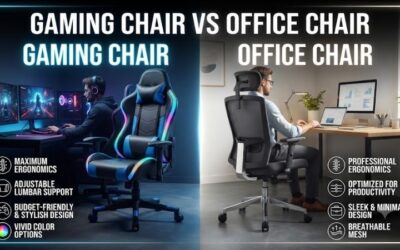
A high-quality ergonomic office chair may provide excellent support for upright desk work, while gaming chairs often offer deeper recline, head pillows, and more visual customization. The better choice depends on posture and use. Users who work and game upright may prefer a task chair, while others may value gaming-chair flexibility.
How Should I Sit in a Gaming Chair?
Start with your feet supported, knees comfortably bent, hips positioned against the backrest, and lower back supported without excessive pressure. Adjust the armrests so the shoulders remain relaxed and place the monitor near eye level. Small posture changes throughout the session are better than trying to remain perfectly still.
Conclusion
The best ergonomic gaming chair should fit your body before it matches your setup. Secretlab offers broad adjustability, Razer focuses on adaptive lumbar movement, AndaSeat suits larger users, Corsair provides a roomy seat, and Herman Miller targets upright task posture. Choose based on fit, lumbar control, armrests, and how you actually sit.