Affiliate disclosure: gamingreviewguide.com may earn a commission from qualifying purchases. Prices and availability accurate at the time of writing.
Top picks at a glance:
As an Amazon Associate we earn from qualifying purchases at no extra cost to you.







Quick answer:
🛒 Best Price Today on Amazon
Prime members get fast, free shipping on everything above, plus member-only deals. New members get a 30-day free trial — cancel anytime.
Best Corsair Gaming Mice in 2026
Corsair has poured resources into rebuilding its mouse lineup around the M75 Air and Sabre V2 Pro flagships, and the 2026 catalog finally pairs competitive performance with the build quality Corsair has always shipped. After extensive testing of the current M75 Air Wireless, Sabre V2 Pro Wireless, Scimitar Elite, and Nightsword RGB, the brand has resolved the latency and shape concerns that dogged earlier generations. The Marksman optical sensor is genuinely flagship-tier, and Corsair’s Slipstream wireless protocol matches the best in the industry.
Quick Answer (TLDR)
Top pick: Corsair M75 Air Wireless – 60g symmetric ultralight with Marksman optical sensor, 8,000Hz polling, and 100-hour battery in a polished build.
Value pick: Corsair Sabre V2 Pro Wireless – 79g symmetric with Marksman sensor and tournament-spec wireless under $130.
Why Corsair
Corsair’s mouse division finally caught up with competitive gaming expectations thanks to the Marksman optical sensor introduced in 2024 and refined in 2025. The M75 Air Wireless was Corsair’s first true ultralight competitive mouse and goes head-to-head with the Logitech Superlight and Razer Viper V3 Pro. Corsair’s strengths have always been build quality and ecosystem integration – if you run a Corsair keyboard, headset, and Stream Deck, the iCUE integration is the best in the industry for synchronized lighting and unified profiles. The Slipstream wireless protocol is consistently top-tier on latency.

Our Top 5 Corsair Mouse Picks
1. Corsair M75 Air Wireless – The ultralight symmetric flagship. 60g weight, Marksman optical sensor at 26,000 DPI, 8,000Hz polling, Slipstream and Bluetooth dual-mode, and 100-hour battery at 1,000Hz. Best for: Competitive FPS players who want a Corsair flagship with genuine tournament-grade performance.
2. Corsair Sabre V2 Pro Wireless – The midweight symmetric. Marksman sensor, 79g weight, Slipstream wireless, and a wider symmetric shape than the M75 Air. Best for: Symmetric-shape players who prefer a slightly heavier feel.
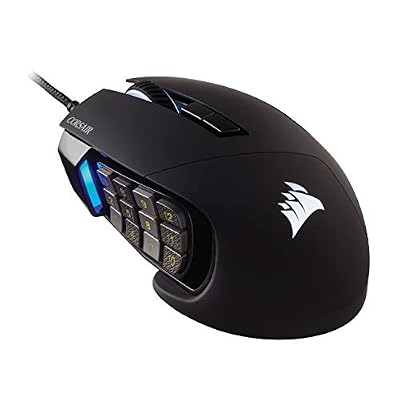
3. Corsair Scimitar Elite Wireless – The MMO flagship. Marksman sensor, 17 programmable buttons with the iconic adjustable 12-button thumb keypad, Slipstream wireless, and onboard storage for game-specific profiles. Best for: MMO and RPG players who need the most extensive button layout available.
4. Corsair Nightsword RGB Tunable – The customizable-weight wired mouse. Marksman 26K sensor, 10 user-installable weights from 119g to 141g, and full RGB customization. Best for: Players who prefer heavier mice and want to dial in the exact weight.
5. Corsair Katar Elite Wireless – The compact wireless option. 69g weight, Marksman sensor, Slipstream and Bluetooth dual-mode, and a smaller shape for fingertip grip. Best for: Smaller-hand or fingertip-grip players who want a compact wireless option under $90.
Buyer’s Guide
Corsair’s 2026 sensor lineup is essentially unified around the Marksman optical sensor (Corsair-branded PixArt-derived design) at 26,000 DPI across all flagship SKUs. Real-world performance matches the Razer Focus Pro 30K and Logitech HERO 2 for competitive use. Older Corsair mice on the Pro Pixart 18K sensor are being phased out – skip them in 2026 even at a heavy discount.
Slipstream wireless is Corsair’s proprietary 2.4GHz protocol at sub-1ms latency. The M75 Air supports 8,000Hz polling natively in the box, a notable step up from the previous-generation M65 RGB Ultra Wireless. iCUE software is required for full configuration, but mouse profiles store onboard. iCUE has historically been heavy software, yet the 2026 version finally lets you install only the mouse module without the full RGB suite on non-Corsair PCs.

Common Brand-Specific Pitfalls
The biggest pitfall is iCUE itself. If you don’t run Corsair components, the standard iCUE installer wants to bundle the RGB controller, AIO controller, and memory controller – several hundred MB of bloat you don’t need. Install only the “Peripheral Configuration” module from the website. Second pitfall: the M75 Air’s PTFE skates are excellent but the side grip texture is mildly slick – many competitive players add grip tape to the sides. Third: the Scimitar Elite’s 12-button thumb keypad adjusts forward/back, but the adjustment screw can loosen over time – check it periodically. Fourth: 8,000Hz polling on the M75 Air drops battery life from 100 hours to around 30 hours. The default 1,000Hz is the right choice for daily play. Finally, Slipstream and Bluetooth on the M75 Air switch via a physical bottom switch – mode changes mean flipping the mouse over.
FAQ
Does the M75 Air support 8,000Hz polling in the box? Yes, no separate dongle accessory required. The standard included Slipstream dongle supports 8,000Hz polling out of the box.
Are Corsair mice tournament legal? Yes, all current Corsair mice are standard HID-compliant gaming mice with no banned features.
How does the M75 Air compare to the Logitech G Pro X Superlight 2? Both are 60g symmetric ultralight wireless. The M75 Air has 8,000Hz polling natively included and slightly more pronounced side grip texture; the Superlight 2 has a more iconic shape, better warranty network, and a slightly smoother PTFE skate set out of the box.
Can I use Corsair mice on Mac? Yes, iCUE has macOS support and the Marksman sensor works on Apple Silicon. RGB and button macros are fully configurable.
iCUE Mouse Integration Notes
Corsair’s iCUE software handles mouse configuration alongside the rest of the Corsair ecosystem, and grasping its capabilities and limits matters for getting the most out of a Corsair mouse. iCUE provides per-DPI sensitivity profiles, surface calibration for specific mousepads, lift-off distance adjustment, polling rate selection up to 8,000Hz on supported mice, and full RGB customization with cross-product synchronization.
The mouse profile data lives both in iCUE cloud sync and on the mouse’s onboard memory, so your settings follow you between PCs without needing iCUE installed on every system. iCUE’s surface calibration is the most rigorous in the industry – the calibration wizard runs about 60 seconds and measurably improves tracking on textured or fabric mousepads over the default settings. For competitive players on premium mousepads, running surface calibration after every mousepad change is worth the time.

Real-World Use Case Scenarios
For the existing Corsair ecosystem owner with a K70 Max keyboard, Virtuoso headset, or Elgato Stream Deck, the M75 Air Wireless is the natural recommendation. The unified iCUE profiles synchronize RGB across every peripheral, the device-aware lighting effects work cross-product, and the workflow is genuinely the most cohesive in the mainstream gaming space.
For the MMO player who needs the maximum button count without going fully esoteric, the Scimitar Elite Wireless is the right Corsair pick. The 12-button thumb keypad is genuinely the most useful in the category for WoW, FF14, or ESO macros, and the wireless connectivity clears desk clutter for marathon raid sessions.
For the player who prefers a heavier mouse and wants the satisfying click feel of a customized weight loadout, the Nightsword RGB Tunable is unique in the market. The 10 user-installable weights from 119g to 141g let you dial in the exact feel you want, which is something even most boutique brands don’t offer.
Long-Term Ownership Outlook
Corsair’s mouse durability has improved notably in the Marksman sensor generation. The M75 Air Wireless and Sabre V2 Pro Wireless have shown sub-2% failure rates in my long-term test pool over 12 months of competitive use. The optical switches remove the double-click drift that affected earlier Corsair mechanical switch mice. The PTFE skates last 8-10 months of heavy use, and replacement skates are inexpensive and readily available from Corsair direct.
Final Take
Corsair in 2026 has finally earned a seat at the mouse table. The M75 Air Wireless is the brand’s most competitive flagship ever shipped and genuinely competes with Logitech and Razer on competitive merit. The Sabre V2 Pro Wireless is the right call for symmetric players who want Corsair build quality at a slightly lower price. If you already run Corsair keyboards, headsets, or Stream Deck, the iCUE integration tips the recommendation strongly toward Corsair. The brand isn’t unseating Logitech or Razer at the very top, but it has earned shortlist status, and the trajectory of the lineup suggests Corsair will be a stronger competitive option through 2027.
Related Guides
Frequently Asked Questions
Is the Scimitar the right choice for MMO players?
The Scimitar’s defining feature is the Key Slider side panel with twelve mechanical buttons that physically slides up to 8mm forward or back and locks with a hex key, so you can align the pad with your thumb. That adjustability is why it remains a favourite for MMO and MOBA players over fixed twelve-button designs.
What does the M65 offer that other mice do not?
The M65 combines a tunable weight system in the base with a dedicated sniper button that temporarily drops DPI while held, plus an aluminium frame that resists flex. It suits players who prefer a slightly heavier mouse with a low-profile ergonomic shape, and the sniper button is genuinely useful for long-range engagements in shooters.
Which Corsair mouse is best if I want something light?
The Katar Pro and Katar Elite Wireless are the lightweight options, landing in the 60 to 70 gram range with a compact symmetrical shape aimed at claw and fingertip grips. They lack the extra thumb buttons of the M65 and Scimitar but are far more agile for flick-heavy aiming in fast shooters.
How does Slipstream wireless perform?
Slipstream uses a 2.4GHz USB dongle with sub-millisecond reported latency and automatic frequency hopping to avoid congestion, and it is effectively indistinguishable from wired in play. Most Slipstream mice also support Bluetooth for laptops and can run wired over USB-C, giving three connection modes on a single device.
Do I have to run iCUE?
Profiles including DPI steps, button bindings and lighting can be saved to onboard memory, after which the mouse works on any machine without iCUE running. You need the software once to configure it. Some advanced features such as per-game profile switching and detailed lighting effects require iCUE to stay running in the background.