🛒 Best Price Today on Amazon
Prime members get fast, free shipping on everything above, plus member-only deals. New members get a 30-day free trial — cancel anytime.
Choosing a mobile controller is really a decision about connection and coverage. A Bluetooth pad like the GameSir G8 Plus frees the phone from a plug and can move between a phone, a tablet and a Nintendo Switch, while a wired USB-C model trades that freedom for a direct, battery-free link. The G8 Plus also raises a second question: whether Hall Effect sticks and triggers, back buttons and a built-in battery matter enough to pick it over slimmer plug-in rivals.

This review is for phone gamers who split time between native titles, cloud streaming and emulation, Switch owners who want one pad for two systems, and players comparing the G8 Plus with the wired GameSir G8 Galileo, the Backbone One and the Razer Kishi V2. Every pick below was chosen from the names and specifications on its Amazon product page, including connection type, supported platforms, stick and trigger hardware, device fit range and battery details, so the differences that matter stay visible throughout.
Quick Picks
As an Amazon Associate we earn from qualifying purchases.
| Product | Best for | Key spec from title |
|---|---|---|
| GameSir G8 Plus Bluetooth Mobile Game Controller | One pad for phone, tablet and Switch | Bluetooth with Hall Effect joysticks and Hall trigger |
| GameSir G8 Galileo Type-C Mobile Gaming Controller | Wired play with a headphone jack | USB-C plug and play with 3.5mm audio jack |
| Backbone One Mobile Gaming Controller (USB-C) | Cloud and remote-play streaming | USB-C model for Android and iPhone 15 Series |
| Razer Kishi V2 Mobile Gaming Controller for Android | Touch-only Android games | Virtual Controller Mode with microswitch buttons |
How to Choose
Bluetooth or USB-C connection
The connection decides how the controller behaves day to day. Bluetooth models such as the G8 Plus pair wirelessly, keep working when the phone sits in a dock or stands on a table, and carry their own battery that needs charging. USB-C models plug straight into the phone, draw power from it and need no pairing, which suits players who want to pick up and play with nothing to configure. Check which style your games and devices reward before comparing anything else, because the rest of the feature list hangs off this choice.
Device fit and case clearance
Every telescopic controller publishes a fit range, and it is the first specification to check against your own hardware. The G8 Plus stretches to hold devices up to 215 mm long, which covers large phones and small tablets, while the G8 Galileo lists phones from 110 to 185 mm long and no deeper than 13 mm. Camera bumps count toward that depth on wired models, and most listings recommend playing without a case or with a very thin one, so measure the phone with its case on before ordering.
Stick and trigger hardware
Stick and trigger hardware separates the controllers in this group. The G8 Plus and G8 Galileo both list Hall Effect joysticks, and the Galileo adds a Hall trigger, a design that reads position magnetically instead of through contact surfaces. The Backbone One lists high-precision thumbsticks and analog triggers without the Hall Effect label, while the Kishi V2 leans on microswitch buttons and analog triggers. Match the hardware to your games: shooters and racers lean on triggers, while long sessions make stick feel the priority.
Platform modes and companion apps
Platform support is wider than the phone in your pocket. The G8 Plus lists Nintendo Switch, iOS, Android and PC among its platforms, and it switches pairing modes depending on the host device. The wired models aim narrower, at Android phones and USB-C iPhones. Companion apps also differ: GameSir, Backbone and Razer each offer one for firmware, button mapping or game launching, and the Kishi V2 uses its app for the Virtual Controller Mode that maps buttons onto touch controls in games without native controller support.
The 4 Best Options
GameSir G8 Plus Bluetooth Mobile Game Controller
The G8 Plus is the controller here for players whose gaming spreads across several screens. Its Bluetooth link covers phones, small tablets and the Nintendo Switch, and the stretchable bridge opens wide enough for devices up to 215 mm long, so the same pad can cradle a phone for a commute and a Switch for the couch. Hall Effect joysticks and triggers headline the listing, joined by a 6-axis gyroscope, dual vibration motors and two back buttons. Swappable face buttons let the layout follow Xbox or Nintendo conventions, and the built-in 1000 mAh battery means the pad runs on its own power rather than draining the phone.
Specs
- Connectivity: Bluetooth, with wired USB-C mode for PC
- Platforms: Nintendo Switch, iOS, Android, tablets and PC
- Joysticks: Hall Effect, with Hall Effect analog triggers
- Motion: 6-axis gyroscope
- Vibration: dual asymmetric rumble motors
- Extra buttons: 2 remappable back buttons
- Battery: built-in 1000 mAh rechargeable, lithium ion
- Device fit: phones and small tablets up to 215 mm long
- Dimensions: 230 x 107 x 55 mm; weight 314 g
Best for: players who want one wireless controller for a phone, a tablet and a Switch.
Watch out for: the four pairing modes follow different steps per platform, so expect a short setup the first time each device connects.
ASIN: B0D8JJRCJN
GameSir G8 Galileo Type-C Mobile Gaming Controller
The G8 Galileo is the wired sibling of the G8 Plus, built for players who would rather plug in than pair. Its USB-C connector goes straight into Android phones and the iPhone 15 series, so there is no battery to charge and no Bluetooth menu to visit before a session starts. The listing keeps the Hall Effect joysticks and adds a Hall trigger, plus a 3.5mm audio jack that the Bluetooth model leaves out, which matters for wired headsets. Mappable buttons include a pair of back buttons, and the movable Type-C plug is shaped to sit flush against the phone.
Specs
- Connectivity: USB-C Type-C, plug and play
- Compatibility: most Android devices and iPhone 15 Series
- Joysticks: Hall Effect joysticks with Hall trigger
- Audio: 3.5mm audio jack
- Phone fit: 110 to 185 mm long, up to 13 mm deep, camera depth up to 5 mm
- Buttons: mappable, including 2 back buttons
- Size: 217 x 107 x 54 mm
Best for: Android and USB-C iPhone players who want a wired link and a headphone jack.
Watch out for: the listing recommends using it without a case or with a case within 1 mm, and the GameSir app support is Android only.
ASIN: B0CM3C9HRG
Backbone One Mobile Gaming Controller (USB-C)
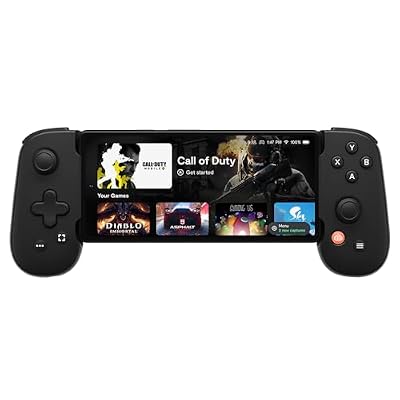
The Backbone One takes the slimmest route in this group. It plugs into the USB-C port of Android phones and the iPhone 15 series, collapses down small for a bag pocket, and leans on the Backbone app to gather games, streaming services and remote play in one launcher. The listing names Xbox, PlayStation, Call of Duty, Roblox, Minecraft and Genshin Impact among the things it plays, which reflects its streaming-first audience. A 3.5mm headset jack and pass-through charging cover long sessions, and at 4.9 ounces it is the lightest controller here by a wide margin.
Specs
- Connectivity: USB-C direct connection
- Compatibility: Android devices 10.0 and up and iPhone 15 Series
- Color: USB-C (Black)
- Audio: 3.5mm headset jack
- Charging: USB-C pass-through charging for the phone
- Item weight: 4.9 ounces
- Manufacturer: Backbone
Best for: cloud gaming and remote-play sessions on a phone, with the smallest carry size.
Watch out for: this listing is the USB-C model, so older Lightning iPhones need the separate Lightning version instead.
ASIN: B0BMD4KFSL
Razer Kishi V2 Mobile Gaming Controller for Android
The Kishi V2 is the Android specialist of the four. It connects over USB-C, is powered by the phone, and builds its controls around microswitch buttons with analog triggers and two programmable multifunction buttons. Its extendable bridge holds most popular Android smartphones, and the interchangeable rubber cushions adjust the fit around different phone sizes and camera layouts. The feature that sets it apart is Virtual Controller Mode in the Razer Nexus app, which maps the physical buttons onto touch controls, opening up Android games that never added native controller support.
Specs
- Connectivity: USB-C
- Model: RZ06-04180100-R3U1
- Buttons: microswitch buttons, analog triggers, programmable macros
- Fit: extendable bridge for most Android smartphones, interchangeable rubber cushions
- App: Razer Nexus with Virtual Controller Mode
- Dimensions: 7.12 x 1.31 x 3.63 in
- Weight: 123 g
Best for: Android players whose favorite games are touch-only and need button mapping.
Watch out for: this version is for Android, and most phone cases have to come off for the USB-C plug to seat fully.
ASIN: B09XBHHVV2
Which One Fits Your Situation
You split your gaming between a phone and a Switch
Pick the GameSir G8 Plus. It is the only controller in this group that lists the Nintendo Switch alongside iOS and Android, and its Bluetooth link means the same pad can stay paired to the console and still serve the phone. The wide 215 mm bridge also means a small tablet can join the rotation without a second purchase.
You want to plug in and play with zero setup
Pick the GameSir G8 Galileo if your phone is Android or a USB-C iPhone and you value a headphone jack, or the Backbone One if pocket size matters most. Both draw power from the phone, skip pairing entirely and start working the moment the connector seats, which suits short sessions squeezed into a commute or a lunch break.
You mostly stream games from a console or PC
Pick the Backbone One. Its app is organized around launching streamed and remote-play games, the controller collapses small enough to live in a jacket pocket, and pass-through charging plus the headset jack keep longer streamed sessions practical. The listing itself leads with Xbox and PlayStation play, which matches how this controller is actually used.
Your favorite Android games only support touch controls
Pick the Razer Kishi V2. Virtual Controller Mode in the Razer Nexus app lets its physical buttons stand in for on-screen taps, which none of the other controllers here offer. That makes it the practical choice when a beloved Android title never added a controller option and shows no sign of getting one.
Common Mistakes
- Buying a USB-C controller for a Lightning iPhone, or the reverse, without checking which connector the phone actually has.
- Skipping the published fit range, then finding the bridge cannot stretch over a large phone or a small tablet.
- Leaving a thick case on the phone when the listing recommends playing case-free or with a case within 1 mm.
- Assuming every mobile game supports controllers, when many popular Android titles remain touch-only.
- Choosing a Bluetooth controller and forgetting it has its own battery that needs charging before a trip.
Frequently Asked Questions
Does the GameSir G8 Plus work with both iPhone and Android phones?
Yes. The listing names iOS and Android among its platforms, along with the Nintendo Switch, tablets and PC. Because it connects over Bluetooth rather than a plug, the same unit pairs with each platform in turn, although the pairing steps differ by mode, so the first connection to each new device takes a little longer than later ones.
Can the G8 Plus hold a small tablet as well as a phone?
Yes, within its published limit. The stretchable bridge opens to fit devices up to 215 mm long, which covers large phones and smaller tablets such as compact Android slates and the Switch itself. Anything longer than that limit will not seat securely, so measure the device first, especially if a case adds length at both ends.
Does the G8 Plus need charging like a phone accessory?
Yes. Unlike the three wired controllers in this article, the G8 Plus runs on its own built-in 1000 mAh rechargeable battery, split across the two sides of the pad. That independence is what lets it work with a Switch or a propped-up tablet, but it also means a flat battery ends the session until the pad is plugged in.
Which of these controllers also works with the Nintendo Switch?
Only the GameSir G8 Plus. Its listing includes the Switch among the supported platforms, and it can even close around the console like a grip or serve as a standalone pad. The G8 Galileo, Backbone One and Kishi V2 are phone controllers for Android and USB-C iPhone models, and none of them lists Switch support.