🛒 Best Price Today on Amazon
Prime members get fast, free shipping on everything above, plus member-only deals. New members get a 30-day free trial — cancel anytime.
A 4000Hz polling rate changes how often your mouse reports its position to your computer, and the buying decision is not only about the number printed on the box. Some mice reach 4000Hz wirelessly straight out of the box, others need a special receiver to unlock the faster rate, and a few only hit the headline figure over a cable. Choosing the wrong setup leaves you with a standard 1000Hz mouse that cost flagship money, so the receiver, the sensor, and the shape matter as much as the headline figure itself.


This guide is for competitive shooter players, claw and fingertip grippers, and anyone moving from a 1000Hz mouse to a faster report rate. Every mouse below was chosen from the name and specifications shown on its Amazon product page, and each one supports 4000Hz polling or higher. The four picks cover symmetrical esports shapes, a driverless option, and a dedicated claw design, so you can match the mouse to your grip and your setup before you buy.
Quick Picks
As an Amazon Associate we earn from qualifying purchases.
| Product | Best for | Key spec from title |
|---|---|---|
| Razer Viper V3 Pro | Esports FPS with 8000Hz wireless | 8K Polling, 35K DPI optical sensor |
| Logitech G PRO X Superlight 2 | All-round competitive play | 8kHz report rate, 44K DPI sensor |
| ENDGAME GEAR OP1w 4K V2 | Dedicated claw grip at 4000Hz | 4000Hz polling, 30K DPI optical sensor |
| BenQ ZOWIE U2-DW 4K | Driverless FPS play at 4000Hz | 4K polling rate, 3950 sensor |
How to Choose
How the 4000Hz rate actually reaches your PC
A polling rate is only as fast as the connection carrying it, so the receiver in the box decides what you really get. The Razer Viper V3 Pro and the ENDGAME GEAR OP1w 4K V2 ship with a high polling receiver included, while the BenQ ZOWIE U2-DW 4K uses its Enhanced Receiver as both a charging dock and the link that enables 4000Hz wireless. Other mice reach the faster rate only with a receiver bought separately. Before ordering, read the listing to confirm whether the fast receiver is included, and check whether the 4000Hz mode works wirelessly or only over a cable.
Sensor and DPI range
High polling means little if the sensor cannot keep up with fast flicks, so look at the sensor name on the listing. The Viper V3 Pro uses a Focus Pro 35K optical sensor, the Superlight 2 uses a HERO 2 sensor, and the OP1w 4K V2 uses a PixArt PAW3950, all of which are built for competitive tracking with no smoothing or filtering. A huge DPI ceiling is not the deciding factor, since most shooter players use a modest sensitivity and the ZOWIE U2-DW caps its steps at 3200 DPI. What matters more is consistent tracking at your chosen sensitivity, clean lift-off behaviour, and a sensor that holds its line during fast swipes.
Shape, grip, and weight
Polling rate cannot fix a shape that fights your hand, so grip comes before hertz. Symmetrical shells such as the Viper V3 Pro, the Superlight 2, and the U2-DW suit claw and fingertip grips, while the OP1w 4K V2 is shaped specifically for right-handed claw players. All four mice sit in the light class, with the Viper V3 Pro at 54 grams, the Superlight 2 at 60 grams, and the U2-DW at 60 grams, so long sessions put less strain on the wrist. Measure your hand, compare it with the dimensions on the listing, and favour a shape you already know over a new shape with a bigger number.
Battery life at high polling rates
Running at 4000Hz or 8000Hz asks the mouse to report far more often, and that extra work drains the battery faster than the headline battery figure suggests. The ZOWIE U2-DW lists 80 hours at 1000Hz but only 24 hours at 4000Hz, a gap that shows how much the faster rate costs. The Viper V3 Pro and the Superlight 2 both list up to 95 hours of battery life, yet those figures also assume the standard polling rate rather than the maximum. If you play long sessions, keep the charging cable within reach, charge between sessions, or drop to 2000Hz for everyday use and switch to 4000Hz only for matches.
The 4 Best Options
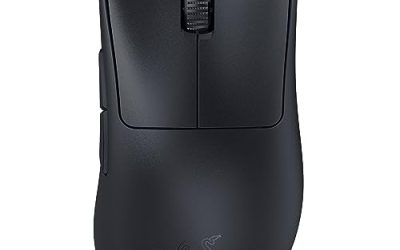
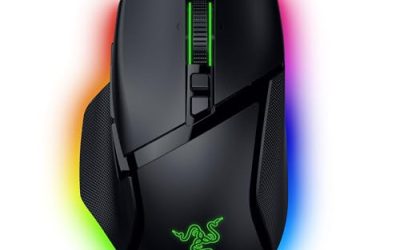
Razer Viper V3 Pro
The Viper V3 Pro is the pick for players who want the fastest wireless polling available without giving up a proven esports shape. Its symmetrical shell weighs 54 grams, and the Focus Pro 35K optical sensor tracks cleanly across surfaces including glass, so flicks and micro-adjustments stay consistent. An included HyperPolling Wireless Dongle delivers a true polling rate of up to 8000Hz over HyperSpeed Wireless, which is well above the 4000Hz bar for this guide. Gen-3 optical switches remove debounce delay from clicks, and eight programmable controls cover the bindings most shooter players need.
Specs
- 54 g ultra-lightweight symmetrical design
- True 8000 Hz wireless polling with the included HyperPolling Wireless Dongle
- Focus Pro 35K Optical Sensor Gen-2
- Gen-3 optical switches
- 8 programmable controls
- Up to 95 hours of battery life
- HyperSpeed Wireless connectivity
Best for: Competitive FPS players who want 8000Hz wireless polling in a light symmetrical shell.
Watch out for: The 8000Hz mode shortens battery life sharply, so plan to charge more often when you run it at the maximum rate.
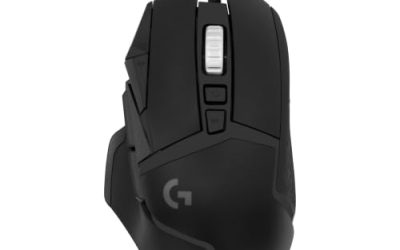
Logitech G PRO X Superlight 2
The Superlight 2 is the all-rounder of this group, a mouse that suits nearly every genre while still clearing the 4000Hz bar with room to spare. Its current Amazon listing shows an 8kHz report rate and a HERO 2 sensor rated up to 44,000 DPI, paired with a sub-60-gram shell that has no honeycomb cutouts. LIGHTFORCE hybrid switches combine optical speed with a mechanical click feel, and the five programmable buttons keep the layout simple for players who dislike clutter. LIGHTSPEED wireless keeps the connection stable in busy tournament environments, and USB-C charging makes topping up straightforward.
Specs
- 60 g lightweight design
- Up to 8kHz report rate over LIGHTSPEED wireless
- HERO 2 sensor, up to 44,000 DPI
- LIGHTFORCE hybrid switches
- 5 programmable buttons
- Up to 95 hours of battery life
- USB-C charging
Best for: Players who want one light wireless mouse for shooters, MOBAs, and everyday play at 4000Hz or above.
Watch out for: The listing has been updated to an 8kHz report rate, so confirm the polling options in the software match your monitor and CPU before settling on the fastest setting.
ENDGAME GEAR OP1w 4K V2
The OP1w 4K V2 is built for one job, giving right-handed claw grippers true 4000Hz wireless polling with a shape made for that grip. Its PixArt PAW3950 sensor reaches up to 30,000 CPI, and Kailh GX switches are hot-swappable, so worn switches can be replaced without soldering. A 4K dongle comes in the box, which means the 4000Hz mode works immediately with no separate receiver to buy. The mouse also supports 2000Hz and 1000Hz wireless and 1000Hz when wired, giving you slower modes for longer battery life between matches.
Specs
- True 4000Hz wireless polling with the included 4K dongle
- PixArt PAW3950 optical sensor, up to 30,000 CPI
- Kailh GX switches, hot-swappable
- Claw-grip design for right-handed players
- Supports 2000Hz and 1000Hz wireless, and 1000Hz wired
- Lightweight wireless build
Best for: Right-handed claw grippers who want 4000Hz wireless out of the box with no extra receiver to buy.
Watch out for: The claw-focused shape does not suit palm grippers or left-handed players, so check your grip style before ordering.
BenQ ZOWIE U2-DW 4K

The U2-DW 4K is the pick for players who want 4000Hz wireless without installing any software. Its driverless design means DPI and report rate change with physical buttons on the mouse, and the included 4K Enhanced Receiver doubles as a charging dock while enabling polling rates up to 4000Hz. A symmetrical 60-gram shell with a left-side curve supports claw grips from several angles, and the 3950 sensor covers DPI steps from 400 to 3200. Battery life reaches 80 hours at 1000Hz and 24 hours at 4000Hz, so the faster mode is best saved for matches rather than all-day use.
Specs
- 4000Hz wireless polling with the included 4K Enhanced Receiver
- 60 g symmetrical design
- 3950 sensor
- Driverless plug-and-play operation
- Report rates of 125, 500, 1000, 2000, and 4000Hz
- DPI steps of 400, 800, 1000, 1200, 1600, and 3200
- Battery life of 80 hours at 1000Hz and 24 hours at 4000Hz
Best for: FPS players who want a driverless 4000Hz wireless mouse with a charging dock receiver.
Watch out for: The 3200 DPI ceiling is lower than the other picks, so players who use very high sensitivity should confirm the DPI steps fit their settings.
Which One Fits Your Situation
Competitive FPS player chasing the fastest wireless response
Choose the Razer Viper V3 Pro. Its included HyperPolling dongle delivers up to 8000Hz wireless, the 54-gram shell moves with almost no resistance, and the Focus Pro 35K sensor holds tracking during fast flicks. Keep the charger nearby, since the fastest polling mode drains the battery much sooner than the standard rate.
Player who wants one mouse for every genre
Choose the Logitech G PRO X Superlight 2. Its symmetrical shape works for claw and palm grips, the HERO 2 sensor handles shooters and slower genres alike, and the 60-gram shell stays comfortable across long sessions. The 8kHz report rate on the listing gives you headroom above 4000Hz whenever you want it.
Right-handed claw gripper who wants 4000Hz with no extras
Choose the ENDGAME GEAR OP1w 4K V2. The claw-shaped shell, the PAW3950 sensor, and the included 4K dongle give you true 4000Hz wireless straight out of the box. Hot-swappable Kailh GX switches add longevity for players who click hard through long competitive seasons.
Player who hates software and wants plug-and-play
Choose the BenQ ZOWIE U2-DW 4K. No driver is needed, DPI and polling change with buttons on the mouse, and the Enhanced Receiver charges the mouse while it enables 4000Hz wireless. The symmetrical shape suits claw grips, and the simple setup means you can move between computers without reinstalling anything.
Common Mistakes
- Buying a mouse labelled 4000Hz-ready and then using the standard receiver, which leaves the polling rate at 1000Hz.
- Setting 8000Hz on a weaker CPU and wondering why the game stutters, when 4000Hz would have run smoothly.
- Judging battery life from the headline figure without noticing it was measured at 1000Hz, not at 4000Hz.
- Choosing by the biggest DPI number instead of the shape that fits your hand and grip.
- Ignoring the included receiver and buying a second dongle you do not need, or forgetting to check whether one is included at all.
Frequently Asked Questions
Does a 4000Hz gaming mouse need a special receiver?
Most wireless 4000Hz mice need a receiver rated for the faster rate, and the four picks here all include one in the box. The Viper V3 Pro ships with a HyperPolling dongle, the OP1w 4K V2 includes a 4K dongle, and the U2-DW 4K uses its Enhanced Receiver. Some other mice sell the fast receiver separately, so always confirm what is included before ordering.
Is 8000Hz better than 4000Hz for most players?
For most players the difference between 4000Hz and 8000Hz is small, and both are far smoother than 1000Hz on a high-refresh monitor. The faster rate reports position more often, yet it also uses more CPU and drains the battery sooner. Players with a strong CPU and a 240Hz or faster monitor gain the most, while others will feel no change at all.
Does 4000Hz polling drain the battery faster?
Yes, because the mouse wakes and reports four times as often as it does at 1000Hz, and that extra work uses more power. The ZOWIE U2-DW lists 80 hours at 1000Hz but only 24 hours at 4000Hz, which shows the scale of the gap. Charging between sessions or dropping to 2000Hz outside matches keeps the mouse ready without giving up the faster rate when it counts.
Can I use a 4000Hz mouse on a standard monitor?
Yes, a 4000Hz mouse works on any monitor, and the cursor still feels smoother than it does at 1000Hz. The benefit grows on high-refresh displays, where the screen can show the extra position updates instead of waiting for the next frame. If your monitor runs at 60Hz, the gain is smaller, so weigh the faster polling against battery life and CPU use before leaving it at the maximum.