🛒 Best Price Today on Amazon
Prime members get fast, free shipping on everything above, plus member-only deals. New members get a 30-day free trial — cancel anytime.
A gaming laptop’s own keyboard is chained to its screen, so you end up hunched close to the display with your mouse arm squeezed against the machine’s flank. An external combo fixes the posture, but a laptop desk punishes the wrong choice: a full-size board eats the space your mouse needs, and two hungry cables fight over a handful of ports. The real decision is footprint and connection, meaning a compact TKL or 75 percent layout, plus a clear-eyed choice between wired simplicity, a single wireless receiver and flexible tri-mode pairing.
This guide is for students in dorm rooms, players who game on the same laptop they carry to class, and anyone building a small desk around a portable machine. Every pick is a genuine combo listing, one box containing both the keyboard and the mouse, chosen from the sizes and connection types stated on its Amazon page. The shortlist runs from wired TKL sets through rechargeable wireless combos to one premium LIGHTSPEED pairing that breaks the budget pattern on purpose.
Quick Picks
As an Amazon Associate we earn from qualifying purchases.
| Product | Best for | Key spec from title |
|---|---|---|
| CHONCHOW 87-Key TKL Combo | Wired TKL with stated console support | 87-key tenkeyless, wired USB |
| MageGee K1 Combo | Smallest wired footprint | 75-percent keyboard, wired USB |
| Redragon S155-PRO | Tri-mode freedom | Bluetooth, 2.4 GHz and USB-C wired |
| Logitech G715 + G705 Combo | Premium wireless exception | LIGHTSPEED wireless plus Bluetooth |
| MageGee V560 | Simple single-band wireless | 2.4 GHz wireless, rechargeable |
How to Choose
Footprint First: TKL and 75 Percent Layouts
A laptop desk is shallow, and every centimetre of keyboard width is a centimetre taken from your mouse. That is why the wired picks here are an 87-key tenkeyless board from CHONCHOW and a 75-percent board in the MageGee K1 set, while the Redragon S155-PRO also uses a compact 75-percent keyboard. Dropping the number pad pulls your mouse hand closer to your body, which is better for your shoulder and leaves room for wider aim movements. Count your desk depth before ordering anything, and be honest about how much of it the laptop itself already occupies.
How the Pair Connects Decides Your Port Budget
Read the connection wording on each listing, because the trade-offs differ. Wired combos like the CHONCHOW and MageGee K1 sets never need charging and never drop a signal, but each device takes its own cable and port. The MageGee V560 uses one 2.4 GHz wireless link for the set, freeing ports and clearing the desk. The S155-PRO goes furthest with tri-mode connection over Bluetooth, 2.4 GHz and USB-C wired, so it can pair with the laptop one way and still work cabled when the battery runs low mid-session.
Judge the Mouse Half on Its Listed Numbers
Combo mice are often an afterthought, so check what the listing actually states. Redragon lists the S155-PRO’s mouse at up to 12,800 DPI, a figure comfortably beyond what laptop gaming needs, while several other listings in this guide state no mouse DPI at all, which tells you where their priorities sit. Keyboard wording needs the same honesty: the MageGee V560’s keys are described as a mechanical-feel membrane design, not true mechanical switches, and the article keeps that distinction wherever the set is discussed. Buy the set whose stated specs match your games.
Travel and Daily Wear Favour the Compact Sets
A combo that travels between a dorm, a library and home takes knocks a desktop set never meets. Compact 75-percent and TKL boards slide into a laptop bag beside the machine, and rechargeable wireless sets like the S155-PRO and V560 remove the cable tangle from the daily pack and unpack routine. Wired sets travel fine too, but their cables need managing. The premium Logitech pairing is the exception in size and positioning alike, better suited to a fixed desk where the laptop docks than to a bag that moves daily.
The 5 Best Options
CHONCHOW 87-Key TKL Gaming Keyboard and Mouse Combo

CHONCHOW’s set pairs an 87-key tenkeyless keyboard with a gaming mouse over wired USB, and the listing backs the keyboard with LED rainbow backlighting and 19-key anti-ghosting. The TKL layout is the laptop-friendly part: it keeps the function row and arrows while surrendering the number pad your mouse space needs more. Unusually, the listing title states support for PS4 and Xbox alongside PC, laptop and Mac, which makes this the combo to look at if the same set must serve a console too. Wired power means no charging routine, at the cost of two cables on a small desk.
Specs
- Keyboard: 87-key tenkeyless layout
- Connection: wired USB combo
- Backlighting: LED rainbow
- Anti-ghosting: 19-key, as listed
- Compatibility as listed: PS4, Xbox, PC, Laptop, Mac
Best for: Laptop players who want a wired TKL set with console support stated in the listing.
Watch out for: Both devices are wired, so the set occupies two USB ports on a machine that may have few to spare.
ASIN: B07YHSTNJP
MageGee K1 Wired Gaming Keyboard and Mouse Combo
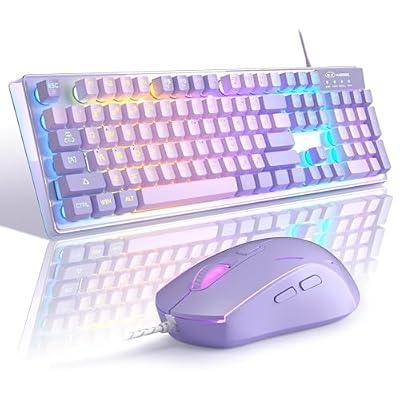
The MageGee K1 is the smallest wired footprint in this guide, built around a compact 75-percent keyboard sold in a single listing with its gaming mouse. RGB backlighting keeps the gaming look intact despite the shrunken layout, and the wired USB connection keeps the pairing simple: plug in and play, with no receivers to lose and no batteries to manage. For a laptop that lives on a narrow desk or a kitchen table, that combination of tiny board and zero wireless fuss is the whole argument. It is the straightforward pick for players who value space over features.
Specs
- Keyboard: compact 75-percent layout
- Connection: wired USB combo, single listing
- Backlighting: RGB
- Mouse: gaming mouse included in the set
Best for: Tight laptop desks where the smallest wired footprint matters most.
Watch out for: The listing states little beyond the layout and lighting, so check the live page if mouse specifications matter to you.
ASIN: B0CRT3ZYZX
Redragon S155-PRO Wireless Gaming Keyboard and Mouse Combo

The S155-PRO is the flexible traveller of the group: a compact 75-percent rechargeable keyboard and mouse set that connects by Bluetooth, 2.4 GHz or USB-C wired, exactly as its listing states. That tri-mode design suits a gaming laptop perfectly, because the same set pairs wirelessly at a desk and plugs in when the battery fades. Redragon lists the mouse at up to 12,800 DPI, the keyboard carries RGB backlighting, and the listing states Windows and Mac support. Of the budget-tier combos here, this is the one that behaves like a much more expensive pairing.
Specs
- Keyboard: compact 75-percent, rechargeable
- Connection: tri-mode Bluetooth, 2.4 GHz and USB-C wired
- Mouse: up to 12,800 DPI, as listed
- Backlighting: RGB
- Compatibility as listed: Windows and Mac
Best for: Laptop players who move between desks and want one set that pairs three ways.
Watch out for: Wireless convenience means a charging habit; the wired mode covers you, but only if the cable is in your bag.
ASIN: B0FDG55BPG
Logitech G715 + G705 Wireless Combo

This single Logitech listing pairs the G715 wireless gaming keyboard with the G705 wireless gaming mouse, and it is included as the deliberate premium exception rather than a budget rival. The connection is LIGHTSPEED wireless plus Bluetooth, and the listing states PC, Mac and laptop use, so it docks with a gaming laptop as happily as with a desktop. Everything else in this guide competes on compact value; this set competes on being the big-brand wireless pairing for players who have stopped compromising. If your laptop is a desktop replacement that rarely travels, this is the set that matches it.
Specs
- Contents: G715 wireless gaming keyboard and G705 wireless gaming mouse, one combo listing
- Connection: LIGHTSPEED wireless plus Bluetooth
- Compatibility as listed: PC, Mac and Laptop
- Tier: premium big-brand wireless combo
Best for: Desktop-replacement laptop owners who want the premium wireless pairing in one box.
Watch out for: It sits in a different tier from the other four sets, so judge it against separate premium components, not against budget combos.
ASIN: B0B6WXT3K3
MageGee V560 Wireless Gaming Keyboard and Mouse Combo

The V560 keeps wireless simple: one 2.4 GHz connection for the keyboard and mouse set, a rechargeable design, and an RGB backlit keyboard, per its listing. It is listed for Mac, laptop and PC, which covers the gaming laptop brief without dongle juggling beyond the single receiver. One piece of listing honesty matters here: the keys are described as a mechanical-feel membrane design, so expect a quiet, soft press rather than switch tactility, whatever the gaming styling suggests. For players who want a cable-free desk at a budget tier and mostly play after dark, the backlighting and simple pairing make a tidy case.
Specs
- Connection: 2.4 GHz wireless combo
- Keyboard: RGB backlit, rechargeable set
- Keys: mechanical-feel membrane, as listed
- Compatibility as listed: Mac, Laptop and PC
Best for: Players who want one simple wireless link and a rechargeable set for a small desk.
Watch out for: The keys are membrane with a mechanical feel, not mechanical switches, so do not buy it expecting switch feedback.
ASIN: B0D1MGVRR8
Which One Fits Your Situation
A Dorm Desk With Barely Any Depth
Choose between the two smallest wired footprints: the MageGee K1’s 75-percent board is the tiniest here, while the CHONCHOW’s 87-key TKL keeps a little more breathing room and a function row that feels familiar. Both leave the right side of the desk to your mouse, which is where laptop setups usually fail. If the desk also hosts textbooks, the K1’s compact board wins the argument.
One Receiver, No Cable Clutter
The V560’s single 2.4 GHz wireless link is the cleanest answer, giving a laptop back its ports and its desk back its surface. The S155-PRO matches it with a 2.4 GHz mode of its own, then adds Bluetooth and a wired fallback for travel days. Pick the V560 for set-and-forget simplicity at home; pick the Redragon if the same combo also rides in your bag.
You Travel With Your Laptop Every Week
The S155-PRO was made for this pattern: a 75-percent rechargeable board, tri-mode pairing for whatever screen you land at, and a mouse with a listed 12,800 DPI ceiling. Its wired mode rescues a flat battery without ending the session. The MageGee K1 travels well too, being small and receiver-free, but its two cables need a pouch of their own in the bag.
You Want the Premium Wireless Set
The Logitech G715 and G705 pairing is the one combo here bought for keeps rather than for now. LIGHTSPEED wireless plus Bluetooth, stated PC, Mac and laptop support, and two devices designed to work as a set put it in a different class from the budget listings. It suits a laptop that lives docked at a proper desk, where its size and tier make sense, instead of a bag-friendly travel kit.
Common Mistakes
- Buying a full-size keyboard combo that consumes the desk space a laptop mouse needs to move.
- Assuming every wireless combo connects the same way, when listings here span single-band 2.4 GHz, tri-mode and LIGHTSPEED pairings.
- Reading “mechanical feel” as mechanical switches, when the V560 listing describes a membrane keyboard.
- Forgetting that a wired combo uses two USB ports on a laptop that may only offer a few.
- Expecting console support that the listing never states; only the CHONCHOW title names PS4 and Xbox among these picks.
Frequently Asked Questions
Why choose a TKL or 75 percent combo for a gaming laptop?
Because desk space is the scarcest resource in a laptop setup. An 87-key TKL or a 75-percent board removes the number pad, which pulls your mouse hand inward and frees the right side of the desk for aiming. The CHONCHOW, MageGee K1 and S155-PRO sets all use compact layouts for exactly this reason, and your shoulder will notice the difference before your score does.
Is a wired or wireless combo better with a laptop?
Wired sets never need charging and never drop a connection, which suits a fixed desk, but they spend two USB ports. Wireless sets return those ports and travel better, at the cost of a charging routine. Tri-mode sets like the S155-PRO split the difference by offering Bluetooth, 2.4 GHz and a wired mode in one listing, which is why they fit laptop life so well.
Does the Logitech combo work with a Mac as well as a gaming laptop?
Yes, on the listing’s own wording: the G715 and G705 combo states PC, Mac and laptop use, and connects over LIGHTSPEED wireless plus Bluetooth. That makes it the easiest premium pick for a household split between a Windows gaming laptop and a Mac. The S155-PRO and V560 listings also state Mac support, so the budget tier is not shut out of that flexibility either.
Can these combos be used with a console instead of a laptop?
Only one listing here says so: the CHONCHOW TKL combo’s title states PS4 and Xbox alongside PC, laptop and Mac. The other sets list computer platforms only, so their console support should not be assumed from the fact that they are gaming products. If console use matters, buy the set whose listing actually names the console, and test it with your games before relying on it.