🛒 Best Price Today on Amazon
Prime members get fast, free shipping on everything above, plus member-only deals. New members get a 30-day free trial — cancel anytime.
- Best Studio Monitor Speakers at a Glance
- What Are Nearfield Monitors and How Are They Different From Regular Speakers?
- Budget Tier: Best Home Studio Speakers on a Small Desk
- Mid-Range Tier: Best Studio Speakers for Mixing and Music Production
- Premium Tier: Best Desk Monitor Speakers for Detail
- Inputs: XLR, TRS, RCA and USB Monitor Speakers
- Best DJ Studio Speakers and DJ Monitor Speakers
- Best Bass Monitor Speakers: How Much Low End to Expect
- Best Drum Monitor Speakers: Can Studio Monitors Work for Drums?
- Desk Placement and Room Tips for Nearfield Monitors
- Pick X If: Decision Table
- Alternatives Worth Considering
- Frequently Asked Questions
Updated November 2026 – For the best studio monitor speakers on a desk, the Yamaha HS5 suits buyers who want a flat, honest reference, the JBL 305P MkII suits buyers who want wide imaging on a tight budget, the KRK Rokit 5 G5 suits bass-heavy beat makers, the Adam T5V suits buyers who want more high-end detail, and the PreSonus Eris E3.5 or IK Multimedia iLoud Micro Monitor suit small desks.
The best studio monitor speakers for a desktop are nearfield monitors: small powered speakers designed to be heard from about an arm’s length or a little more. Unlike consumer speakers that flatter the sound, studio monitors aim to reproduce what is in the recording so your mixes hold up on headphones, car stereos and phones. They also work well for gaming and general listening if you accept a more neutral tone. This guide covers the main models reviewers name in 2026, explains inputs, room and desk placement, and answers common questions about USB monitors, DJ use, bass and drum recording. Details come from the makers’ listings and from review roundups, many of which are affiliate-style, so use rankings as general consensus rather than measurement.
Best Studio Monitor Speakers at a Glance
| Product | Tier | Best for | Key stated spec | Main limit |
|---|---|---|---|---|
| PreSonus Eris E3.5 | Budget | Very small desks | 3.5-inch woofer, as the maker lists | Limited bass extension |
| IK Multimedia iLoud Micro Monitor | Budget to mid-range | Tiny rooms, portable setups | 3-inch woofers, EQ switches | Small cabinets limit loudness and bass |
| JBL 305P MkII | Budget | Wide sweet spot, imaging | 5-inch woofer, bi-amplified | Not designed for deep sub-bass |
| Yamaha HS5 | Mid-range | Honest reference mixing | 5-inch woofer, bi-amplified | Bass can sound light in some rooms |
| KRK Rokit 5 G5 | Mid-range | Beats, electronic music | 5-inch woofer, app EQ | Bass-forward tuning |
| PreSonus Eris E4.5 and E5 | Budget to mid-range | Step up from the E3.5 | 4.5 and 5-inch woofers | Check room-tuning controls on the maker’s page |
| Adam T5V | Premium | Detail, long sessions | 5-inch woofer, U-ART ribbon-style tweeter | Higher cost than other 5-inch options |
What Are Nearfield Monitors and How Are They Different From Regular Speakers?
Nearfield monitors are active speakers with built-in amplifiers, designed to be listened to at close range so the room has less influence on the sound. Most have a woofer for lows and mids and a tweeter for highs, each powered by its own amplifier, which makers call bi-amplified. Hi-fi speakers often boost bass or treble to sound pleasing. Studio monitors aim for a flat response, which makes mistakes in a mix easier to hear. The result can sound plain at first, and many users take a few days to adjust.
Budget Tier: Best Home Studio Speakers on a Small Desk
PreSonus Eris E3.5 – Best for Very Small Desks
Specs: 3.5-inch woofer · active two-way design · balanced and unbalanced inputs · front headphone output, as the maker lists.
The PreSonus Eris E3.5 is the budget pick for small desks in 2026 roundups. Its compact size fits beside a laptop or monitor, and it has front-panel volume and headphone controls so you can reach them easily. It works as a gaming and creator speaker as well as a basic monitor. The limit is physics: a 3.5-inch woofer cannot produce deep bass, so electronic producers who work with sub-bass often pair it with headphones or add a small subwoofer. The E4.5 and E5 are larger models in the same family that appear in some roundups, and a few sites rank the E4.5 as their overall winner.

PreSonus Eris 3.5 Powered Studio Monitors, Pair — 3.5” Active Near | -Field Desktop Speakers for Music Production, Gaming, Movies & Hi-Fi | 50W, Woven-Composite Woofer, Silk-Dome Tweeter, Black
Included for 'Best Studio Monitor Speakers for Desktop Music and Gaming' as a representative home product in this roundup; selection reflects the product set returned for this topic.
View on AmazonIK Multimedia iLoud Micro Monitor – Best for Tiny Rooms and Portable Setups
Specs: 3-inch woofers · built-in EQ switches · compact cabinet · active speakers, per the maker and roundups.
The iLoud Micro Monitor targets small rooms and portable setups, according to roundups, with a small body that fits on a crowded desk. IK Multimedia gives it EQ switches to adapt the sound to desk and wall placement, which helps when the speakers sit near a wall. Reviewers describe it as a reasonable choice for mobile producers, video editors and anyone with limited desk space. The compromise is the same as with all tiny monitors: low bass is limited, and loud playback in a larger room will push the small drivers.

IK Multimedia iLoud Micro Monitor 50 watt Portable Wireless Bluetooth Studio Reference Monitors, Dual Speakers for Music Production, Mixing, Mastering, Composing, producing and DJs
Included for 'Best Studio Monitor Speakers for Desktop Music and Gaming' as a representative home product in this roundup; selection reflects the product set returned for this topic.
View on AmazonJBL 305P MkII – Best for Wide Imaging on a Budget
Specs: 5-inch woofer · 1-inch tweeter · bi-amplified · Image Control Waveguide, as the maker lists.
The JBL 305P MkII is the value pick in most 2026 roundups, praised for a wide sweet spot and clear stereo imaging. A wide sweet spot means you can move your head a little without the sound collapsing, which helps in a shared desk setup. It has balanced XLR and TRS inputs and an RCA input, so it connects to most audio interfaces. Reviewers generally note that deep sub-bass is limited, as with any 5-inch design, and that the tuning leans a little bright for some listeners. It is a good first pair for beginners learning to mix.
Mid-Range Tier: Best Studio Speakers for Mixing and Music Production
Yamaha HS5 – Best for Honest Reference Mixing
Specs: 5-inch woofer · 1-inch dome tweeter · bi-amplified · XLR and TRS balanced inputs, as the maker lists.
The Yamaha HS5 is the most frequently named all-rounder in 2026 roundups. The HS line has a long reputation for a flat, revealing sound that makes weak points in a mix easy to hear, which is the point of a reference monitor. It has room control and high-trim switches on the back to adjust for placement near walls. Reviewers note that the bass can sound light in untreated rooms, so some producers add the larger HS7 or HS8 in the same line, or a subwoofer, if they need more low end. The HS5 suits mixing, mastering checks, podcast editing and critical listening.

YAMAHA Hs5 Powered Studio Monitor, Pair
Included for 'Best Studio Monitor Speakers for Desktop Music and Gaming' as a representative home product in this roundup; selection reflects the product set returned for this topic.
View on AmazonKRK Rokit 5 G5 – Best for Beats and Electronic Production
Specs: 5-inch woofer · 1-inch tweeter · bi-amplified · app-based room EQ, as the maker lists.
The KRK Rokit 5 G5 is the bass-forward pick in roundups. The Rokit family has long been popular with hip-hop and electronic producers, and the G5 adds an app with EQ settings that help the speaker adapt to the room. One guide prefers the older G4 for beats, citing its onboard room EQ, which tells you the series has changed across generations. That is worth knowing if you shop for a used pair. Bass-forward tuning can feel exciting, but it can lead new mixers to under-mix low end, so compare mixes on headphones or a second speaker.

KRK RP5G5 ROKIT 5 Generation Five 5" Powered Studio Monitor Pair
Included for 'Best Studio Monitor Speakers for Desktop Music and Gaming' as a representative home product in this roundup; selection reflects the product set returned for this topic.
View on AmazonPreSonus Eris E5 – Best for a Step Up From the E3.5
Specs: 5-inch woofer · bi-amplified · tuning controls for room response, as the maker lists for the Eris family.
The Eris E5 appears in several roundups as a mid-range option and sits between the tiny E3.5 and the larger studio speakers. It has acoustic tuning controls to adjust high and low response for the room, which can help in a typical bedroom or home office. It is a reasonable choice for producers who want a fuller low end than the E3.5 without moving to a premium brand. Check the maker’s current specifications for the exact input types and tuning options on your chosen model.
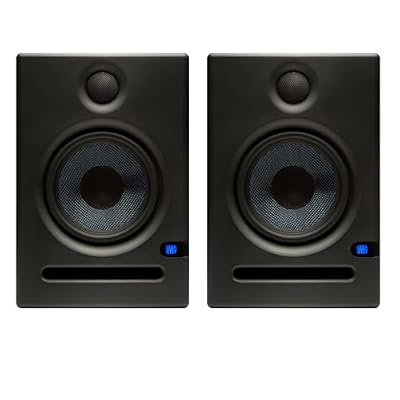
PreSonus Eris E5 Pair 2-Way 5.25” Near Field Studio Monitors
Included for 'Best Studio Monitor Speakers for Desktop Music and Gaming' as a representative home product in this roundup; selection reflects the product set returned for this topic.
View on AmazonPremium Tier: Best Desk Monitor Speakers for Detail
Adam T5V – Best for Detail and Long Sessions
Specs: 5-inch woofer · U-ART tweeter · bi-amplified · balanced inputs, as the maker lists.
The Adam T5V is the detail and high-end pick in roundups, described as a step-up purchase with a smoother upper range and more comfort during long sessions. Adam is known for its ribbon-style tweeter technology, and the T-series brings that approach to a lower tier. Reviewers say it can reveal subtle reverb tails and high-frequency detail that cheaper monitors miss. It suits listeners who spend many hours at the desk and want to hear fine detail without harshness. As with the other 5-inch models, it has limited deep bass.

ADAM Audio T5V Studio Monitor(Pair)
Included for 'Best Studio Monitor Speakers for Desktop Music and Gaming' as a representative home product in this roundup; selection reflects the product set returned for this topic.
View on AmazonInputs: XLR, TRS, RCA and USB Monitor Speakers
The best inputs for a studio monitor are balanced XLR or TRS connections, which resist noise over longer cable runs, and the best connection for a desktop is a balanced cable from an audio interface. Most 5-inch monitors from Yamaha, JBL, KRK and PreSonus accept balanced XLR and TRS, and some add RCA for consumer devices. If you want to plug directly into a laptop headphone jack, you need a cable that converts from a 3.5 mm stereo plug to TRS or RCA, and you may hear more noise from the computer.
The best USB monitor speakers are active speakers that include a USB input or built-in digital-to-analog converter. Most traditional studio monitors do not have one, so an audio interface or a small USB digital-to-analog converter is the usual solution. If you want true USB speakers with no extra hardware, look for models that state USB audio input in the maker’s specifications. Many gamers pair a pair of active monitors with a basic USB interface so the same speakers work for music, voice chat and games.
| Source | Connection to use | Notes |
|---|---|---|
| Audio interface | Balanced TRS or XLR | Best noise rejection, standard for music production |
| Laptop or PC headphone jack | 3.5 mm to RCA or TRS cable | Unbalanced, may pick up computer noise |
| Console or TV | RCA or optical to a digital-to-analog converter | Depends on available outputs |
| Turntable or DJ controller | RCA or balanced outputs | Check output type on the controller’s manual |
| Bluetooth | Usually not available | Most studio monitors do not include it |
Best DJ Studio Speakers and DJ Monitor Speakers
The best DJ monitor speakers are active monitors with enough low-end and output for your room, and the 5-inch models above work in a bedroom DJ setup. DJs often prefer a slightly fuller bass response than mixing engineers do, so the KRK Rokit 5 G5 is a common choice in this group. Larger rooms or parties need bigger woofers or a separate subwoofer, and you should check the controller’s output type before buying cables. Studio monitors are not a substitute for a club sound system, but they work well for practice and mixing at home.
Best Bass Monitor Speakers: How Much Low End to Expect
The best bass monitor speakers for a desk are usually larger models, such as the 7-inch and 8-inch versions in the Yamaha HS and KRK Rokit families, or a 5-inch monitor paired with a studio subwoofer. A 5-inch woofer can reproduce clear mid-bass but cannot go very low, so the sound can feel thin compared with consumer speakers. If you work on bass-heavy genres, add a sub designed for studios or use headphones to check low-end balance. The room also shapes bass: monitors near a wall or corner sound louder in the low end, and the back-panel controls on many monitors help compensate.
Best Drum Monitor Speakers: Can Studio Monitors Work for Drums?
Studio monitors work well for monitoring electronic drums and recorded drum tracks at moderate levels, but they are not designed for live acoustic drummers who need high output. Electronic drummers often connect a kit module to powered monitors through the module’s line outputs, and a monitor with a wider bass response gives a better kick sound. For loud rehearsal or stage use, a dedicated drum monitor or PA speaker is the better category. Read the monitor maker’s output and power specifications to confirm it suits the volume you need.
Desk Placement and Room Tips for Nearfield Monitors
- Form an equilateral triangle: put the monitors and your head at roughly equal distances, with the tweeters at ear height.
- Use isolation pads or stands: a decoupling pad or stand keeps the speakers from vibrating the desk and lets you aim them at your ears.
- Keep distance from walls: a few inches or more between the back of the speaker and the wall reduces bass buildup, especially for ported models.
- Use the back-panel switches: room and high-trim controls help compensate for walls and desk reflections.
- Keep levels moderate: high volume tires your ears and stresses small drivers.
- Add basic acoustic treatment: panels at the first-reflection points on the side walls can make the sound clearer.
Pick X If: Decision Table
| Pick this | If you |
|---|---|
| PreSonus Eris E3.5 | have a very small desk and a tight allowance |
| IK Multimedia iLoud Micro Monitor | need a tiny or portable pair with EQ switches |
| JBL 305P MkII | want a wide sweet spot and a low entry cost |
| Yamaha HS5 | want a flat reference for critical mixing |
| KRK Rokit 5 G5 | make beats or electronic music and want a bass-forward sound |
| Adam T5V | want more high-end detail and are ready to step up |
Alternatives Worth Considering
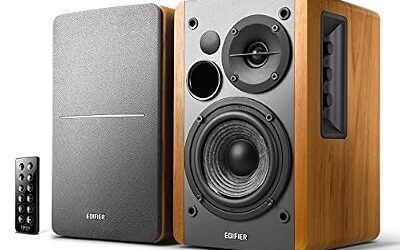
- Edifier R1280T: a powered bookshelf set that is not a true studio monitor but is a value choice for general listening and gaming, according to one roundup.
- Larger Yamaha HS and KRK Rokit models: the 7-inch and 8-inch versions give more bass for bigger rooms.
- Studio headphones: a useful second reference for rooms with poor acoustics.
Frequently Asked Questions
What are the best studio speakers for a beginner?
The JBL 305P MkII and Yamaha HS5 are the models most often recommended in 2026 roundups for beginners. Both are 5-inch active monitors that suit a desk and connect to a basic audio interface. Pick the JBL for a wide sweet spot and the Yamaha for a flatter reference sound.
Are studio monitors good for gaming and music listening?
Studio monitors work well for gaming and music if you like a neutral sound, because they show detail without boosting bass. They can sound plainer than consumer speakers at first. You also need an input they accept, such as a balanced interface or an RCA adapter cable.
Do I need a subwoofer with 5-inch studio monitors?
You do not need a subwoofer for most mixing, but a 5-inch woofer has limited deep bass. If you work with bass-heavy music or want more low-end impact for games and films, a subwoofer or a larger monitor adds low end. Use headphones or a second reference to check low-end balance.
Can I connect studio monitors to a laptop without an interface?
You can connect through a 3.5 mm to RCA or TRS cable from the headphone jack. This is an unbalanced connection and may pick up noise from the computer. A small audio interface or USB digital-to-analog converter usually gives cleaner sound.
How far should I sit from nearfield monitors?
Nearfield monitors work best at roughly an arm’s length or a little more, forming an equilateral triangle with your head. Closer or farther changes the balance between direct sound and room reflections. Consult the maker’s manual for recommended placement.
Are USB monitor speakers better than regular studio monitors?
USB monitor speakers are simpler because they connect directly to a computer, but they usually offer fewer input choices. Traditional studio monitors with balanced inputs fit more setups and work with audio interfaces. Choose based on whether you want plug-and-play convenience or flexibility.