🛒 Best Price Today on Amazon
Prime members get fast, free shipping on everything above, plus member-only deals. New members get a 30-day free trial — cancel anytime.
- Best VR Headsets for Steam Compared
- Meta Quest 3 – Best Overall VR Headset for Steam
- Pimax Crystal Light – Best for Visual Clarity
- HTC VIVE Focus Vision – Best Hybrid PCVR Headset
- PICO 4 Ultra – Best Wireless Alternative
- Meta Quest 3S – Best Budget VR Headset for Steam
- How to Choose the Best VR Headset for Steam
- FAQ
- Conclusion

Valve Index VR Full Kit
Included for 'Best VR Headset for Steam: Top SteamVR Picks for PC Gaming' as a relevant option in this category; details come from the product listing.
View on Amazon
Pimax Crystal Super VR Headset, 3840x3840 per Eye, Ultrawide, 140° FOV, Eye- Tracking, Ultra-Sharp for Flight & Racing Simulators & Gaming, DP Connection with PC
Included for 'Best VR Headset for Steam: Top SteamVR Picks for PC Gaming' because the listing specifies 3840x3840 per Eye and Ultrawide, details this guide uses to compare options.
View on Amazon
HTC Vive Focus Vision — Mixed Reality and PC VR Headset + Controllers — Consumer Edition
Included for 'Best VR Headset for Steam: Top SteamVR Picks for PC Gaming' as a relevant option in this category; details come from the product listing.
View on Amazon
Meta Quest 3 512GB, VR Without Wires, Gorilla Tag Cardboard Monkenaut Bundle, Amazon Exclusive, 3-Month Trial of Meta Horizon+ Included
Included for 'Best VR Headset for Steam: Top SteamVR Picks for PC Gaming' because the listing specifies VR Without Wires and Gorilla Tag Cardboard Monkenaut Bundle, details this guide uses to compare options.
View on AmazonThe best VR headset for Steam should make SteamVR feel responsive, sharp, and comfortable without creating unnecessary setup friction. Some headsets connect directly through DisplayPort, while others stream wirelessly through
Best VR Headsets for Steam Compared
| VR Headset | Best For | Resolution Per Eye | Refresh Rate | SteamVR Connection |
|---|---|---|---|---|
| Meta Quest 3 | Best Overall | 2064 × 2208 | Up to 120Hz | Steam Link / PC streaming |
| Pimax Crystal Light | Best Visual Clarity | 2880 × 2880 | 72/90/120Hz | DisplayPort 1.4a |
| HTC VIVE Focus Vision | Best Hybrid PCVR | 2448 × 2448 | 90Hz / 120Hz DP beta | Steam Link / USB / DisplayPort |
| PICO 4 Ultra | Best Wireless Alternative | 2160 × 2160 | Up to 90Hz | Steam Link |
| Meta Quest 3S | Best Budget Choice | 1832 × 1920 | Up to 120Hz | Steam Link |
Meta Quest 3 – Best Overall VR Headset for Steam
Best For: Most SteamVR players who want wireless freedom, strong optics, and easy setup
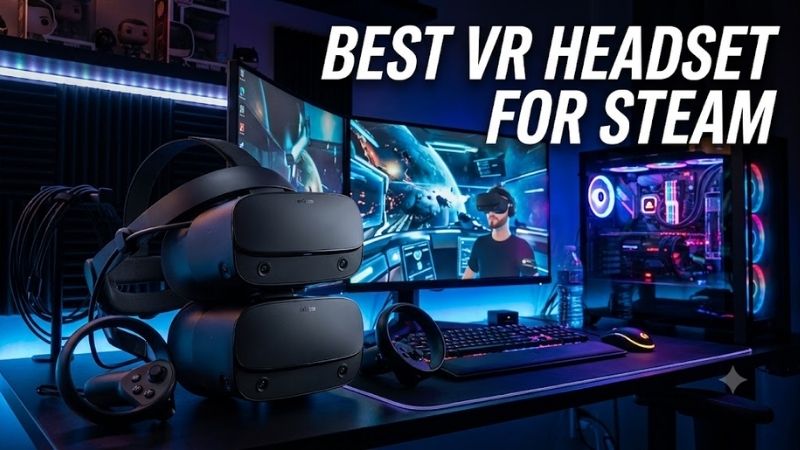
Meta Quest 3 is the most balanced SteamVR option for many players because it combines pancake lenses, solid resolution, inside-out tracking, and official Steam Link support. Meta lists 2064 x 2208 pixels per eye, a 110-degree horizontal field of view, and a display capable of refresh rates up to 120Hz in normal consumer use.
For Steam gaming, Quest 3 can connect wirelessly through Valve’s Steam Link app, provided the PC runs Steam and SteamVR on the same network. Valve recommends Wi-Fi 6 or Wi-Fi 6E and a wired connection from the gaming PC to the router. That setup reduces extra cables around the play space while keeping access to a large Steam library.
Key Features
- 2064 × 2208 pixels per eye
- LCD display
- Pancake optics
- 110° horizontal field of view
- Up to 120Hz standard refresh rate
- Snapdragon XR2 Gen 2
- 8GB memory
- Wi-Fi 6E
- Inside-out head and hand tracking
- Official Steam Link support
What Makes It Different
Quest 3 uses pancake optics, which improve edge-to-edge clarity compared with older Fresnel designs and make it easier to glance around a scene without constantly turning your entire head. The headset also works as a standalone system, so buying it for SteamVR does not prevent you from using native Quest software when the PC is turned off.
The main limitation is that wireless PCVR uses video compression rather than a native DisplayPort signal. A strong network can produce an excellent experience, but visual quality and latency still depend on encoding, router placement, and interference. Players who demand an uncompromised wired image for simulation may prefer a dedicated DisplayPort headset.
Pros
- Excellent pancake optics
- Official Steam Link support
- No base stations required
- Wireless PCVR
- Strong standalone ecosystem
- Wide 110-degree horizontal FOV
- Wi-Fi 6E support
- Easy room-scale setup
Cons
- Wireless PCVR uses compressed video
- Battery management is required
- No native DisplayPort input
- Visual quality depends partly on network performance
Use Case
Quest 3 works particularly well for room-scale SteamVR games where freedom of movement matters. Titles such as Half-Life: Alyx, rhythm games, shooters, and social VR benefit from avoiding a cable behind the player. It also remains practical for seated games when you value simplicity more than squeezing every possible pixel from a high-end GPU.
Who It’s For
Choose Quest 3 if you want one headset that can handle SteamVR, standalone games, room-scale play, and mixed reality without external base stations. It is especially practical for general PC gaming. Simulation users should weigh its flexibility against the cleaner native signal and higher resolution offered by dedicated wired PCVR hardware.
Pimax Crystal Light – Best for Visual Clarity
Best For: Flight simulators, racing simulators, and detail-focused wired PCVR
Pimax Crystal Light is built for players who put PCVR image clarity ahead of wireless freedom. It uses dual 2880 x 2880 QLED panels with MiniLED local dimming, glass aspheric lenses, and a native DisplayPort 1.4a connection. Pimax lists a 110-degree horizontal field of view, 35 pixels per degree, and 72, 90, or 120Hz modes.
The direct DisplayPort connection is its defining advantage for SteamVR. Instead of encoding the PC image into a compressed video stream, the headset receives a native PC display signal. That makes Crystal Light especially attractive for cockpit games where small gauges, distant track details, and text clarity can matter more than untethered room-scale freedom.
Key Features
- 2880 × 2880 resolution per eye
- QLED panels with MiniLED local dimming
- Glass aspheric lenses
- 35 PPD
- 110° horizontal FOV
- 72Hz, 90Hz, and 120Hz modes
- DisplayPort 1.4a
- USB 3.0
- Four-camera inside-out tracking
- 58–72mm IPD range
What Makes It Different
Inside-out tracking uses four cameras, so the standard setup does not require SteamVR base stations. That keeps installation simpler than lighthouse-based systems while preserving a dedicated PCVR workflow. Pimax also positions Crystal Light heavily toward Microsoft Flight Simulator, DCS, iRacing, and other detail-sensitive simulation experiences.
Its trade-offs are weight and specialization. Pimax lists the headset at 815g, which is substantially heavier than lightweight standalone headsets, and there is no eye tracking on Crystal Light. The high display resolution also places serious demands on the graphics card, especially when a game is rendered near native resolution at high refresh rates.
Pros
- Extremely high per-eye resolution
- Native DisplayPort connection
- No wireless compression
- 35 PPD
- Local dimming
- Inside-out tracking
- 120Hz option
- Strong fit for simulations
Cons
- Heavy at 815g
- No eye tracking
- Requires a powerful gaming PC
- Wired-only focus
- Less convenient for active room-scale play
Use Case
Crystal Light is particularly well suited to racing rigs and flight-simulation cockpits where the player remains seated and can route the DisplayPort cable safely. Reading gauges, identifying braking markers, and seeing distant scenery clearly are more important in those scenarios than being able to walk freely around a large room without wires.
Who It’s For
Choose Crystal Light if you already own a powerful gaming PC and want SteamVR primarily for seated simulation, racing, or high-detail PCVR. It is less appealing when you value wireless movement, standalone apps, or simple travel use. Its strength is a focused PC connection built around sharp visuals rather than an all-purpose headset ecosystem.
HTC VIVE Focus Vision – Best Hybrid PCVR Headset
Best For: Players who want wireless SteamVR and an optional direct DisplayPort mode
HTC VIVE Focus Vision takes a hybrid approach by supporting standalone use, wireless PCVR, USB streaming, and an optional DisplayPort mode. HTC uses dual 2448 x 2448 LCD panels, lists up to a 120-degree field of view, and supports 120Hz operation in DisplayPort mode as a beta feature, while standard operation is centered on 90Hz.
Valve officially lists VIVE Focus Vision as a supported Steam Link headset, so wireless access to SteamVR does not require an unofficial streaming application. HTC also offers VIVE Streaming. For players who later want a direct PC path, HTC’s wired kit adds DisplayPort support rather than forcing the headset to remain wireless forever.
Key Features
- 2448 × 2448 pixels per eye
- Dual LCD panels
- Up to 120° field of view
- 90Hz standard operation
- 120Hz DisplayPort mode in beta
- Eye tracking
- Automatic IPD adjustment
- Wi-Fi 6 / 6E
- Removable battery
- Steam Link support
- Optional DisplayPort kit
What Makes It Different
The headset includes eye tracking with automatic IPD adjustment from 57 to 72mm, four tracking cameras, stereo color passthrough cameras, and a depth sensor. Those features make it more versatile than a basic PC-only headset. HTC also uses a removable battery, with a reserve battery designed to keep the system alive briefly during a hot swap.
The drawback is that its strongest wired PCVR mode requires additional hardware. HTC’s DisplayPort workflow needs the compatible Wired Streaming Kit, which adds cost and more cabling. The headset is therefore most compelling for users who genuinely want both standalone flexibility and a higher-quality wired path instead of buying a headset for only one mode.
Pros
- Wireless Steam Link support
- Optional DisplayPort mode
- Eye tracking
- Automatic IPD adjustment
- Swappable battery
- Color passthrough
- Inside-out tracking
- Up to 120° FOV
Cons
- DisplayPort requires extra hardware
- More complex than Quest 3
- Battery lasts about two hours
- Premium feature set can be excessive for simple SteamVR use
Use Case
Focus Vision makes sense if your VR habits change depending on the game. You can play active room-scale titles wirelessly through Steam Link, then use the wired DisplayPort kit for a seated game where image quality and response consistency matter more. The removable battery also supports longer standalone or wireless sessions with spare batteries.
Who It’s For
Choose VIVE Focus Vision if you want SteamVR wireless today but expect to experiment with DisplayPort, eye tracking, mixed reality, or extended PCVR sessions later. Buyers who only want inexpensive wireless Steam gaming may find Quest 3 simpler, while pure simulator users may prefer Pimax’s higher resolution and direct PCVR focus.
PICO 4 Ultra – Best Wireless Alternative
Best For: Wireless SteamVR players who prefer PICO’s balanced headset design
PICO 4 Ultra is another officially supported Steam Link headset and offers a balanced design with the battery positioned at the rear. PICO specifies 2160 x 2160 resolution per eye and a refresh rate up to 90Hz. It uses Qualcomm’s Snapdragon XR2 Gen 2 platform with 12GB of memory, giving it substantial standalone capability outside PCVR.
For Steam, the important feature is official Steam Link support rather than raw standalone performance. Valve lists PICO 4 Ultra among compatible devices and recommends Wi-Fi 6 or Wi-Fi 6E for the best wireless experience. A wired Ethernet connection between the PC and router is also recommended so the wireless hop is limited mainly to the headset.
Key Features
- 2160 × 2160 resolution per eye
- Up to 90Hz refresh rate
- Pancake optics
- Snapdragon XR2 Gen 2
- 12GB memory
- Balanced rear-battery design
- Inside-out 6DoF tracking
- Official Steam Link support
- Wireless PCVR
- Standalone VR and MR capability
What Makes It Different
PICO’s balanced front-and-rear weight distribution can make long sessions feel different from headsets that place most hardware toward the face. The front section weighs 304g and the rear 276g according to PICO. That arrangement can reduce the forward-heavy sensation that some players notice during longer room-scale sessions.
The limitation is ecosystem availability, which varies more by region than Meta’s Quest line. It also tops out at 90Hz rather than targeting the higher refresh modes available on some competitors. Players should treat PICO 4 Ultra as a wireless SteamVR alternative rather than assuming it wins every specification comparison against Quest or dedicated PCVR hardware.
Pros
- Official Steam Link support
- Pancake lenses
- Balanced weight distribution
- 2160 × 2160 per eye
- 12GB memory
- Inside-out tracking
- Standalone capability
- Wireless SteamVR
Cons
- Maximum refresh rate is 90Hz
- Regional availability varies
- Accessory ecosystem is smaller than Quest
- Wireless PCVR still depends on network quality
Use Case
PICO 4 Ultra works well for room-scale SteamVR, social experiences, rhythm games, fitness titles, and shooters where a cable would restrict movement. Its rear-mounted battery helps counterbalance the front hardware, making it an interesting choice for players who prioritize physical balance and wireless freedom over the highest possible display refresh rate.
Who It’s For
Choose PICO 4 Ultra if it is officially sold and supported in your region and you want wireless SteamVR with a balanced headset design. It is particularly attractive for active play. Buyers should compare local warranty, accessory availability, and Steam Link support before making it the center of a long-term PCVR setup.
Meta Quest 3S – Best Budget VR Headset for Steam
Best For: Entry-level SteamVR users who prioritize price over premium optics
Meta Quest 3S is the budget-focused SteamVR choice because Valve officially supports it through Steam Link and it shares Meta’s current standalone software platform. It uses the same Snapdragon XR2 Gen 2 generation as Quest 3, but its display and optics are less advanced. For PCVR, responsive streaming is possible while visual clarity remains the main compromise.
Quest 3S uses 1832 x 1920 pixels per eye and a narrower field of view than Quest 3. It also relies on a different optical design rather than Quest 3’s premium pancake setup. Those differences matter in SteamVR because cockpit text, distant details, and peripheral clarity can expose optical limitations during longer gaming sessions.
Key Features
- 1832 × 1920 pixels per eye
- Up to 120Hz
- Snapdragon XR2 Gen 2
- 8GB memory
- Inside-out tracking
- Touch Plus controllers
- Steam Link support
- Standalone gaming
- Wi-Fi 6E
- Color passthrough
What Makes It Different
The advantage is access. Steam Link provides a direct Valve-supported path from a gaming PC to the headset over the home network, and the same controllers work for room-scale SteamVR interaction. The headset can also run standalone games when away from the PC, giving budget buyers more flexibility than a low-cost wired headset that serves only one purpose.
Its display reaches 1832 x 1920 pixels per eye with a 96-degree horizontal field of view, compared with 2064 x 2208 and 110 degrees on Quest 3. Those differences explain why the cheaper model is better treated as an accessible SteamVR entry point than a direct substitute for Quest 3 when image clarity is a major priority.
Pros
- Lower-cost entry into SteamVR
- Official Steam Link support
- No external base stations
- Wireless PCVR
- Standalone gaming support
- Current XR2 Gen 2 platform
Cons
- Lower-resolution display than Quest 3
- Narrower field of view
- Less advanced optics
- Wireless image remains compressed
Use Case
Quest 3S makes sense when you want to try Half-Life: Alyx, VRChat, Beat Saber, shooters, and other SteamVR titles without committing to expensive PCVR hardware. Its wireless design is especially convenient for active games. Less demanding optics also matter less in games where motion and interaction dominate over reading tiny text.
Who It’s For
Choose Quest 3S if price matters more than premium optics and you primarily want to enter SteamVR without installing base stations or buying dedicated PC-only hardware. If you frequently play flight simulators, racing games, or titles with small interface elements, spending more on Quest 3 or Crystal Light is easier to justify.
How to Choose the Best VR Headset for Steam
Wired vs. Wireless SteamVR
Wireless SteamVR gives you freedom to rotate, crouch, and move around without managing a cable. Valve’s Steam Link supports compatible Meta, HTC, and PICO headsets over the home network. Valve requires at least 5GHz Wi-Fi 5 and recommends Wi-Fi 6 or Wi-Fi 6E, with the gaming PC connected to the router by Ethernet.
Wired DisplayPort headsets avoid video-stream compression and remove the router from the rendering path. This is especially attractive for racing, flight simulation, and other seated experiences where a cable is easy to manage. The trade-off is reduced freedom for room-scale games and a more permanent relationship between the headset and gaming PC.
Resolution and Pixels Per Degree
Resolution tells you how many pixels each panel contains, but pixels per degree can provide better context for perceived detail because it relates resolution to field of view. Pimax rates Crystal Light at 35 PPD, while Meta lists Quest 3 at 25 PPD. Higher clarity can help with cockpit instruments, text, distant objects, and detailed virtual desktops.
Higher resolution also increases GPU requirements. Rendering two high-resolution views at 90 or 120 frames per second can be extremely demanding, particularly in flight simulators or heavily modded games. A headset with impressive panels may therefore require reduced render resolution, upscaling, or lower graphics settings on a midrange gaming PC.
Pancake vs. Aspheric vs. Fresnel Optics
Lens design affects how much of the visible image remains sharp when your eyes move away from the center. Pancake lenses, such as those used by Quest 3 and PICO 4 Ultra, can provide a broad clarity zone in a compact optical system. Pimax instead uses glass aspheric lenses on Crystal Light to emphasize edge-to-edge PCVR clarity.
Fresnel optics can still deliver enjoyable VR but usually require more careful headset positioning to stay inside the visual sweet spot. This becomes noticeable in games where you glance at instruments with your eyes instead of moving your entire head. Optical quality should therefore be considered alongside panel resolution rather than treated as a separate minor specification.
Tracking System
Inside-out tracking uses cameras on the headset to follow the controllers and the player’s movement without external hardware. Quest 3, Crystal Light, Focus Vision, PICO 4 Ultra, and Quest 3S all use variations of this approach, making them easier to set up in bedrooms, offices, and shared spaces than older lighthouse-dependent systems.
SteamVR base-station tracking remains useful for specialized setups and accessories, but it adds hardware around the room. For most new SteamVR users, modern inside-out tracking provides a better balance of convenience and performance. Simulation players using wheels, HOTAS controls, or gamepads also depend less heavily on controller tracking.
Refresh Rate
Higher refresh rates can improve motion smoothness and reduce perceived judder, but the PC must still generate frames quickly enough to make use of them. Quest 3 supports high refresh modes, Crystal Light offers up to 120Hz, and VIVE Focus Vision is testing 120Hz through DisplayPort. PICO 4 Ultra reaches up to 90Hz.
A stable 90Hz experience is often better than selecting 120Hz and forcing the PC into repeated reprojection. The right target depends on the game and GPU. Competitive or rhythm games may benefit from higher refresh, while visually demanding simulators can be more practical at a lower refresh rate with increased rendering detail.
PC and Network Requirements
SteamVR performance depends heavily on the gaming PC. Valve’s Steam Link minimum list includes a GTX 970-class NVIDIA GPU or supported AMD hardware, while the recommendation moves to an RTX 2070-class NVIDIA GPU and 16GB of RAM. Modern high-resolution VR games may require considerably more power for high settings.
Wireless users should also treat the network as part of the VR system. Put the router near the play area, use a clean 5GHz or 6GHz band where possible, and connect the PC through Ethernet. A powerful GPU cannot eliminate wireless latency or compression artifacts caused by a congested network or poor router placement.
FAQ
What Is the Best VR Headset for SteamVR?
Meta Quest 3 offers the most flexible balance for general SteamVR because Valve officially supports it through Steam Link, while its pancake optics and inside-out tracking keep setup straightforward. Pimax Crystal Light is more specialized and makes greater sense when native DisplayPort image clarity is the highest priority.
Can Meta Quest 3 Play Steam Games?
Yes. Valve officially supports Meta Quest 3 through the Steam Link app. The gaming PC must run Steam and SteamVR, and the headset connects over the local network. Valve recommends Wi-Fi 6 or Wi-Fi 6E for better wireless performance and recommends connecting the gaming PC to the router with Ethernet.
Is DisplayPort Better Than Wireless for SteamVR?
DisplayPort avoids the video compression required when PCVR is streamed wirelessly, so it can provide cleaner image quality and consistent latency. Wireless SteamVR provides much greater freedom of movement. Which is better depends on whether your priority is unrestricted room-scale play or maximum visual fidelity for seated PCVR.
Do I Need SteamVR Base Stations?
Not with the headsets in this roundup. Quest 3, Pimax Crystal Light, VIVE Focus Vision, PICO 4 Ultra, and Quest 3S can use inside-out tracking. Base stations remain relevant for lighthouse-based headsets, specialized controllers, and some tracking accessories, but they are no longer mandatory for entering SteamVR.
What GPU Do I Need for SteamVR?
Requirements vary greatly by headset and game. Valve lists relatively modest minimum hardware for Steam Link, but high-resolution headsets such as Crystal Light can place much heavier demands on the GPU. Flight simulators, racing simulators, supersampling, and high refresh rates can justify a modern high-end graphics card.
Is Steam Link Good Enough for VR Gaming?
Steam Link can provide a strong wireless PCVR experience when the PC and network meet Valve’s recommendations. Quality depends on the router, wireless interference, encoding performance, and headset. Users sensitive to compression or pursuing maximum simulator clarity may still prefer a direct DisplayPort connection instead.
Conclusion
The best VR headset for Steam depends on how you want to play. Meta Quest 3 offers the strongest overall balance, Pimax Crystal Light targets maximum wired clarity, VIVE Focus Vision combines wireless and DisplayPort options, PICO 4 Ultra offers balanced wireless PCVR, and Quest 3S provides a cheaper entry into SteamVR.