🛒 Best Price Today on Amazon
Prime members get fast, free shipping on everything above, plus member-only deals. New members get a 30-day free trial — cancel anytime.

Pimax Crystal Super VR Headset, 3840x3840 per Eye, Ultrawide, 140° FOV, Eye- Tracking, Ultra-Sharp for Flight & Racing Simulators & Gaming, DP Connection with PC
Included for 'Best VR Headset for PC Gaming for Immersive PCVR Play' because the listing specifies 3840x3840 per Eye and Ultrawide, details this guide uses to compare options.
View on Amazon
Oculus Rift S PC-Powered VR Gaming Headset
Included for 'Best VR Headset for PC Gaming for Immersive PCVR Play' as a relevant option in this category; details come from the product listing.
View on Amazon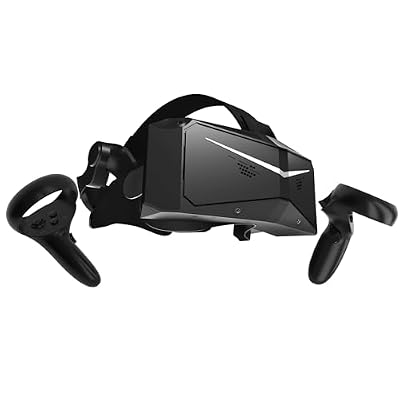
Pimax Crystal Light VR Headset for PC, 2880x2880 per Eye, 8K QLED Display with Local-Dimming, Inside-Out Tracking, PC VR Headset for Flight Sims, iRacing & Gaming (Full Payment Version)
Included for 'Best VR Headset for PC Gaming for Immersive PCVR Play' because the listing specifies 2880x2880 per Eye and 8K QLED Display with Local-Dimming, details this guide uses to compare options.
View on AmazonThe best VR headset for PC gaming should balance visual clarity, tracking, comfort, refresh rate, and the performance demands placed on your graphics card. Some headsets prioritize wireless freedom, while dedicated PCVR models use DisplayPort to avoid compression and extract maximum detail from powerful gaming PCs.
Best VR Headsets for PC Gaming at a Glance
| VR Headset | Best For | Resolution Per Eye | Main Strength |
|---|---|---|---|
| Meta Quest 3 | Most PC gamers | 2064 × 2208 | Wireless PCVR and standalone versatility |
| Pimax Crystal Light | Simulation and visual clarity | 2880 × 2880 | High-resolution native DisplayPort |
| Bigscreen Beyond 2 | Lightweight premium PCVR | 2560 × 2560 | Extremely light headset design |
| HTC VIVE Focus Vision | Hybrid premium PCVR | 2448 × 2448 | DisplayPort, eye tracking, standalone use |
| PlayStation VR2 with PC Adapter | OLED PCVR gaming | 2000 × 2040 | OLED contrast and strong value |
1. Meta Quest 3
Best For: Most PC gamers who want wired and wireless flexibility
Meta Quest 3 is one of the most versatile choices for PC gaming because it can operate as both a standalone headset and a PCVR device. Gamers can connect to a computer through a compatible USB cable or stream PC games wirelessly, making it easier to move freely without a dedicated DisplayPort cable trailing across the room.
Its pancake lenses are one of the strongest reasons to consider Quest 3 over older Fresnel-based headsets. They provide a comparatively large clear viewing area, so users do not need to position the headset as precisely to keep text and game interfaces sharp. This is particularly useful in cockpit games and desktop-style VR applications.
The display uses 2064 × 2208 pixels per eye, delivering enough detail for mainstream PCVR while avoiding the extreme GPU load imposed by much higher-resolution headsets. That balance matters for users with midrange graphics cards because VR requires the computer to render separate high-frame-rate views for both eyes simultaneously.
Wireless PCVR is a major advantage when playing room-scale games such as shooters, rhythm titles, and action experiences. Image compression and network latency still exist, so a dedicated Wi-Fi setup helps. Sim racers and flight-sim players who remain seated may care less about wireless freedom and more about uncompressed DisplayPort output.
Key Features
- 2064 × 2208 resolution per eye
- Pancake lens design
- Standalone VR functionality
- USB PCVR support
- Wireless PCVR streaming
- Inside-out controller tracking
- Color mixed-reality passthrough
- Broad SteamVR compatibility through PC connection
What Makes It Different
Quest 3 does not force users to choose between standalone VR and computer gaming. The same headset can handle casual wireless titles without a PC and then connect to a gaming desktop for demanding SteamVR experiences. This makes it particularly useful for first-time VR buyers who want access to several types of content.
Pros
- Wireless PCVR option
- Excellent pancake optics
- Standalone gaming support
- No external tracking stations required
- Large software ecosystem
- Relatively manageable PC performance requirements
Cons
- PC image is streamed rather than native DisplayPort
- Wireless quality depends on network conditions
- Battery limits untethered sessions
- Head strap upgrades may improve comfort
Use Case: Half-Life: Alyx, room-scale games, Beat Saber, wireless SteamVR, mixed reality, and users who also want standalone VR.
Who It’s For: PC gamers who want the most flexible combination of convenience, image quality, wireless movement, and software compatibility.
2. Pimax Crystal Light
Best For: Sim racing and flight simulation
Pimax Crystal Light is aimed much more directly at dedicated PCVR users. Each eye receives a 2880 × 2880 QLED image through glass aspheric lenses, producing significantly higher visual density than mainstream standalone headsets. That extra clarity is especially valuable when reading cockpit gauges or spotting distant objects.
Its DisplayPort 1.4 connection sends the image directly from the graphics card rather than relying on the compressed video streaming commonly used by standalone-derived PCVR headsets. This gives simulation enthusiasts a clearer path from GPU output to the headset, although the high rendering resolution also demands substantially stronger hardware.
The Crystal Light supports 72, 90, and 120 Hz modes and provides a 110-degree horizontal field of view. Inside-out tracking uses four cameras, meaning users can run the headset without installing base stations. An optional Lighthouse solution remains available for enthusiasts building more specialized SteamVR tracking systems.
At 815 grams, the headset is substantially heavier than lightweight PCVR alternatives. That weight is an important trade-off because simulation sessions can last several hours. Players should consider facial fit and head support alongside image quality rather than assuming the sharpest display will automatically produce the best long-session experience.
Key Features
- 2880 × 2880 resolution per eye
- QLED display technology
- Glass aspheric lenses
- 72, 90, and 120 Hz refresh modes
- 110-degree horizontal field of view
- Native DisplayPort 1.4 connection
- Four-camera inside-out tracking
- 58–72 mm manual IPD adjustment
- 815 g headset weight
What Makes It Different
Crystal Light concentrates resources on the parts simulation enthusiasts care about most: native PC connectivity, high pixel density, and strong cockpit readability. It removes some of the standalone and eye-tracking hardware found in more expensive headsets, creating a more focused option for users who mainly play from a high-end PC.
Pros
- Excellent visual clarity
- Native DisplayPort connection
- High-resolution panels
- Up to 120 Hz
- Inside-out tracking
- Particularly strong for simulators
Cons
- Heavy headset
- Demands a powerful GPU
- No built-in eye tracking
- Less convenient than wireless VR
Use Case: Microsoft Flight Simulator, DCS, iRacing, Assetto Corsa, Elite Dangerous, and other seated simulation games.
Who It’s For: Enthusiasts who prioritize cockpit readability and image clarity over wireless freedom or standalone functionality.
3. Bigscreen Beyond 2
Best For: Premium lightweight PCVR
Bigscreen Beyond 2 takes the opposite approach from large all-in-one headsets. The headset itself weighs only 107 grams, making it dramatically lighter than most mainstream PCVR devices. That low mass can reduce facial and neck fatigue during extended VR sessions, although the complete setup requires separate tracking hardware and controllers.
Each eye receives a 2560 × 2560 image, while refresh-rate choices include 75 and 90 Hz. Bigscreen specifies a horizontal field of view around 108 degrees and uses SteamVR tracking. The headset therefore integrates naturally with Lighthouse base stations and compatible SteamVR controllers rather than relying on onboard camera tracking.
The dedicated DisplayPort-based PC connection avoids the wireless compression involved with hybrid standalone headsets. It also means Beyond 2 is firmly a PCVR product rather than a device for standalone games. Users need a Windows gaming computer, base stations, and appropriate controllers before the system becomes a complete VR setup.
Comfort is the primary reason to accept that additional complexity. Heavy front-loaded headsets can become tiring even when their specifications look impressive, while the Beyond design places very little mass on the face. For enthusiasts who already own SteamVR tracking hardware, the upgrade path can be particularly attractive.
Key Features
- 2560 × 2560 resolution per eye
- 75 Hz and 90 Hz refresh modes
- 108-degree horizontal field of view
- 107 g headset-only weight
- SteamVR Lighthouse tracking
- DisplayPort 1.4 connection
- Adjustable IPD
- Five-meter fiber-optic cable
- Built-in stereo microphones
What Makes It Different
Beyond 2 is defined by physical size and weight rather than by standalone features. At only 107 grams for the headset itself, it removes much of the bulk associated with batteries, processors, tracking cameras, and other onboard hardware. The result is a specialist PCVR headset designed around comfort and dedicated desktop performance.
Pros
- Extremely low headset weight
- High-resolution display
- Dedicated PCVR connection
- SteamVR tracking compatibility
- Compact physical design
- Good choice for long sessions
Cons
- Base stations required
- Controllers purchased separately
- No standalone operation
- More expensive complete ecosystem
Use Case: Long VR sessions, VRChat, simulation, room-scale SteamVR gaming, and existing Lighthouse-based installations.
Who It’s For: Experienced PCVR users who already own tracking equipment or prioritize headset comfort enough to build a dedicated SteamVR system.
4. HTC VIVE Focus Vision
Best For: Hybrid PCVR, social VR, and advanced tracking
HTC VIVE Focus Vision combines standalone functionality with multiple ways to connect to a gaming computer. It supports wireless PC streaming, USB connectivity, and a DisplayPort mode through compatible wired hardware. That last option is particularly valuable to PC gamers who want a direct high-quality connection rather than compressed wireless video.
The dual LCD displays provide 2448 × 2448 pixels per eye, while field of view reaches up to 120 degrees. DisplayPort mode also supports up to 120 Hz in beta, giving the headset meaningful performance headroom when paired with a powerful GPU capable of sustaining high VR frame rates.
Built-in eye tracking operates at 120 Hz and automatically adjusts IPD across a supported 57–72 mm range. Eye tracking can also support compatible foveated-rendering implementations, concentrating rendering resources where the user is looking. Actual benefits depend on the game or application supporting the relevant feature.
The headset includes full-color passthrough cameras, a depth sensor, hand tracking, and support for additional body and face-tracking accessories. These features make it especially relevant to VRChat and mixed-reality users. Pure sim racers may find much of this hardware unnecessary compared with a simpler dedicated PCVR headset.
Key Features
- 2448 × 2448 resolution per eye
- Up to 120-degree field of view
- Up to 120 Hz in DisplayPort mode
- Built-in eye tracking
- Automatic IPD adjustment
- Full-color stereo passthrough
- Inside-out tracking
- Wi-Fi 6 and 6E support
- DisplayPort PCVR option
- Hot-swappable rear battery
What Makes It Different
VIVE Focus Vision combines advanced social and mixed-reality tracking with serious PC connectivity. Users can move between standalone content, wireless PCVR, and a DisplayPort-based setup while retaining integrated eye tracking and expandable body-tracking support, making it more flexible than most dedicated simulation-focused headsets.
Pros
- Direct DisplayPort PC option
- High-resolution displays
- Eye tracking
- Wide field of view
- Standalone and wireless modes
- Expandable tracking ecosystem
Cons
- More expensive and complex than basic PCVR
- Around two hours of standalone battery life
- DisplayPort equipment may require additional hardware
- Advanced tracking features are unnecessary for some games
Use Case: VRChat, social VR, SteamVR, mixed reality, room-scale gaming, creative work, and players who want both standalone and premium PC connectivity.
Who It’s For: Enthusiasts who want one headset to cover gaming, social VR, mixed reality, and advanced tracking rather than buying a PC-only device.
5. PlayStation VR2 With PC Adapter
Best For: OLED PCVR at a more accessible level
PlayStation VR2 can also be used for PC gaming through Sony’s official PC adapter and the required PC software. This gives computer users access to its OLED display hardware and Sense controllers without purchasing a PlayStation exclusively for VR, although several PS5-specific features are reduced or unavailable on PC.
Each eye receives a 2000 × 2040 OLED image, giving PS VR2 one important advantage over common LCD headsets: deep black levels and strong contrast. Dark horror environments, night scenes, and space games can therefore feel particularly convincing because black areas are not illuminated in the same way as conventional LCD panels.
The headset supports high-refresh-rate operation and a roughly 110-degree field of view, while inside-out cameras handle tracking without Lighthouse base stations. Fresnel lenses create a smaller clarity sweet spot than modern pancake optics, so correct headset positioning matters more than on something like Meta Quest 3.
PC users should understand that eye tracking, headset feedback, adaptive triggers, and HDR functionality are not all available in the same way as when PS VR2 is connected to a PlayStation 5. The PC experience should therefore be evaluated around its display, tracking, controllers, and SteamVR access rather than its complete PS5 feature set.
Key Features
- 2000 × 2040 OLED resolution per eye
- OLED display panels
- Approximately 110-degree field of view
- Inside-out tracking
- PlayStation VR2 Sense controllers
- Official PC adapter support
- SteamVR compatibility
- Fresnel lenses
- Wired PC connection
What Makes It Different
PS VR2 is one of the more accessible ways to get OLED contrast in a modern PCVR system. While its PC implementation does not carry over every PlayStation-specific capability, the combination of OLED panels, tracked controllers, and official SteamVR support gives existing PS VR2 owners a particularly useful second platform.
Pros
- OLED black levels and contrast
- Official PC support
- No external base stations
- Strong controller design
- Good option for existing PS VR2 owners
- SteamVR access
Cons
- PC adapter required
- Fresnel lens sweet spot is smaller
- Some PS5 headset features are unavailable on PC
- Wired-only PCVR experience
Use Case: Horror games, Half-Life: Alyx, SteamVR, dark cinematic games, and users who already own a PlayStation VR2 headset.
Who It’s For: Gamers who value OLED contrast or already own PS VR2 and want to expand into PCVR without buying another complete headset.
How to Choose the Best VR Headset for PC Gaming
Match Resolution to Your GPU
Higher resolution improves text clarity and distant detail, but every increase also adds rendering load. VR must generate separate images for both eyes at high frame rates, so a 2880 × 2880-per-eye headset demands much more GPU performance than a mainstream device. Simulation users should budget for graphics hardware accordingly.
DisplayPort vs Streaming
Native DisplayPort sends the PC’s video output directly to compatible headsets, avoiding the compression required by USB or wireless video streaming. This can improve clarity and consistency. Wireless streaming provides freedom from cables, making it more attractive for room-scale games where physical movement matters more.
Pancake, Aspheric, and Fresnel Lenses
Lens design affects clarity across the field of view as much as display resolution does. Pancake lenses provide broad visual clarity in compact headsets, aspheric lenses can deliver excellent sharpness, and Fresnel designs are cheaper but usually have a smaller sweet spot. Resolution alone cannot describe how clear a headset feels.
Tracking Requirements
Inside-out tracking uses cameras on the headset and requires little room preparation. Lighthouse tracking adds external base stations but can provide highly consistent controller tracking for dedicated VR installations. Users who already own SteamVR base stations may find specialist headsets easier to justify than first-time VR buyers.
Refresh Rate
Ninety hertz is a practical target for many PCVR games, while 120 Hz can make head movement feel smoother when the GPU can maintain the required frame rate. Higher refresh rates increase performance demands considerably. A stable 90 fps experience is usually preferable to selecting 120 Hz and relying on constant reprojection.
Consider Headset Weight
A specification sheet cannot fully predict comfort, but weight matters during long sessions. Large headsets place more stress on the neck and face unless their weight distribution is excellent. Ultra-light headsets sacrifice standalone hardware and onboard tracking to reduce mass, so comfort and convenience often pull in opposite directions.
Think About Your Main Games
Flight and racing simulators benefit heavily from high resolution because players constantly read gauges and look toward distant objects. Room-scale action games benefit more from wireless freedom and simple tracking. VRChat users may prioritize eye and body tracking, while horror games can gain noticeably from OLED contrast.
FAQ
What Is the Best Type of VR Headset for PC Gaming?
The right type depends on how you play. Wireless hybrid headsets are convenient for room-scale gaming, while DisplayPort PCVR models emphasize image fidelity and consistent latency. Simulation enthusiasts often benefit from high-resolution wired headsets, whereas general users may prefer standalone devices that also support SteamVR.
Do I Need a Powerful GPU for PCVR?
Yes, especially for high-resolution headsets. VR renders separate views for each eye and targets high, consistent frame rates to maintain comfortable motion. Lower-resolution devices can work with more modest hardware, while headsets such as Pimax Crystal Light benefit significantly from modern high-end graphics cards.
Is Wireless VR Good Enough for PC Gaming?
Wireless PCVR can work extremely well when the network is configured properly. A wired Ethernet connection from the PC to the router and strong nearby Wi-Fi generally improve consistency. Compression and latency still exist, so serious simulation users may prefer native DisplayPort while room-scale players may value wireless freedom more.
Is Meta Quest 3 Good for SteamVR?
Yes. Quest 3 can access PCVR content through wired or wireless streaming and is widely used with SteamVR. Its main trade-off is that the PC image is encoded and streamed rather than delivered through a native DisplayPort input. For many gamers, convenience outweighs the small fidelity loss compared with dedicated PCVR hardware.
Is High Resolution Important for Sim Racing?
Yes. High resolution makes dashboards, braking markers, mirrors, distant cars, cockpit displays, and small text easier to read. It is one reason devices such as Crystal Light are attractive for simulation. The trade-off is significantly greater GPU demand, particularly when targeting high refresh rates and detailed game settings.
Do I Need Base Stations?
Not always. Quest 3, Crystal Light, VIVE Focus Vision, and PS VR2 can use inside-out tracking without external stations. Bigscreen Beyond 2 relies on SteamVR Lighthouse tracking, so base stations are required. Lighthouse systems add setup complexity but remain appealing for enthusiasts who already own compatible controllers and trackers.
Conclusion
The best VR headset for PC gaming depends on whether you prioritize wireless freedom, clarity, comfort, or specialized tracking. Quest 3 offers the easiest all-round route into PCVR, Crystal Light targets high-detail simulators, Beyond 2 emphasizes low weight, Focus Vision adds advanced tracking, and PS VR2 brings OLED contrast to SteamVR.