- Top Pick: Logitech G305 Lightspeed Wireless Gaming Mouse – Black
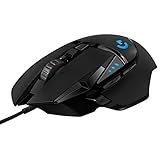
- Best Value: Logitech G203 Wired Gaming Mouse – Black
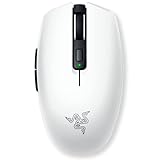
- Premium Choice: Razer Orochi V2 Wireless Gaming Mouse — Ultra Lightweight & Portable, Bluetooth & 2.4Ghz Wireless Connectivity, 18K DPI, Up to 950hrs Battery Life, Compatible with PC & Mac — White
Not every hand fits a full-size rodent, and not every grip style benefits from a large shell. A small gaming mouse delivers the nimble control that claw and fingertip players crave, and it is a genuine ergonomic necessity for gamers with smaller hands. This guide rounds up the best compact gaming mice that pack flagship performance into a pint-sized package.
As an Amazon Associate I earn from qualifying purchases.
A great small gaming mouse combines a compact shell with a top-tier sensor and low weight. Below is a comparison of the standout compact models that prove smaller can be better.
| Product | Key Spec | Best For | Rating |
|---|---|---|---|
| Razer Viper Mini Signature Edition | 49g, 30,000 DPI | Ultralight small pick | |
| Logitech G Pro X Superlight 2 | 60g, 32,000 DPI | Small-to-medium hands | |
| Pulsar X2 Mini | 52g, 26,000 DPI | Symmetrical claw grip | |
| Glorious Model O Minus | 58g, 19,000 DPI | Lightweight value | |
| Razer Viper Mini | 61g, 8,500 DPI | Budget small mouse | |
| Endgame Gear XM1r | 70g, 19,000 DPI | Precision fingertip grip | |
| Cooler Master MM310 | 53g, 12,000 DPI | Affordable compact pick |
🛒 Best Price Today on Amazon
Prime members get fast, free shipping on everything above, plus member-only deals. New members get a 30-day free trial — cancel anytime.
Why a Small Gaming Mouse Improves Control
Mouse size directly affects how you aim. A small gaming mouse sits comfortably under a claw or fingertip grip, letting your fingers do the fine-tuning while your wrist handles the broad strokes. For players with smaller hands, an oversized mouse forces an awkward reach that hurts accuracy, whereas a compact shell keeps every button within easy reach.
Matching Mouse Size to Hand Size
The single most important fit factor is your hand length. If you measure under about 17 centimeters from wrist to fingertip, a small gaming mouse will almost always feel more natural than a full-size model. Compact mice like the Razer Viper Mini and Pulsar X2 Mini are purpose-built for these hands, delivering effortless control.
Grip Styles That Favor Compact Mice
Claw and fingertip grips thrive on smaller mice because they rely on finger movement rather than palm contact. A small gaming mouse gives fingertip players the low, short body they need for rapid micro-adjustments. Palm-grip players with large hands, by contrast, usually prefer bigger shells, so grip style should guide your choice.
Weight and Agility
Small mice are often ultralight by nature, and low weight amplifies their agility. The Razer Viper Mini Signature Edition weighs a staggering 49 grams, letting you flick and reposition with almost no effort. This combination of small size and low mass makes compact mice favorites among competitive shooter players.
Sensor Precision in a Small Body
A compact shell does not mean a compromised sensor. The best small gaming mouse models pack flagship optical sensors capable of tracking at high DPI with pixel precision. The Logitech G Pro X Superlight 2, though technically a medium mouse, suits smaller hands and delivers elite tracking that rivals any full-size competitor.
How to Choose a Small Gaming Mouse
Start by measuring your hand and identifying your grip style. Fingertip and claw grippers with smaller hands should prioritize the most compact options, while those on the border between small and medium may prefer a slightly larger shell like the Superlight 2.
Next, weigh the importance of weight and wireless freedom. If you chase the lightest possible feel, the Viper Mini Signature Edition and Pulsar X2 Mini lead the field. If budget matters more, the Razer Viper Mini and Cooler Master MM310 deliver excellent compact performance affordably.
Finally, consider the sensor and switches. All of these small gaming mouse options offer accurate tracking, so focus on switch durability and button layout. A well-placed side button and crisp main clicks ensure your compact mouse serves you well for years.
Wired Versus Wireless Small Mice
Both connection types have their place. Wired small mice like the Endgame Gear XM1r keep weight down and eliminate charging, while wireless models offer cable-free freedom. Modern wireless small gaming mice match wired latency through dedicated dongles, so the choice comes down to personal preference.
Budget Versus Premium Compact Mice
You can find an excellent small gaming mouse at any price. The Cooler Master MM310 and Razer Viper Mini deliver strong value, while the Viper Mini Signature Edition represents the ultralight premium end. Decide how much weight savings and sensor sophistication justify the cost.
How to Measure Before You Shop
Spec sheets list mouse length, width, and height in millimeters, but the numbers only help if you know your own hand. A two-minute measurement removes most of the guesswork.
- Lay your dominant hand flat on a ruler with the wrist crease at zero, then read the distance to the tip of your middle finger. This is your hand length.
- Measure across the knuckles at the widest point for hand width.
- Note your natural grip: fingertips only, claw (arched fingers, palm resting at the back), or palm.
- Compare the mouse’s listed length with your hand length. Claw and fingertip grips tolerate a mouse that is noticeably shorter than the hand, while palm grips need a longer shell that fills the palm.
- Check the listed weight against your aim style. Fast, flick-heavy players generally prefer lighter shells.
Quick Sizing Reference
| Hand length | Typical fit | Grip it suits |
|---|---|---|
| Under about 17 cm | Compact or ultra-small shell | Fingertip, claw |
| About 17 to 19 cm | Small-to-medium shell | Claw, relaxed palm |
| Over about 19 cm | Medium or full-size shell | Palm, relaxed claw |
These ranges are general guidelines rather than hard rules, and shell shape matters as much as length, so confirm dimensions on the listing.
Common Mistakes
- Choosing by weight alone while ignoring shell length, which leaves the pinky and ring finger cramped or dragging.
- Assuming smaller always means better; a mouse that is too short forces the fingers to curl and can tire the wrist during long sessions.
- Skipping the measurement step and trusting the “small” label, since brands define that word differently.
Troubleshooting a Poor Fit
If the side of your hand aches, the mouse is probably too narrow or too short. If your ring finger drags on the pad, the shell is too long or the sensor sits too far back. Raising or lowering sensitivity will not fix either problem; only a better-matched shell will.
Frequently Asked Questions
Who should use a small gaming mouse?
A small gaming mouse suits players with smaller hands and anyone who uses a claw or fingertip grip. These grips rely on finger movement rather than full palm contact, so a compact shell keeps every button within easy reach and improves control. If a full-size mouse feels bulky or forces an awkward reach, a smaller model will likely aim better.
Are small gaming mice good for competitive gaming?
Absolutely. Many competitive players choose a small gaming mouse for its agility and precision. Compact shells are often ultralight, like the 49-gram Razer Viper Mini Signature Edition, enabling rapid flicks and effortless repositioning. Paired with flagship sensors, small mice deliver the pinpoint accuracy that fast-paced shooters and esports titles demand.
How do I know if a mouse is too big for my hand?
Measure your hand from wrist crease to middle fingertip. If you measure under about 17 centimeters, most full-size mice will feel oversized, and a small gaming mouse will fit more naturally. Signs a mouse is too big include straining to reach buttons, an unstable grip, or hand fatigue during longer gaming sessions.
Do small gaming mice have fewer buttons?
Often, but not always. Compact designs prioritize a clean, lightweight layout, so many small gaming mouse models stick to two side buttons and the essentials. However, plenty of compact mice still offer programmable buttons and DPI toggles. If you need many extra buttons, check the specifications, since some small mice keep the layout minimal.
Can a small gaming mouse be wireless?
Yes. Many of the best small gaming mouse options are wireless, including the Razer Viper Mini Signature Edition and Pulsar X2 Mini. Modern wireless compact mice use dedicated 2.4GHz dongles that match wired latency, so you enjoy cable-free freedom without any performance penalty. Battery life on these efficient mice easily covers days of play.
Complete your setup with our guides on lightweight gaming mice, the best budget wireless gaming mouse, white wireless gaming mice, the lightest gaming headset, white gaming desktops, and lightweight gaming laptops.
As an Amazon Associate we earn from qualifying purchases at no extra cost to you.