- Top Pick: Mikirini 11 in 1 Mobile Phone Game Controller for PUBG/Call of Duty
- Best Value: BIGBIG WON Gaming Triggers, Mobile Game Controller for PUBG/Fornite/Call of Duty Integrated Mobile Triggers Aim Button Shooter Joystick for iPhone and Android Mobile Gaming Trigger Black
- Premium Choice: Android Game Controller Key Mapping Function Wireless Gaming Controller Gamepad for PUBG Mobile, Call of Duty Mobile, Android Phone/Tablet, Samsung, Redmi, Motorola, One+ – Not for iOS/PC (Black)
🛒 Best Price Today on Amazon
Prime members get fast, free shipping on everything above, plus member-only deals. New members get a 30-day free trial — cancel anytime.
- Best Call Of Duty Mobile Controller Support (2026)
- How to Set Up Controller Support in Call of Duty Mobile
- Sensitivity and Button Mapping Tips for Controller Play
- Common Mistakes New Controller Players Make in COD Mobile
- What to Look For When Choosing a COD Mobile Controller
- Which Controller Fits Your Playstyle?
- Common Mistakes When Buying a COD Mobile Controller
- Trigger Stops, Dead Zones, And Stick Drift: What To Check Before Buying
- Stick Drift And Why Analog Stick Technology Matters Over Time
- Android Vs iOS: Controller Compatibility Differences To Know
- Frequently Asked Questions
- Related Articles
- Related Guides
Best Call Of Duty Mobile Controller Support (2026)
Call of Duty Mobile plays beautifully on touch, but a controller transforms aiming, movement, and recoil control into something closer to the console experience. The catch is that Call of Duty Mobile controller support is limited and matchmaking-restricted, so the best controllers are the ones that pair reliably, feel great in your hands, and keep your phone powered and cool. This 2026 roundup ranks the top controllers for COD Mobile and explains how support actually works before you buy.
As an Amazon Associate I earn from qualifying purchases.
As an Amazon Associate we earn from qualifying purchases at no extra cost to you.

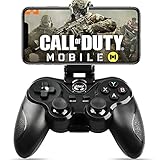

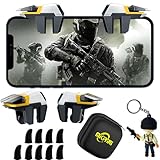
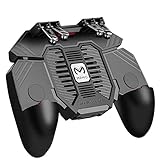


How Call Of Duty Mobile Controller Support Really Works
COD Mobile officially supports controllers in specific modes rather than everywhere. In practice, standard Bluetooth gamepads like the Xbox and DualSense controllers work in Multiplayer and are matched only against other controller and console players, keeping things fair. Some game modes and features are touch-only, so a controller does not fully replace your fingers. Because support is tied to modes and updates, pairing a reliable, widely compatible pad matters more than raw features. For the pairing walkthrough, see our mobile controller setup guide.
Clip-On Versus Bluetooth Controllers For COD Mobile
You have two main paths. Clip-on telescopic controllers such as the Backbone and Razer Kishi wrap around your phone so the sticks sit right beside the screen, giving a Switch-like feel with near-zero latency because many connect over USB-C. Standalone Bluetooth pads like the Xbox controller let you lean your phone on a stand and play from a distance, which is comfortable for longer sessions but adds a tiny bit of wireless delay. Your choice depends on whether you play on the move or at a desk. Compare mounting styles in our phone controller mounting comparison.
| Product | Best For | Standout Feature | Rating |
|---|---|---|---|
| Backbone One (USB-C) | On-the-go COD Mobile play | Wired-fast USB-C connection and companion app | 4.8/5 |
| Razer Kishi V2 | Full-size grip on large phones | Microswitch buttons and pass-through charging | 4.7/5 |
| Xbox Wireless Controller | Desk and TV-style play | Rock-solid Bluetooth and familiar layout | 4.7/5 |
| Sony DualSense | Comfort during long sessions | Large grips and precise sticks | 4.6/5 |
| GameSir G8 Galaxy | Hall-effect precision on mobile | Drift-resistant Hall sticks and triggers | 4.6/5 |
Backbone And Razer Kishi: The Clip-On Champions
For most players, a telescopic clip-on is the best way to get COD Mobile controller support. The Backbone One connects over USB-C for essentially wired latency, folds around your phone, and its companion app makes launching games and capturing clips easy. The Razer Kishi V2 counters with tactile microswitch face buttons, a sturdier bridge for bigger phones, and pass-through charging so your battery does not drain during a ranked grind. Both put full analog sticks right next to the screen, which dramatically improves aim compared to thumbs on glass. See our best mobile gaming accessories list for cooling and grips to match.
Xbox And DualSense: Bluetooth Pads That Just Work
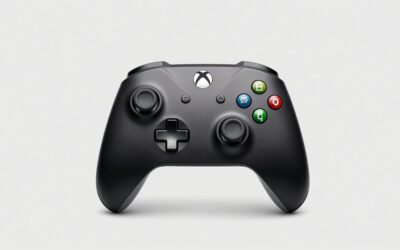
If you would rather prop your phone on a stand, the Xbox Wireless Controller is the most dependable Bluetooth option. It pairs quickly, holds a stable connection, and its layout is second nature to console players. The Sony DualSense is equally strong, with larger grips and accurate sticks that suit long multiplayer nights, and it also connects over Bluetooth in seconds. Both are officially recognized by COD Mobile in supported modes and match you only with other controller users, so you are never at an unfair touch-versus-stick disadvantage. Learn to keep them connected in our Bluetooth pairing troubleshooting notes.
GameSir G8 And Hall-Effect Precision For Serious Aim
Competitive players chasing the cleanest aim should look at the GameSir G8 Galaxy. This clip-on uses Hall-effect sticks and triggers that resist the drift that eventually plagues cheaper controllers, so your crosshair stays true match after match. The full-size grips make it comfortable for extended ranked play, and the USB-C connection keeps latency low. For anyone who plays COD Mobile seriously enough to worry about long-term stick accuracy, Hall-effect hardware is the upgrade that pays off. Explore more precision gear in our Hall-effect controller roundup.
How to Set Up Controller Support in Call of Duty Mobile
- Pair the controller with the phone or tablet over Bluetooth before opening the game, since COD Mobile detects an already-connected controller more reliably than one paired mid-session.
- Open the in-game settings menu and confirm a controller icon appears in the control scheme selector; if it does not, toggle Bluetooth off and on and relaunch the app.
- Switch the control layout from touch to controller in the settings menu, which remaps the virtual buttons to the physical controller automatically.
- Adjust stick dead zones in the controller settings submenu if the aim drifts at rest, a common issue with older or heavily used controllers.
- Save the profile before entering a match, since some control scheme changes only apply after a full app restart.
Sensitivity and Button Mapping Tips for Controller Play
Default controller sensitivity in COD Mobile tends to feel slower than touch sensitivity at the same numeric setting, so most players raise the general and ADS sensitivity sliders from the default before their first ranked match. Remapping the jump and slide buttons to the back paddles, on controllers that have them, keeps both thumbs on the sticks during close-range fights instead of lifting off to reach a face button.
Aim-assist strength is tied to the sensitivity curve chosen in settings, so switching from a linear to an exponential curve changes how aim-assist feels even if the base sensitivity number stays the same. Trying both curve types for a few matches before committing to one is the most reliable way to find a personal fit, since the right curve depends on thumb strength and prior controller experience more than any single recommended setting.
Common Mistakes New Controller Players Make in COD Mobile
- Leaving sensitivity at default and blaming the controller for sluggish aim, when a few minutes in the settings menu usually fixes it.
- Using a clip-on controller with worn-out stick cups, which introduces drift that feels like a game problem but is actually a hardware wear issue.
- Skipping the dead zone adjustment, which matters more on budget controllers than premium ones.
- Switching control schemes mid-match instead of before loading into a game, which can cause the app to ignore the new layout until the next match.
- Assuming every clip-on mount fits every phone case, when thicker cases often need to come off before the controller clips on securely.
What to Look For When Choosing a COD Mobile Controller
Latency: Clip-On vs. Bluetooth
Clip-on controllers connect through the phone’s charging port, so they send input over a wired connection with effectively no added lag beyond the game’s own touch-to-display latency. Bluetooth controllers add a short radio handshake delay, typically a few milliseconds, which most players never notice in casual play but competitive-minded players sometimes prefer to avoid entirely.
Analog Stick Technology: Hall-Effect vs. Potentiometer
Traditional controllers use potentiometer-based sticks, which rely on physical contact that wears down over months of use and can develop drift. Hall-effect sticks use magnets and sensors instead of contact points, so they resist the wear that causes drift and tend to hold consistent calibration far longer, which matters for a mobile shooter where small adjustments decide gunfights.
Button Remapping and Macro Support
Most controllers aimed at mobile shooters let players remap face buttons and triggers through a companion app, matching the layout used for jump-shotting or quick weapon swaps. Macro support, where one press triggers a sequence like a slide-cancel into a reload, is rarer and usually limited to controllers with onboard memory instead of phone-side software alone.
Battery Life and Charging Port Placement
Clip-on controllers draw power from the phone itself, shortening the phone’s own battery life during long sessions, while Bluetooth controllers carry their own rechargeable battery. Port placement matters too: a clip-on controller that blocks the charging port forces a trade-off between staying plugged in and staying mobile.
Which Controller Fits Your Playstyle?
| If you… | Choose… |
|---|---|
| Want zero added input lag and don’t mind the phone sitting inside the controller | Backbone or Razer Kishi |
| Already own a console controller and want to reuse it over Bluetooth | Xbox controller or DualSense |
| Want the most drift-resistant sticks for competitive aim training | GameSir G8 |
| Switch between a phone and a tablet and want one controller for both | Xbox controller or DualSense |
Common Mistakes When Buying a COD Mobile Controller
- Ignoring phone size and case compatibility — clip-on controllers have a fixed bridge width, and a thick case can prevent the phone from seating correctly.
- Assuming any controller unlocks crossplay-style lobbies — controller support changes aim assist and matchmaking behavior, but it does not merge mobile players into console or PC lobbies.
- Choosing Bluetooth purely for the lowest possible latency — wired clip-on options remove the radio handshake entirely, which matters more to players chasing frame-perfect inputs.
- Skipping the warranty terms on stick-drift coverage — potentiometer-based sticks can develop drift within months, so checking return policies before buying protects against a common failure point.
- Paying extra for hall-effect sticks without a clear need — casual players who are not chasing competitive precision may not use the aim advantage enough to justify the price gap.
Trigger Stops, Dead Zones, And Stick Drift: What To Check Before Buying
Standard gamepad triggers travel a fair distance before registering a full pull, which matters less in a shooter with no analog trigger actions but still affects how fast a controller feels to react. Some controllers add adjustable trigger stops that shorten that travel for quicker inputs, a feature worth checking on the spec sheet rather than assuming every pad includes it. Dead zone, the small range of stick movement that gets ignored before the game registers input, is set in the controller’s firmware or driver rather than something Call of Duty Mobile lets you adjust directly, so a pad with a tighter factory dead zone will generally feel more responsive for fine aim adjustments out of the box.
Stick Drift And Why Analog Stick Technology Matters Over Time
Traditional analog sticks rely on a potentiometer that tracks position through physical contact, and that contact wears down with use, which is the root cause behind the stick drift complaints common on older or heavily used pads. Hall-effect sticks, which the GameSir G8 and a growing number of newer controllers use, track stick position with a magnetic sensor instead of physical contact, so there is nothing to wear down the same way. For a mobile shooter where fine aim adjustments happen constantly, a drift-resistant stick matters more over months of play than it does on day one.
Android Vs iOS: Controller Compatibility Differences To Know
Bluetooth controllers that follow the standard HID profile generally pair the same way on Android and iOS, but clip-on controllers are a different story — some models built around a specific phone’s charging port or case dimensions are not interchangeable between platforms. iOS also restricts which controllers can access certain system-level features compared to Android, so a controller marketed as universal can still behave slightly differently depending on the phone it is paired with. Checking a controller’s listed compatibility against the exact phone model, not just the operating system in general, avoids a mismatch after the fact.
Frequently Asked Questions
Does Call of Duty Mobile officially support controllers?
Yes, Call of Duty Mobile supports controllers in certain modes, primarily Multiplayer, and it matches controller users against other controller and console players to keep competition fair. Support is tied to specific modes and game updates, so some features remain touch-only, and controller availability can change with new seasons.
Are clip-on or Bluetooth controllers better for COD Mobile?
Clip-on controllers like the Backbone and Razer Kishi connect over USB-C for near-wired latency and put the sticks right beside the screen, which is ideal on the go. Bluetooth pads like the Xbox controller are more comfortable for desk play with a stand but add slight wireless delay, so choose based on your play style.
Will using a controller get me matched with console players?
In supported modes, COD Mobile places controller users in a separate matchmaking pool with other controller and console players rather than against touch players. This keeps input methods balanced, so you should not face touch-only opponents when a controller is connected, though exact behavior can vary between game modes and updates.
Do Hall-effect controllers matter for Call of Duty Mobile?
Hall-effect sticks and triggers, found in controllers like the GameSir G8, resist the stick drift that gradually affects traditional potentiometer pads. For competitive players who log many hours, this means aim stays accurate over time. Casual players may not notice immediately, but Hall-effect hardware is a worthwhile long-term investment for reliability.